
Your Ultimate Guide to 3rd Party Snapchat Apps That Actually Work
So, what exactly is a 3rd party Snapchat tool? It's pretty simple: any app or program not officially made by Snap Inc. that interacts with your Snapchat account. Their main goal is usually to let you save photos and videos without triggering that dreaded screenshot notification.
While tons of sketchy mobile apps will get your account banned, a well-built desktop tool like SnapNinja lets you safely archive your memories from your Windows PC or macOS machine.
What Are 3rd Party Snapchat Tools Anyway?
Let's get straight to the point. You see a hilarious Snap from a friend, a photo you absolutely need to keep, or a chat message that’s too good to lose. The catch? It’s on Snapchat, which means it’s designed to disappear forever. A 3rd party Snapchat tool is built to solve that exact problem, giving you a way to save content that would otherwise vanish into thin air.
This isn't about spying; it's about smart privacy. Think of it as archiving your memories, keeping receipts for your own protection, or just saving a funny moment before it's gone for good. The real challenge is getting around Snapchat's infamous screenshot notification system without getting your account flagged.
The Two Types of Tools You Need to Know
When people want to save a Snap, their first instinct is often to search for a modded app on their phone, whether it's for iOS or Android. Honestly, this is the worst path you can take. These "tweaked" apps directly mess with Snapchat's own code, which sets off all sorts of alarm bells for their security systems. It’s a fast track to getting your account permanently banned.
There's a much smarter, safer way: the Desktop Advantage. This involves using a tool that works with Snapchat Web on your Windows or macOS computer. Why is this better? Because it operates completely outside the mobile app's heavily monitored environment, making it undetectable.
This comparison really highlights the difference between those risky mobile mods and a secure desktop solution.
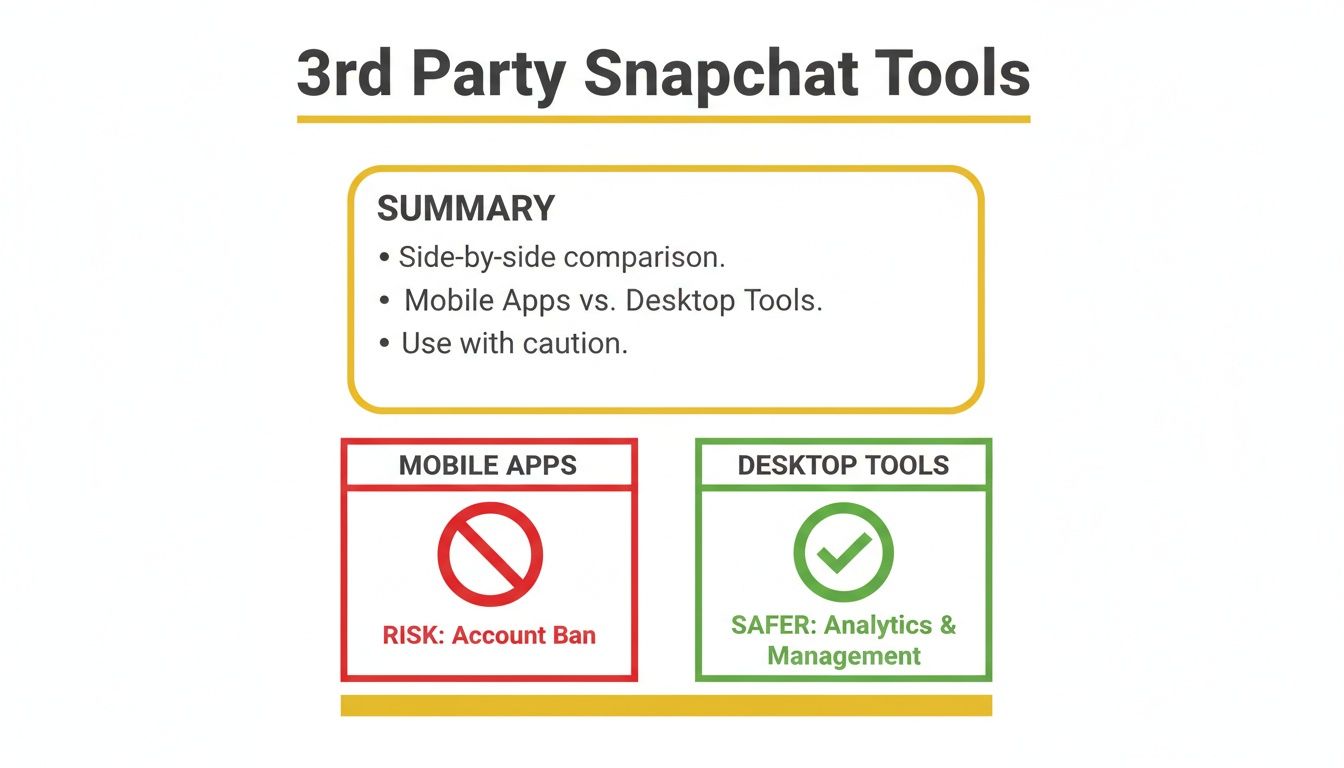
As you can see, the choice is pretty clear. Mobile apps put your entire account in jeopardy, while desktop tools offer a secure and undetectable alternative.
Mobile Mods vs. Desktop Tools: A Quick Comparison
To really spell it out, here’s a quick breakdown of why risky mobile apps get you banned while safer desktop solutions like SnapNinja keep your account secure.
| Feature | Risky Mobile Apps (Mods/APKs) | Safe Desktop Tools (SnapNinja) |
|---|---|---|
| How It Works | Directly modifies the official Snapchat app's code. | Intercepts data from Snapchat Web on your computer, away from the mobile app. |
| Detection Risk | Very High. Snapchat's servers easily detect unauthorized app modifications. | Extremely Low. Operates outside the mobile app's security checks. It's invisible. |
| Account Safety | High risk of temporary locks and permanent bans. | Safe. Does not violate the terms of service that lead to bans. |
| Notifications | Unreliable. Some mods fail and still send notifications. | None. No screenshot or "Saved to Camera Roll" notifications are ever sent. |
| Platform | iOS (jailbreak/sideloading) & Android (APKs). | Windows & macOS via a standard web browser. |
| Ease of Use | Complex and often requires technical steps like jailbreaking. | Simple. Just log in to Snapchat Web and let the tool do its job. |
Ultimately, mobile mods are a gamble with your account. Desktop tools, on the other hand, are designed for safety and reliability from the ground up.
Why The Desktop Method Is Undetectable
The magic is all in how the content is captured. Mobile hacks are trying to fight Snapchat on its home turf (your phone), which is a losing battle. A desktop solution like SnapNinja plays a completely different game. It captures the data stream on your Windows or macOS computer before it even has a chance to trigger Snapchat's detection systems.
Because it operates outside the official app, it never trips the digital wire that sends a "Saved to Camera Roll" or screenshot notification. This makes SnapNinja completely invisible to the sender and, more importantly, safe for your account. It's the only reliable solution.
In this guide, we’ll break down exactly how this works. We'll get into the technical side of Snapchat's detection, explore the many legitimate reasons for archiving your content, and show you precisely how to do it without risking your account.
How Snapchat Catches You Screenshotting
Ever wondered how Snapchat instantly knows the second you take a screenshot? It’s not magic—it's just a really smart, aggressive piece of code designed to police its own environment. Think of the official Snapchat app on your phone as a fortress with a single, heavily guarded gate.
The app is built to monitor specific actions happening within its walls, and tracking the screen capture function is a top priority. The moment you press that button combination on your iPhone or Android, you trip a digital wire. This "tripwire" is an event listener coded directly into the app, and it immediately pings Snapchat's servers. Those servers then push that infamous notification to the other person. It's a closed-loop system, which makes it incredibly difficult to fool from the inside.
This is precisely why all those common "hacks" you see online are so unreliable and often just get you into trouble.
Why Mobile Tricks Always Fail
For years, people have tried to outsmart this system. The most famous one is probably the "airplane mode" trick, where you kill your phone's network connection before snapping the screenshot. The idea was that the app couldn't send the notification without internet. While this may have worked in the very early days, Snapchat patched that loophole a long, long time ago.
Now, the app just logs the screenshot event locally. The second you reconnect to Wi-Fi or cellular data, it sends the notification. It's a constant game of cat and mouse, and Snapchat is always one step ahead.
Other methods people try usually fall into these categories:
- Third-Party Screen Recorders: These apps try to record your screen's content without using the phone's native screenshot function. The problem is, Snapchat's security can often detect these recorders running in the background and will either block the content or just send a notification anyway.
- Modified Snapchat Apps (APKs/Tweaks): This is by far the most dangerous approach. These unofficial versions of Snapchat claim to disable the notification feature, but they do so by messing with the app's core code. This direct interference is a massive red flag for Snapchat's anti-cheat system.
Trying to beat Snapchat on its home turf—your mobile device—is a losing game. The app is specifically engineered to detect any interference within its iOS or Android environment. Tampering with it directly is the fastest way to get your account locked or permanently banned.
The Inherent Risk of Mobile Mods
When you install a modified or 3rd party Snapchat app on your phone, you're basically inviting a hostile program into a secure space. Snapchat's servers are constantly checking the integrity of the app connecting to them. If your app's digital signature doesn't match the official one, it immediately flags your account for suspicious activity.
At first, you might get a temporary lock-out with a warning. Keep using the modded app, and Snapchat will bring down the hammer with a permanent ban. That means losing all your memories, streaks, and friends forever. It isn't a risk—it's an inevitability. To get a closer look at these detection systems, you can explore our guide on how to screenshot Snapchat without them knowing, which breaks down the technical side even further.
The fundamental problem here is that all mobile-based solutions are fighting an uphill battle. They are trying to operate inside a system that is actively hunting for them. The only real way to operate safely is to move the entire operation to a different playing field where Snapchat's mobile security has no jurisdiction at all: your desktop.
The Desktop Advantage: Why PCs and Macs Are Invisible

So, we’ve established that trying to beat Snapchat on your phone is a losing battle. The app is a fortress, and any attempt to mess with it from the inside gets you caught. But what if you could move the game to a field where you have the home-team advantage?
This is where your desktop computer comes in.
This simple shift from mobile to desktop is the entire secret to safely and invisibly saving Snaps. The reason it works is that tools designed for your PC or Mac don't interact with the heavily policed mobile app at all. Instead, they operate through Snapchat Web on your Windows or macOS machine, completely outside of that hostile environment.
Bypassing the Digital Tripwire
Think of it like this: the mobile app is a security guard watching a live TV broadcast. The moment you pull out your phone to record the screen, the guard sees you and sounds the alarm. That’s your screenshot notification.
A desktop tool like SnapNinja takes a completely different approach. Instead of filming the TV screen, it taps directly into the main cable feed before it even reaches the TV. It captures the raw data stream as it comes into your browser. The TV (the Snapchat app) and its security guard have no idea what’s happening because, from their perspective, nothing out of the ordinary has occurred.
You're not hacking, modifying, or interfering with Snapchat's code. You're simply capturing data that is already being sent to your computer.
Because this process happens entirely on your machine and outside the app's monitored environment, it remains 100% undetectable. There is no "tripwire" to trigger because you're not even on the same property as the alarm system.
How It Works: A Technical Analogy
To get a bit more technical without being boring, Snapchat Web and the mobile app both receive the same encrypted data from Snapchat's servers. The key difference is the environment where that data is decrypted and displayed.
- On Mobile (iOS/Android): The data is decrypted inside the official Snapchat app, which is a locked-down, heavily monitored sandbox. The app has deep hooks into the operating system specifically to watch for screen captures.
- On Desktop (Windows/macOS): The data is decrypted by your web browser. While browsers are secure, they exist in a more open environment that you control. A desktop tool works alongside your browser to intercept this data stream as it’s being processed.
These tools aren't breaking any encryption or hacking Snapchat. They're just doing what your computer already does—processing incoming data—but with an added step: saving a copy of the media files to your hard drive before they vanish. The Snapchat app has zero visibility into the processes running on your PC or Mac, making this approach fundamentally invisible.
The Power of Archiving Over Spying
This brings us back to the core idea of smart privacy. Using a 3rd party Snapchat tool on your desktop isn't about spying; it's about protecting your own data and memories. It's for creating a personal backup of moments that matter to you.
Think about these common scenarios:
- Archiving Memories: A loved one sends you a once-in-a-lifetime video from a family event. You shouldn't have to ask them to send it a different way; you should be able to keep it.
- Keeping Receipts: Someone says something important, concerning, or even threatening in a chat. Saving that conversation isn't spying—it's creating a record for your own safety and peace of mind.
- Saving Sentimental Content: Your partner sends you a sweet photo or a funny clip. You want to keep it forever without the awkwardness of the "You saved this to camera roll!" notification.
The desktop method gives you the power to do all of this without breaking rules or risking your account. It allows you to use Snapchat on your own terms, preserving the content that is meaningful to you. By understanding the platform's limitations, you can choose the right tools to work around them safely.
If you're interested in a deep dive, you can explore more about how a dedicated Snapchat downloader leverages this desktop advantage for complete privacy. This method ensures your digital interactions remain yours to keep.
Smart Reasons to Save Snaps and Protect Yourself
Let’s reframe the conversation a bit. Using a 3rd-party Snapchat tool isn't really about "spying" on people. It's more about smart archiving and a bit of digital self-defense. In a world where media is designed to vanish, having your own permanent copy of something isn't just a want—it's often a genuine need.
The core idea is simple: you should have control over the conversations and content you're part of. When media is ephemeral by design, it creates a strange reality where memories are easily lost and accountability can just disappear. A tool like SnapNinja is designed to give that control back to you, quietly and safely.
At its heart, this is about reclaiming your digital life, one Snap at a time. It's for preserving your own memories and making sure you have a record when it really counts.
From Personal Memories to Personal Protection
Think about all the completely legitimate, everyday situations where saving a Snap is the most practical thing you could do. These aren't fringe cases; they happen all the time.
Maybe a family member sends you a once-in-a-lifetime video of a baby's first steps from across the country. That’s not something you want to see just once and let it disappear forever; it’s a piece of your family history you’ll want to look back on. Asking them to resend it over email or another app just feels awkward and clunky.
Or, consider a more serious scenario. You're in a heated discussion, and someone makes a specific promise or, worse, a threat. Having a record of that chat isn't being intrusive—it’s a form of personal protection. These are your "receipts," a digital paper trail that proves exactly what was said.
The ability to save a conversation isn't about violating trust; it's about establishing a baseline of security for yourself. When messages are designed to self-destruct, the only person left without proof is you.
This is where the idea of digital self-defense becomes so important. You wouldn't just throw away important letters or delete crucial emails, so why should your digital conversations be treated any differently?
Real-World Scenarios Where Saving a Snap Is Smart
The reasons for wanting a permanent copy of a Snap are as varied as the people using the app. It's never a one-size-fits-all situation.
Here are just a handful of practical examples:
- Archiving Sentimental Moments: Your partner sends a funny, sweet, or flirty photo that just makes you smile. You want to keep it for yourself without that awkward "You saved this to camera roll!" notification popping up on their screen.
- Keeping Important Information: A friend Snaps you their new address or a Wi-Fi password. Saving it is just common sense, making sure you don't lose vital info right when you need it most.
- Content Creation and Repurposing: Maybe you're a creator who uses Snapchat for candid, behind-the-scenes content. You need an easy way to download your own Stories in high quality so you can repost them to TikTok, Instagram Reels, or YouTube Shorts without a watermark.
- Protecting Your Peace of Mind: In the world of online dating, conversations can move fast. Saving a chat can provide clarity later on or serve as a record if someone's behavior becomes inappropriate, giving you the evidence you might need to feel secure.
In all of these cases, the goal isn't malicious. It’s about preservation, convenience, and protection. You're simply making a personal copy of data that was already sent directly to you. Our guide on how to save Snapchat photos safely dives into even more of these personal use cases.
The key takeaway here is that having the ability to archive content puts you back in the driver's seat. It allows you to decide what's worth keeping, whether it's a precious memory or an important piece of information.
How to Use SnapNinja Safely Step by Step
So, you get why using a desktop tool is the only truly safe way to archive Snapchat content. Now for the easy part. SnapNinja was designed to be as simple as possible, so you don't need to be a tech expert to get it running. There’s no complex setup or confusing menus—just a straightforward process that works quietly in the background on your Windows or Mac.
The whole idea behind it is "set it and forget it." You install the software, log into Snapchat on the web as you normally would, and you're done. SnapNinja does the rest, automatically saving every photo, video, and Story you look at without you having to do anything at all.
Your Simple Three-Step Setup
Getting started is as easy as it sounds. Here's a quick rundown of the entire process.
Install SnapNinja on Your Computer: First, download the software for your operating system (Windows or macOS). The installation is just like any other program you’ve used before—quick and painless.
Log into Snapchat Web: Open your favorite web browser (Chrome, Firefox, Safari, etc.) and head over to the official Snapchat Web login page. Sign in with your username and password, just like always.
Let It Run in the Background: That's it! As long as SnapNinja is running, just use Snapchat Web normally. Open Snaps, watch Stories, and go through your chats. The tool works invisibly, grabbing all the media you view and saving it right to a folder on your computer.
Seriously, that's all there is to it. No extra buttons to push or settings to mess with. You use the platform, and SnapNinja handles the archiving.
The real beauty of this method is that it’s completely passive. You're not actively "capturing" anything. The software intercepts the data for you, making sure nothing gets missed and—most importantly—that no notifications are ever triggered.
Why This Matters on a Massive Scale
This hands-off approach is a game-changer when you consider the sheer volume of content flying around. Snapchat has exploded into a global phenomenon, boasting 800 million monthly active users and reaching 8.6% of the world's population with its ads. That scale is exactly why a reliable 3rd party Snapchat tool is so vital.
Users are sending over 5 billion snaps daily, many of which are personal photos, funny videos, or memories that are gone in a flash. You can dive deeper into the platform’s massive scale and see how these Snapchat statistics paint the full picture.
When that much personal content is designed to disappear, having a safe, private way to hold onto what's important to you becomes a matter of controlling your own data. SnapNinja gives you that control by working from your desktop, where it's completely undetectable. It becomes your personal, automated archive for the moments you don’t want to lose.
Common Questions About 3rd Party Snapchat Tools
Alright, let's cut through the noise and get straight to what you're probably wondering. When it comes to using any tool with your Snapchat account, a bit of healthy skepticism is a good thing. This FAQ gives you direct, no-fluff answers to the most common concerns, all while explaining why the "desktop advantage" is key.
Will My Account Get Banned for Using SnapNinja?
This is the big one, so let's be crystal clear: No, your account will not get banned for using SnapNinja.
The reason is actually pretty simple—it all comes down to how and where the tool works. Snapchat’s security is laser-focused on its mobile apps for iOS and Android. Their systems are built to sniff out modded apps, tweaked APKs, and anything that messes directly with the official app on your phone.
SnapNinja doesn't touch any of that. It runs on your desktop (Windows/macOS) and works with Snapchat Web, completely separate from the mobile app. It isn't hacking, modifying, or injecting a single line of code into Snapchat's platform. As far as Snapchat can tell, you’re just another person using their web version in a browser. This "desktop advantage" is precisely what keeps your account safe.
Can I Save Snaps Without the Sender Knowing?
Yes, you absolutely can. Frankly, that's the whole point of a tool built for privacy. Because SnapNinja operates outside the mobile app environment, it never trips the wire for screenshot or "Saved to Camera Roll" notifications.
Think of those notifications as a feature built directly into the mobile app itself. When you use your phone’s built-in screenshot function, the app detects it and sends the alert. SnapNinja gets around this entirely by capturing the media on your PC or Mac before it's even displayed on your screen. The sender gets zero indication that you’ve saved their Snap, Story, or chat.
Do I Need to Jailbreak My Phone or Use a Special APK?
Absolutely not. In fact, you should run in the other direction from anything that asks you to. Jailbreaking your iPhone or sideloading a modified Android APK is the fastest way to get your Snapchat account permanently banned. It’s a direct violation of their terms of service because you’re tampering with their official app.
SnapNinja is a standalone desktop application for Windows and macOS. It requires zero modifications to your phone. You just log into Snapchat Web on your computer, keeping your phone and your Snapchat account completely secure and untouched.
What Kind of Content Can I Save?
Pretty much everything you see on Snapchat Web gets saved automatically. The goal is to give you a complete, effortless archive of your interactions.
The tool is designed to grab all types of media, including:
- Photos: Individual Snaps sent to you or posted in chats.
- Videos: Any video clip, whether it's a direct Snap or part of a Story.
- Stories: Entire Stories from your friends, saved as individual photo and video files.
- Chat Messages: Text conversations are also archived right alongside the media.
Everything is saved directly to a private folder on your computer's hard drive. You can access it all anytime, even if you’re offline, without having to open Snapchat again. It’s your own personal backup.
Why Do People Need Tools Like This Anyway?
The need for something like this comes from how people use Snapchat every day. The platform is a giant, with a global reach of 709 million users who show a 34% higher likelihood of making a purchase than users on other apps. As its revenue pushes toward $7.26 billion, it's clear Snapchat is a central part of modern communication. You can see the full scope of Snapchat's huge market influence and understand why people are so invested in it.
But with that comes a desire for more control. Many users want to save meaningful memories or important "receipts" from chats without the awkwardness of a "Saved to Camera Roll" notification. This is where a tool like SnapNinja fits in. It lets you do just that on a PC or Mac without sending any alerts. While mobile mods are a surefire way to get banned, the desktop capture method remains the only truly safe and undetectable option.
Ready to take control of your Snapchat memories and conversations the safe way? SnapNinja offers the only 100% undetectable desktop solution for Windows and macOS, ensuring your account stays secure while you archive everything that matters.