How to Save Snaps Without a Notification: The Undetected Desktop Method
Ever wonder how to save a Snap without the other person getting that awkward "Saved to Camera Roll" notification? Let's get right into it. The secret isn't some shady mobile hack; it's a completely different approach that's safer, smarter, and 100% undetectable.
When we talk about a 3rd party app, it's usually just a normal app made by a developer who isn't Apple or Google. But in the world of Snapchat, it often means a tool designed to add features the main app is missing—like saving Snaps discreetly.
People do this for totally valid reasons. Maybe you want to archive memories from a close friend, keep receipts from a business chat, or just protect your privacy by having a record of a conversation. It's about having control over your own data.
Why Mobile Snapchat "Hacks" Get You Banned
Let's start with what not to do. If you've ever searched for a way to save Snaps, you've probably seen sketchy apps for your phone (iOS/Android). These "mods" or "tweaks" are a fast track to getting your account permanently banned.
Here's the deal:
- First Party: That's Snapchat. They make the app and the rules.
- Second Party: That's you, the user.
- Third Party: That's the modded app you downloaded from a random website.
These mobile hacks work by directly injecting code into the official Snapchat app on your phone. Think of it like trying to hotwire a car right in front of the police. Snapchat's security is designed specifically to detect this kind of meddling, and when it does, it brings down the ban hammer. Hard.
The bottom line is this: messing with the app on your phone is the #1 reason people lose their accounts. It's a high-risk gamble that almost always ends badly.
This is where the Desktop Advantage comes in. By using a tool that works on your Windows or macOS computer with Snapchat's official website, you're operating in a totally separate environment. It's a blind spot for their detection systems, making it the only truly safe way to archive Snaps.
The High Stakes of Using Mobile Snapchat Mods
If you've ever looked for a third-party app to save Snaps, you've probably stumbled upon a whole world of options for your phone. These are typically modified versions of the official app—often called "mods" or "tweaks"—and they usually come in the form of APK files for Android or IPA files for iOS. They lure you in with promises of cool extra features, but they carry some serious, often hidden, baggage.
These mobile mods work by directly latching onto the official Snapchat app's code. Think of it like a parasite attaching itself to a host. It injects its own code to alter how the original app behaves, which is how it does things like block screenshot notifications. But here's the catch: this direct interference is precisely what makes them so easy for Snapchat's security to spot. Their systems are designed to detect unauthorized meddling, and when they find it, the consequences are usually swift and permanent.
This is where the real danger begins. The moment you install one of these mods, you're giving it deep access to your device. This diagram illustrates how your data flows from your phone to a third-party app developer, bypassing the security measures you normally rely on.
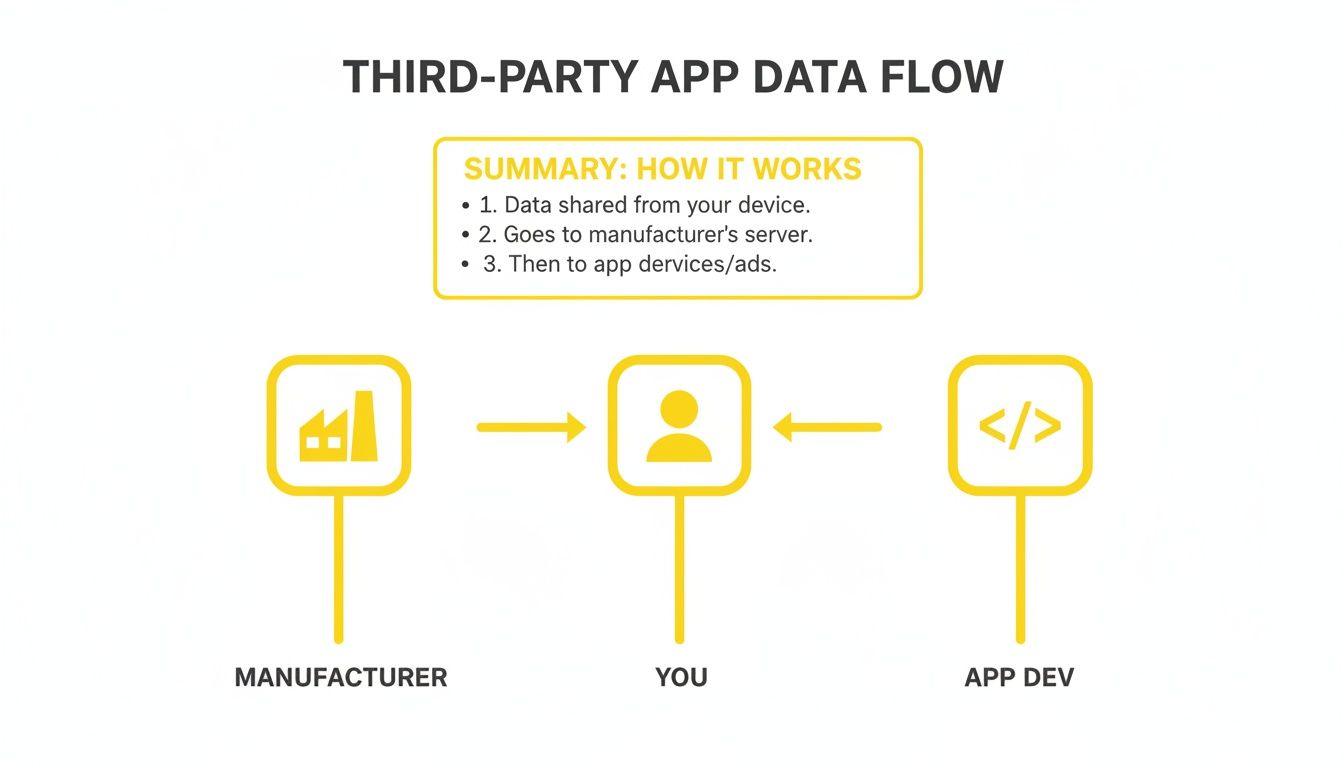
As you can see, granting access to a modded app is like handing over the keys to your digital life. You're giving them a direct line to your personal information, completely outside the protections of the official app.
The Real Dangers of Mobile Mods
The biggest and most immediate risk? Getting your account banned. Snapchat has a zero-tolerance policy for these kinds of apps, and users frequently report being locked out of their accounts without any warning. After all the time you've spent building up your streaks and memories, losing it all in an instant is a pretty tough pill to swallow.
But an account ban is just the tip of the iceberg. The threats go much, much deeper:
- Malware and Spyware: Because these apps come from outside the official app stores, they haven't been through any security checks. They can easily be packed with malicious code designed to steal your data, snoop on your activity, or even hold your device for ransom.
- Credential Theft: Many of these apps ask you to enter your Snapchat username and password directly. This should be a massive red flag. Shady developers can easily collect these logins to hijack your account, read your private messages, and access all your personal info.
The temptation to use a modded mobile app might be strong, but you're essentially gambling with your account's existence and your private data every time you use one. The developer holds all the cards.
This is a high-risk game that rarely ends well for the user. A safer approach avoids modifying the mobile app entirely, which is where the desktop advantage comes in. By operating in a completely separate environment, you sidestep Snapchat's detection systems and keep your credentials secure.
Mobile Mods vs Desktop Tools A Safety Comparison
To really see the difference, it helps to put them side-by-side. The fundamental approach is what separates a risky mod from a secure tool.
| Feature | Risky Mobile Apps (iOS/Android) | Safer Desktop Solution (SnapNinja) |
|---|---|---|
| How It Works | Directly modifies or "hooks" into the official Snapchat mobile app. | Interacts with Snapchat's web platform, not the mobile app. |
| Account Ban Risk | Very High. This is the #1 reason for permanent account bans. | Very Low. Operates in a separate environment that isn't monitored. |
| Data Security | Poor. Often requires login details, exposing you to theft. | Secure. You log in through an official portal; no data is stored. |
| Malware/Spyware Risk | High. Apps from unofficial sources are not vetted for safety. | None. Runs on your desktop with no need to install unverified apps. |
| Installation Method | Complicated and risky "sideloading" of APK or IPA files. | Simple, secure download and installation on your computer. |
Ultimately, the choice comes down to risk versus reward. Mobile mods offer a few quick-and-dirty features at the cost of your account security and personal privacy. A well-designed desktop tool, on the other hand, provides the functionality you need without putting everything on the line.
Why the Desktop Advantage Is Your Best Defense
When you're looking at third-party Snapchat tools, the platform you use them on makes all the difference. This is where the Desktop Advantage comes in—it's a smarter, safer way to manage your digital life without putting your account on the line.
Mobile apps that promise extra features usually have to tamper directly with Snapchat's code. To Snapchat's security systems, this is a massive red flag that screams, "Ban me!"
Think of it like this: using a modded mobile app is like trying to secretly swap out a car's engine while the manufacturer is watching your every move. It's invasive, obvious, and breaks all the rules. A desktop tool, on the other hand, is like using a public road to get where you're going. It simply interacts with Snapchat Web through a standard browser, which is a perfectly legitimate way to access the service.
Because this method doesn't alter the original app's code or break its core rules, it's practically undetectable. It works within the existing framework that Snapchat provides for web users, which is the key to avoiding those dreaded account bans.
Embracing Smart Privacy
Let's be clear: this isn't about "spying." It's about exercising Smart Privacy—having the ability to responsibly archive your own digital life and maintain control over conversations you're a part of. We all have good reasons for wanting to save content that's designed to disappear.
Maybe you just want to:
- Archive Cherished Memories: That hilarious video from a friend or a heartfelt message from family deserves to be kept longer than ten seconds.
- Keep Important 'Receipts': In a business chat or a serious discussion, having a record of what was said can be crucial for accountability.
- Protect Yourself: In difficult situations, saving proof of a conversation can be a necessary step for your own safety and peace of mind.
A desktop tool gives you a secure and private way to manage this data without making things awkward or raising alarms. It puts you in control of what's worth keeping.
The core idea of the Desktop Advantage is simple: by operating in a completely separate and neutral environment (your Windows or macOS browser), you avoid the direct conflict that gets mobile users banned. It's the difference between breaking the rules and using them to your advantage.
How a Desktop Solution Bypasses Notifications
For many people, the main goal is to avoid that giveaway "Saved to Camera Roll" notification. Mobile apps really struggle here because they're fighting a constant battle inside the Snapchat app itself. Every time Snapchat pushes an update, these mods risk breaking or getting caught.
A desktop tool like SnapNinja solves this problem at its root because it works completely outside of the Snapchat mobile app. You just log into Snapchat Web like you normally would, and the tool does its job quietly on your computer.
Since it never interacts with the mobile app's notification system, there's nothing for Snapchat to detect or report back to the other user. The action of saving a Snap happens on your local machine, making it completely invisible on their end. This is what makes it the only truly reliable solution for archiving Snaps without a trace, giving you the privacy and control you actually need.
Meet SnapNinja: The Undetected Desktop Solution
So, we've walked through the minefield of risky mobile mods and touched on why the "Desktop Advantage" is a much safer bet. Now, let's look at the tool that brings that theory to life. Enter SnapNinja, the only reliable solution that bypasses the "Saved to Camera Roll" notification by operating outside the Snapchat app environment.
Forget about those sketchy mobile downloads. SnapNinja is a clean, lightweight desktop app for both Windows and macOS that syncs up with the official Snapchat Web. It just hums along quietly in the background, giving you the power to save Snaps without triggering any alerts. The setup is dead simple—no coding, no complicated steps, and absolutely no risk to your account.
Why It Works So Flawlessly
The brilliance behind SnapNinja is its simplicity and its environment. Since it runs on your computer and works with Snapchat's own web version, it never has to mess with the mobile app's code. This is the secret sauce to it being 100% undetected.
Here's how easy it is:
- Log into your Snapchat account on the official website, just like you normally would.
- Have SnapNinja running in the background on your desktop.
- As you click through Snaps and Stories, SnapNinja automatically saves them to a folder on your computer.
And that's it. Seriously. The other person never knows because the saving happens completely outside of Snapchat's mobile world. It's the perfect way to build a personal archive without making things awkward or setting off red flags.
The key takeaway here is that SnapNinja doesn't hack or modify Snapchat's service. It works alongside the official web platform, not against the mobile app. This is what keeps your account safe and your activity completely private.
Real-World Uses for Smart Privacy
Let's be clear: this isn't about being sneaky. It's about being smart and having control over your own digital conversations and memories. People turn to SnapNinja for all sorts of legitimate, practical reasons.
For example, you might want to:
- Keep sentimental moments: Save that perfect video from a close friend or a sweet photo from your partner you want to look back on.
- Archive funny content: Grab those hilarious Snaps from a friend's Story before they vanish forever.
- Hold onto important proof: Keep "receipts" from important conversations, whether for personal reasons or to protect yourself down the line.
By running on your desktop, SnapNinja provides a stable and secure way to manage these moments. It gives you back the control over your own digital memories—something a typical third-party mobile app just can't promise. To see how it all comes together, you can check out the features on the official SnapNinja website.
How to Spot an Unsafe 3rd Party App
Trying to find a good third-party app can sometimes feel like you're walking through a minefield. It's tough to know what's safe and what's a disaster waiting to happen, especially with platforms like Snapchat. But if you know what to look for, you can learn to spot the sketchy ones a mile away.
Think of it as developing a sixth sense for digital threats. This skill is your best defense against everything from getting your account banned to having your personal data stolen.
The single biggest red flag? An app that asks for your Snapchat password. Full stop. This is a massive security risk and something you should never, ever do. Giving an app your password is like handing a stranger the keys to your front door—it gives them complete control over your account, your private messages, and all your data. A legitimate, well-designed tool will never need your main password.

This is precisely why a desktop tool that works with your browser is a much safer bet. You log into Snapchat's official website yourself, and the tool simply assists your browser session. It never needs to see, handle, or store your login details. If you're curious about how this works, you can check out SnapNinja's commitment to user privacy to see how we've designed our system to keep your information completely secure.
The Unsafe App Checklist
Beyond the password issue, there are a few other clear warning signs. If an app you're considering has any of these traits, it's best to just walk away.
It requires a jailbroken or rooted phone. If an app's first instruction is to modify your phone's core operating system (jailbreaking for iOS, rooting for Android), run for the hills. This process intentionally breaks the built-in security protections on your device, leaving it vulnerable to all sorts of malware.
You have to download it from a sketchy website. There's a reason official apps are on the Apple App Store or Google Play Store—they go through a security screening process. If you have to download an
.apkfile from a random online forum or a shady-looking site, you're rolling the dice on what you're actually installing.The reviews look terrible or suspiciously fake. Always read the user reviews. A flood of one-star ratings from people complaining about banned accounts or stolen data is an obvious warning. Be equally wary of tons of generic, five-star reviews with no real detail—they're often fake.
Ultimately, the safest tools are the ones that don't force you to compromise your security. A desktop solution like SnapNinja, which works alongside Snapchat's official web portal, is built on this principle from the ground up.
By keeping these red flags in mind, you can confidently navigate the app landscape and protect yourself from unnecessary risks. It all comes down to being a little more critical and making smart choices to keep your account and your data safe.
Your Questions About 3rd Party Apps Answered
We've covered a lot of ground, from the dangers lurking in mobile mods to the safety of what I call the "Desktop Advantage." But you probably still have some specific questions buzzing around. Let's tackle them head-on with some straight answers to help you make the smartest choice.
This section is all about clearing up the common worries and curiosities people have when they start looking for a 3rd party app to save their digital memories.
Can Snapchat Detect Screen Recording on a Computer?
This is the big one, and the answer is refreshingly simple: No, it can't. When you use Snapchat Web on your Windows or macOS computer, it's running inside your web browser. The browser has no mechanism to report your computer's screen recording activity back to Snapchat's servers.
Your operating system handles screen recording as a completely separate, local process. Think of it like taking a photo of your monitor with an old-school camera—Snapchat has zero visibility into what's happening outside the browser window. This is the fundamental principle that makes desktop solutions so effective and safe.
Is It Safer to Use a Desktop App Than a Mobile Mod?
Without a doubt. It's not even a fair fight. As we've already discussed, mobile mods (those sketchy APKs and IPAs) work by directly messing with the official Snapchat app's code. This is a massive red flag for Snapchat's security systems and a blatant violation of their terms of service, making an account ban almost inevitable.
A desktop app like SnapNinja, on the other hand, operates in a completely different world. It interacts with the official Snapchat Web platform—a legitimate, approved way to access the service. It doesn't modify a single line of Snapchat's code, which is why it's an undetectable method that keeps your account perfectly safe.
By going the desktop route, you completely avoid the main reason people get banned, all while achieving the exact same goal. It's the difference between kicking down the front door and simply using the key you were already given.
Will Using a 3rd Party App Get My Account Banned?
It all comes down to the kind of app you use. If you install a modified Snapchat client on your phone, the risk of a ban is incredibly high. Snapchat's security is specifically built to hunt for that kind of unauthorized software.
A desktop tool that works with Snapchat Web, however, is a different story entirely. Because it doesn't break any of Snapchat's core rules or alter their software, it operates in a total blind spot. There is virtually no risk of a ban when using a well-designed desktop solution. For anyone looking for a reliable, long-term way to save content, this is the only way to go.
Is SnapNinja Really Undetectable?
Yes, 100%. SnapNinja is undetectable because of how it works. It doesn't "hack" or "trick" Snapchat in any way. It simply runs on your desktop and saves the content that your browser is already displaying while you're logged into Snapchat Web.
Let's break it down with an analogy:
- The Problem: The official Snapchat mobile app has a built-in snitch that tells on you whenever you take a screenshot.
- The Solution: SnapNinja works on your computer, a place where that snitch doesn't even exist. The whole saving process is handled locally on your machine, completely outside of the mobile app's jurisdiction.
Because the action of saving happens entirely on your end, no signal or notification is ever sent back through Snapchat's system. The other user is never alerted, making the entire process completely private and discreet. If you're ready to see how smoothly this works, you can explore the options available by checking out SnapNinja's pricing plans. It's built to be a straightforward, set-it-and-forget-it tool for smart privacy.
Ready to start archiving your memories and conversations securely and privately? SnapNinja is the only desktop solution that guarantees your safety and privacy by working with the official Snapchat Web platform. Ditch the risky mobile mods and choose the smart, undetectable method.
Get SnapNinja Now and Save Snaps Undetected
MossAI Tools