
How to Save a Snapchat Video Without Them Knowing in 2024
Let’s be real for a moment. If you're looking for a truly reliable way how to save a snapchat video without them knowing, you need to stop thinking about your phone. The only method that consistently works and keeps you under the radar is moving the action to your desktop. A dedicated tool used with Snapchat Web bypasses the app's notification system entirely, making your saves 100% invisible.
The Undetectable Method for Saving Snapchat Videos
I’ll get straight to the point. You're trying to save a video without triggering that dreaded "Saved to Camera Roll" alert, but most online "tricks" are a huge risk. Forget the airplane mode hack or those sketchy third-party mobile apps—they’re a great way to get caught or, worse, have your account banned.
The real, lasting solution is what I call the "Desktop Advantage." When you view Snapchat through a web browser on a Windows or macOS computer, you’re stepping outside the app's highly controlled mobile environment. This is where a purpose-built tool becomes your best friend.
Smart Privacy, Not Spying
This isn't about being creepy. It's about smart privacy in an age where everything is designed to disappear. Sometimes, you just need a personal record to archive memories or keep receipts.
Here are a few legitimate reasons you might want to save a video:
- Archiving Memories: Maybe a friend sent a hilarious clip, or your partner sent a sweet message you want to keep forever.
- Keeping Receipts: You might need to document proof of a conversation, a promise made, or even harassment to protect yourself.
- Protecting Your Privacy: Sometimes, you just want a personal, offline copy of an interaction without alerting the other person and kicking off unnecessary drama.
The fundamental issue is that Snapchat’s entire ecosystem is built to monitor actions inside its mobile app. It’s always watching for screen recordings, screenshots, and modified clients on iOS and Android. A desktop tool, however, operates on a completely different playing field.
The key takeaway is simple: by working outside the Snapchat mobile app, a desktop solution makes your actions invisible to Snapchat’s notification triggers. It’s not a hack; it’s just a smarter way to manage your privacy.
This visual really drives home the difference in risk between trying to save on your phone versus using a desktop.
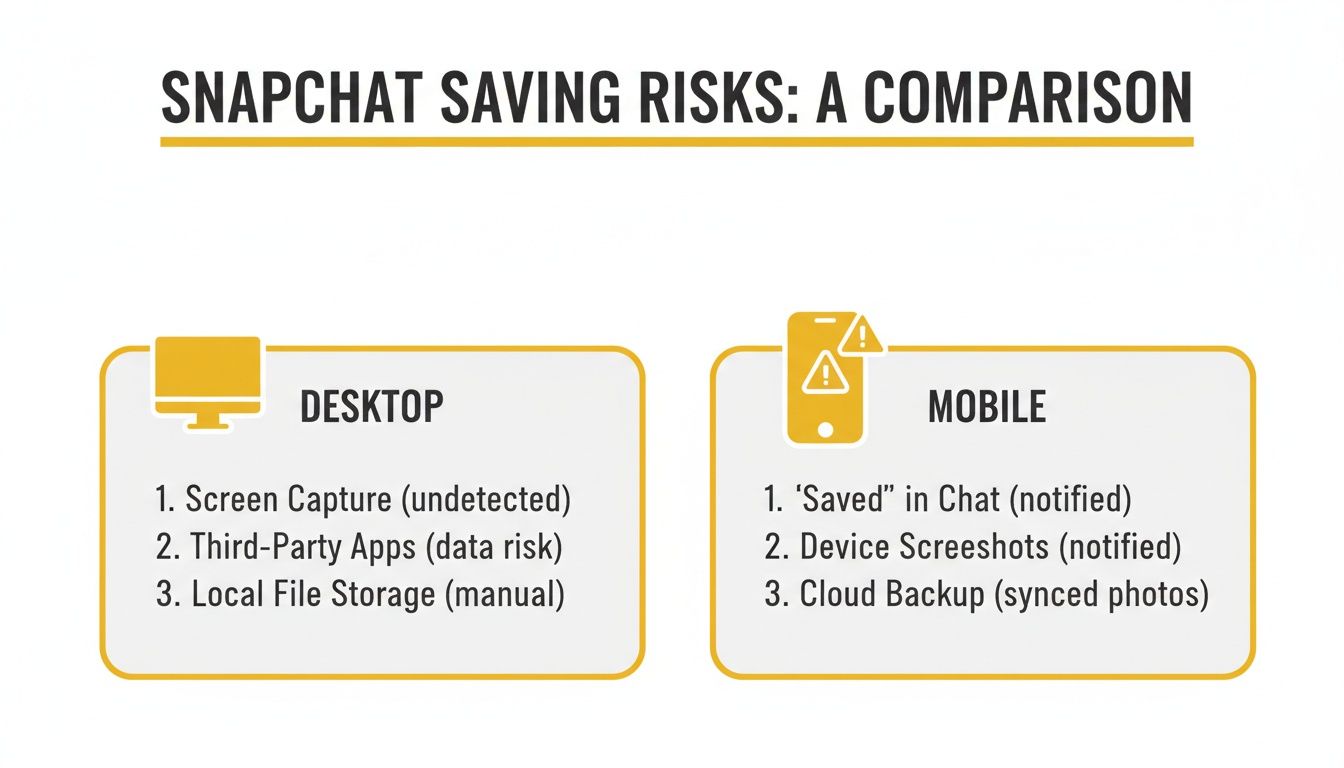
As you can see, the risk levels aren't even comparable.
Desktop vs. Mobile: A Quick Risk Comparison
To put it in perspective, let's break down the actual risks and benefits of each approach. The differences are pretty stark.
| Method | Notification Risk | Account Safety | Reliability |
|---|---|---|---|
| Desktop Tool (SnapNinja) | None. Operates outside the mobile app environment, making saves completely invisible. | High. It's a legitimate desktop app, not a modified client that violates Snapchat's terms. | Very High. Works consistently with Snapchat Web. |
| Mobile Workaround | High. Screen recording is almost always detected. Hacks like airplane mode are unreliable and often fail. | Low. Using third-party apps is a direct violation of Snapchat's terms and a fast track to a ban. | Low. These methods are frequently patched, making them a constant cat-and-mouse game. |
Ultimately, the infographic and the table tell the same story: mobile methods carry a significant risk of detection and potential account penalties. The desktop approach, on the other hand, remains a safe and private option for anyone looking to archive their memories.
Why Those Mobile "Hacks" Are a Bad Idea (and a Risk to Your Account)
If you've looked around for ways to save a Snapchat video privately, you've probably seen the same old "hacks" pop up everywhere. They usually involve things like the airplane mode trick, a sketchy screen recorder, or some third-party app promising miracles. Let’s be real for a second: these methods are a terrible idea and a gamble you're almost guaranteed to lose.
Snapchat's detection systems, on both iOS and Android, are incredibly sharp. They're built specifically to watch every single thing that happens inside the app's environment. When you fire up a screen recorder or try to use a tweaked version of the app, you're going head-to-head with a system designed from the ground up to catch you.
Think about it. Maybe you need to save a conversation for your own records—as proof of a payment or just to protect yourself. You try one of these mobile workarounds, and a second later, the other person gets that dreaded "You screen-recorded the chat!" notification. Now, not only have you failed to save the video discreetly, but you've likely made an awkward situation even worse. This isn't just a possibility; it's what happens to most people who rely on these outdated mobile tricks.
The Trouble with Mobile Solutions
The fundamental problem is that your phone’s operating system gives Snapchat deep access to monitor on-screen activity. There’s really no reliable way to hide what you're doing from the app when you're playing on its home turf.
Here’s a quick breakdown of why these hacks are a dead end:
- The Airplane Mode Trick Is a Myth: Sure, this might seem to work for a second, but Snapchat is smart. It often just queues the notification and sends it the moment your phone reconnects to the internet. It’s a temporary illusion, not a solution.
- Third-Party Apps Are a Trap: Using a modded or unauthorized Snapchat client is a clear violation of their Terms of Service. It’s the fastest ticket to getting your account temporarily suspended or, worse, permanently banned.
- Screen Recording Is Easily Detected: On both iOS and Android, Snapchat can spot native screen recording functions without breaking a sweat, triggering an immediate alert to the sender.
The need for a private way to save content has only grown with the platform's user base. Snapchat exploded from 158 million daily active users back in 2016 to a staggering 443 million by 2024. Yet, the app’s core design means over a billion Snaps vanish every month, leaving people with no built-in way to archive important moments without tipping off the other person. You can dig into more of the numbers in this in-depth analysis of Snapchat's growth.
The bottom line is this: any method that operates within the mobile app environment is fighting a losing battle against Snapchat's detection protocols.
For anyone who cares about their account security and genuine privacy, the risk just isn't worth it. This is exactly why shifting to a desktop approach, using a tool like SnapNinja, isn't just a better option—it's the only one that actually makes sense. By working from Windows or macOS, you operate completely outside the mobile app's reach, effectively sidestepping its entire detection framework.
The Desktop Advantage: A Smarter Way with SnapNinja
Forget about the risky mobile hacks and workarounds. They're a dead end, constantly putting your account on the line. The real, reliable solution isn’t a clever trick on your phone—it’s moving the whole operation to your desktop. This is where a tool like SnapNinja comes into play, and it completely changes how you can approach saving content.
SnapNinja is a dedicated desktop application for Windows and macOS designed to work alongside Snapchat Web. Its power comes from a simple, elegant concept: it operates entirely outside of the Snapchat mobile app’s ecosystem.
Think of the mobile app as a fortress. Inside, guards (Snapchat's detection systems) are watching every single move. SnapNinja doesn't even try to sneak past those guards. Instead, it intercepts the video feed from a completely different vantage point—your web browser. This means its actions are invisible to Snapchat's servers. No alerts, no notifications, no trace.
Why This Method Just Works
The beauty of this approach lies in its simplicity. You don’t need to be a tech guru or mess with complicated settings. The whole process is designed to be effortless and, more importantly, completely silent.
- First, you install SnapNinja on your computer just like any other program.
- Next, you open your browser, head to Snapchat Web, and log in.
- From there, SnapNinja does the work. As you view Snaps or watch Stories, it automatically captures and saves them in the background. That's it. No frantic clicks, no special hotkeys, just seamless saving.
It puts you back in control, letting you decide what's worth keeping without broadcasting your every move.
SnapNinja isn't "hacking" Snapchat. It's a passive listener that works with your browser, making it fundamentally undetectable by the security measures built into the mobile app.
Let's put this in perspective. Over 1 billion snaps fly across the platform monthly among its 453 million daily users. A huge 66% of those users watch friends' Stories every day, and 60% watch videos daily, according to a detailed report on Snapchat trends. That’s a tidal wave of content designed to disappear. SnapNinja sidesteps the notification system entirely, letting you capture videos while you view them on your desktop without anyone knowing.
Real-World Scenarios for Smart Privacy
Framing this as "smart privacy" is important because it's about empowering yourself, not about spying. We all have perfectly legitimate reasons to want a copy of something that's designed to vanish. If you've ever searched for how to save a snapchat video without them knowing, you already get it.
Here are a few situations where a tool like this is invaluable:
- Archiving Precious Memories: Your partner sends a heartfelt video message, or a friend shares a clip from a concert you missed. These are moments you'll want to revisit, and you shouldn't have to ask for permission to hold onto a personal memory.
- Keeping Important "Receipts": On a more serious note, you might need to save a conversation that acts as proof of a verbal agreement, harassment, or bullying. Having an untouchable record can be crucial for your safety and peace of mind.
- Saving Creative Inspiration: Maybe you follow creators who post incredible content. Saving a specific video for inspiration—without a watermark or notification—lets you build a private library of high-quality examples to learn from.
By using a tool designed for discretion, you’re not just saving a video; you're taking a proactive step in managing your digital life. You can see how it works for yourself by checking out the official SnapNinja application here.
Getting SnapNinja Up and Running
Alright, let's get you set up with SnapNinja. The whole point of this tool is to make saving Snaps easy and, more importantly, completely undetectable. We’ll walk through the setup process so you can be ready to go in just a few minutes, with no technical headaches.
The beauty of this method lies in what I call the "Desktop Advantage." By moving your Snapchat viewing to a Windows or macOS computer, SnapNinja can work its magic far away from the prying eyes of the mobile app's notification system. It’s the fundamental reason this technique works so well.
Installing the Software
First up, you need to grab the application. Make it a rule to only download from the official SnapNinja website. This is non-negotiable—it’s the only way to guarantee you're getting the real deal and not some knock-off loaded with malware.
The installation itself is a breeze, just like any other program you've put on your computer.
- On a Windows PC: Find the
.exefile you downloaded, double-click it, and follow the simple on-screen wizard. A few clicks and you're done. - On a Mac: Open the downloaded
.dmgfile. You’ll see the SnapNinja icon—just drag it straight into your Applications folder. Simple as that.
Once it's installed, go ahead and launch the app. Your computer might pop up a request for permissions the first time. It's important to grant these, as SnapNinja needs them to work properly in the background while you’re browsing.
Pro Tip: Always make sure SnapNinja is running before you even open Snapchat Web. I think of it like putting on a stealth suit before a mission. Having it active first ensures it’s ready to capture any content the second you press play.
Connecting to Your Snapchat Account
With SnapNinja active, it’s time to link it to your Snapchat. Just open your favorite web browser—whether it's Chrome, Firefox, or Safari—and head over to the official Snapchat Web login page.
Sign into your account like you always do. Don't look for a SnapNinja button or extension in your browser, because you won't find one. It’s designed to be completely invisible, working silently behind the scenes. The app automatically detects when you’re watching Snaps or Stories and saves them for you.
To ensure everything runs without a hitch, here are a couple of things to keep in mind:
- Watch Out for Browser Extensions: Some aggressive ad-blockers or privacy-focused extensions can sometimes interfere with how web pages load content. If you run into any trouble, try disabling them just for the Snapchat Web tab.
- Double-Check Permissions: If you accidentally clicked "deny" on any of the initial permission requests, you might need to adjust them. On a Mac, you'd go to System Preferences, or on Windows, you'd find the Security settings to manually grant SnapNinja access.
Honestly, the process is built to be almost too easy. There are no complex settings to fiddle with. As soon as you view a video, SnapNinja automatically saves it to a folder on your computer without leaving a trace. If you want to see all the features available, you can explore the different SnapNinja plans to find one that works for you.
Using Your New Superpower: The Ethics of Saving Snaps

Let's be real: knowing how to save a Snapchat video without the sender finding out is a powerful skill. But with great power comes the need to use it responsibly. This isn't about being sneaky or malicious. It's about what I call "Smart Privacy"—using the tools at your disposal to thoughtfully archive your own digital life and protect yourself.
The whole point is to empower you, giving you control over your own interactions and memories, not to violate someone else's trust.
Why You Might Need to Save a Snap Privately
There are plenty of legitimate reasons you'd want to save a snap for your eyes only. Think of it as building a personal, private archive.
- Saving Cherished Memories: Your friend sends a video from a concert you missed, or a family member shares a hilarious, heartfelt moment. These are parts of your life, and you should be able to keep them.
- Keeping a Record for Safety: On a more serious note, sometimes you need to save evidence of harassment, cyberbullying, or even a verbal agreement that was broken. Having that digital proof can be crucial for your peace of mind and personal safety.
- Documenting Quick Business Chats: More and more, quick business details are shared on platforms like Snapchat. Saving these "digital receipts" ensures you have a record of what was actually discussed or agreed upon.
A tool like SnapNinja is really about proactively managing your own digital footprint. It's a defensive measure in a world where media is designed to disappear, ensuring you always have access to your own history when you need it.
The sheer scale of Snapchat makes a private archiving tool almost a necessity. The platform has over 453 million daily active users, and they send billions of snaps every single month. That's a mind-boggling amount of personal content that just evaporates.
Knowing Where to Draw the Line
It’s just as important to understand the ethical boundaries. Using this knowledge to spy on someone, collect content to embarrass them, or share their private moments without consent is a massive breach of trust.
This kind of behavior can have serious personal and legal consequences. We're committed to responsible use, which you can read all about in our detailed privacy policy.
At the end of the day, a tool like this is designed for your personal protection and for preserving your own memories. When you use it thoughtfully, it’s an incredibly valuable asset for navigating modern digital communication.
Common Questions About Saving Snaps Privately
Even with a step-by-step guide, it's normal to have a few lingering questions. When you're trying to figure out how to save a Snapchat video without the other person knowing, you need to be sure the method is rock-solid. Let's tackle some of the most common questions I hear to clear things up.
Is Saving with SnapNinja Really Undetectable?
Yes, and the reason is pretty straightforward: it plays on a completely different field. Snapchat's notification system is hardwired into its mobile apps for iOS and Android. It’s specifically designed to catch actions like screenshots or screen recordings that happen inside that mobile environment.
SnapNinja, on the other hand, runs on your desktop computer while you use Snapchat Web. It grabs the video data as your browser renders it—a process that happens completely outside of the mobile app's reach. Since it never trips the wires that the mobile app is watching for, your activity stays completely off the radar.
Could My Snapchat Account Get Banned for This?
The risk is incredibly low, especially when you stack it up against those shady mobile "hacks" that often get people in hot water. Account bans are almost always the result of using modified or "tweaked" third-party Snapchat clients on mobile. Those apps mess directly with Snapchat's code, which is a huge red flag and a violation of their Terms of Service.
SnapNinja isn't one of those. It’s a legitimate desktop app for Windows and macOS that simply works alongside the official Snapchat Web interface. It doesn't poke at their API or try to fool their servers into thinking it's the mobile app. This makes it a much safer, more sustainable way to keep your memories.
The key takeaway is this: SnapNinja acts as a passive observer on your desktop, not an active intruder on your phone. That crucial difference is what keeps your account safe.
Does This Work for Photos and Chats, Too?
Absolutely. While we've been focused on saving videos, SnapNinja is built to be a comprehensive tool. It's designed to automatically archive whatever you're looking at on Snapchat Web—whether it’s a photo Snap, a video in a Story, or even the text from a chat conversation.
The process is identical for all types of content. As long as you can see it in your web browser, the software will quietly save a copy to your computer in the background. It’s really an all-in-one solution for anyone serious about their privacy.
Why Can't I Just Use a Regular Screen Recorder?
This is a great question because, on the surface, it seems like the most obvious workaround. The problem is that Snapchat has started adding detection mechanisms to its web version, too. Standard screen recording software, and even your computer's built-in screenshot function, can interact with the webpage in ways that are now detectable.
Using a generic tool is a roll of the dice; it might still send that dreaded notification. SnapNinja was engineered from the ground up to sidestep these newer web-based detections, ensuring your captures remain 100% silent when other tools fail. It’s the difference between using a generic wrench and a precision instrument built for one specific job.
Ready to take back control of your digital memories with complete privacy? SnapNinja is the only desktop solution that guarantees your saves are 100% undetected. Get started today and archive your snaps with total confidence.
Learn more and see how it works at https://snapninja.app.