
How to Save Snapchat Without Them Knowing: A Privacy-Smart Guide
Let's be real: if you want to save a Snapchat without them knowing, you have to get off your phone. The only truly safe and undetectable way is by using a dedicated desktop application on your Windows PC or macOS, like SnapNinja. Forget the old mobile tricks—airplane mode, sketchy third-party apps—those are a fast track to triggering a notification and can even get your account banned. A desktop tool works completely outside of Snapchat's mobile app environment, making it the superior way to archive your memories privately.
Why Mobile Tricks Are a Thing of the Past

If you've recently tried the old airplane mode trick or downloaded some shady app promising to save Snaps, you already know the outcome: it doesn't work. Those methods are relics from a time when Snapchat was far simpler. Today, trying to save a Snap on your phone (iOS or Android) is a direct route to triggering that dreaded notification, getting your account flagged, or worse, getting it banned.
The entire game has shifted away from mobile. Understanding why is the first step to safely archiving your memories without putting your account on the line.
Snapchat's "Ghost Defense" Is Watching
Snapchat's detection systems have become incredibly sophisticated. We're not talking about a simple check for a screenshot anymore. The platform uses a multi-layered security system, which I like to call "Ghost Defense," that’s baked directly into the OS level on both iOS and Android. Its one job is to spot any unusual activity, and it does that job very well.
This system uses real-time machine learning and deep system-level hooks. It knows the second a screen recorder becomes active or when you’re switching between apps in a pattern that looks suspicious. This isn't overkill; it's a necessity. With over 453 million daily active users sending roughly 5 billion Snaps every single day, their security has to be ironclad. If you're curious, you can read more about how advanced this detection has become and why it's a constant cat-and-mouse game.
The bottom line is this: mobile "hacks" force you to fight Snapchat on its home turf. You’re using an app on an operating system where Snapchat has all the advantages, making any attempt to outsmart it a huge risk.
Why Every Mobile Workaround Fails
Let’s quickly run through the most common mobile workarounds and pinpoint exactly why they're now obsolete. Each one has a specific flaw that Ghost Defense is designed to catch, putting your account in jeopardy.
- Screen Recording: This is the most obvious one, and Snapchat catches it instantly. The moment you start that screen recording, the app flags the action and sends the notification. No questions asked.
- Third-Party Apps: Those apps you find on the App Store or Google Play promising to save Snaps? They are a massive red flag. Most of them violate Snapchat's Terms of Service, and using them is one of the fastest ways to get your account permanently banned.
- The Airplane Mode Trick: This used to be the go-to method. You’d turn on airplane mode, open the Snap, and screenshot it. The problem is, the app is smart enough now to simply log that action while you're offline and send the notification the second your phone reconnects to the internet.
Trying to find a loophole on your phone is a losing battle. The only truly safe and effective way to save a Snapchat without them knowing is to take the entire process off your phone and onto your desktop, where the rules of the game are completely different.
Mobile Risks vs The Desktop Advantage
To put it simply, trying to save Snaps on your phone is like trying to sneak a cookie out of the jar while the baker is staring right at you. Moving to a desktop environment changes everything.
| Method | Mobile Apps & Hacks (iOS/Android) | Desktop Method (SnapNinja) |
|---|---|---|
| Detection Risk | Extremely High. Directly monitored by Snapchat's OS-level security. | Virtually Zero. Operates outside of the mobile app's direct line of sight. |
| Account Safety | Poor. High chance of getting flagged, suspended, or permanently banned. | Excellent. Doesn't violate ToS in the same way, keeping your account safe. |
| Reliability | Inconsistent. Methods are patched quickly and often stop working. | Consistent. Based on a stable web platform, not a frequently updated mobile app. |
| Ease of Use | Complicated. Often requires precise timing or installing untrusted software. | Simple. A straightforward, set-it-and-forget-it workflow on your computer. |
The table makes it pretty clear. The risk just isn't worth the reward on mobile anymore. A desktop-based approach isn't just a workaround; it's a fundamentally safer and more reliable strategy.
The Desktop Advantage: Snapchat's Big Blind Spot
So, how do you get around Snapchat's mobile-first defenses? The secret is to change the playing field entirely. This strategy hinges on what I call the Desktop Advantage—using your Windows PC or Mac to do what your phone simply can't.
Trying to use hacks on your phone is a losing game. You're operating inside the very ecosystem Snapchat controls. Any app or trick you run on your phone is under the direct watch of the "Ghost Defense" system. It's like trying to whisper a secret in a room full of microphones.
But desktop tools like SnapNinja work in a completely separate space, running far outside the Snapchat app’s line of sight. This is the whole key to saving content without the other person knowing.
Why Your Desktop Is Off-Limits to Snapchat
When you use a desktop tool, you aren't messing with the Snapchat app or your phone’s OS. You're just interacting with Snapchat through a different door—usually a web browser or a special environment that the mobile app can't see into.
Think of it like watching a play from a soundproof booth. You can see and record everything happening on stage, but the actors have no clue you're there. They're performing for the mobile audience, totally oblivious to your desktop observation post. This is exactly how SnapNinja bypasses the "Saved to Camera Roll" notification, giving you a safe way to archive memories.
The Desktop Advantage isn't a glitch; it's a fundamental difference in how these environments work. Snapchat's security is laser-focused on the mobile app, which leaves desktop interaction a wide-open and safe alternative for anyone who knows about it.
The Power of Working in Isolation
Operating on a desktop creates a crucial buffer zone between what you're doing and Snapchat's detection servers. For anyone wondering how to save a Snapchat without them knowing, this isolated approach is incredibly effective. Here's a quick breakdown of why it works so well.
- No System Hooks: On your phone, Snapchat can detect system-level signals that a screen recording has started. On a desktop, recording your screen is a native function of the operating system that Snapchat's web version has zero authority to monitor.
- A Completely Independent Environment: Your computer doesn't report back to Snapchat about what software you're running. A tool like SnapNinja works silently in the background, grabbing the content without ever interacting with Snapchat's servers in a way they can flag.
- It’s About Archiving, Not Spying: This method is really about creating a personal archive. Maybe you're saving a hilarious video from a friend, keeping a "receipt" from an important chat, or just preserving a memory you don't want to disappear forever. The desktop method puts you back in control.
Ultimately, by moving your activity to a PC or Mac, you completely sidestep the security system built to police mobile users. It’s a smarter, safer, and far more reliable way to manage your digital memories on your own terms. For anyone serious about smart privacy and keeping their account safe, making this shift is a no-brainer.
How to Use SnapNinja to Save Snaps Undetected
Alright, theory is great, but let's get our hands dirty. We've established the Desktop Advantage; now it's time to put it to work. This is where SnapNinja comes in—a straightforward guide to getting it running on your Windows or Mac computer.
Forget the confusing tech talk. My goal here is to help you set up a private little corner on your desktop where you can view and save any Snap or Story you want, all without ever tripping a single notification.
Getting Started with SnapNinja
First things first, you need to grab the software. Head directly to the official SnapNinja website and download the right installer for your system (Windows or macOS). The whole process is as simple as installing any other program you'd trust on your computer.
When you get to the login, you'll see it's designed with security in mind. You'll enter your Snapchat credentials through a secure portal that taps into Snapchat's web version, not the mobile app. This difference is everything—it's the very reason your activity stays off the radar.
Here's the secret: SnapNinja isn't some shady "hack." It's a smart desktop client that operates outside the official Snapchat app, using a method that is undetectable on mobile. This is the core of how you can safely save a Snap without the other person knowing—it bypasses the "Saved to Camera Roll" notification entirely.
Navigating the Interface and Saving Your First Snap
Once you're logged in, the layout will look pretty familiar, but you'll notice it's a lot more powerful. You'll see all your friends' stories and your incoming snaps laid out nice and clean. But the real magic is what happens behind the scenes.
Just view a Snap or a Story like you normally would. As soon as the media starts playing, SnapNinja is already saving it for you. There are no extra buttons to click or hoops to jump through. The software does all the heavy lifting for you, completely silently.
This simple flow chart really nails the difference between the risky mobile approach and the secure desktop one.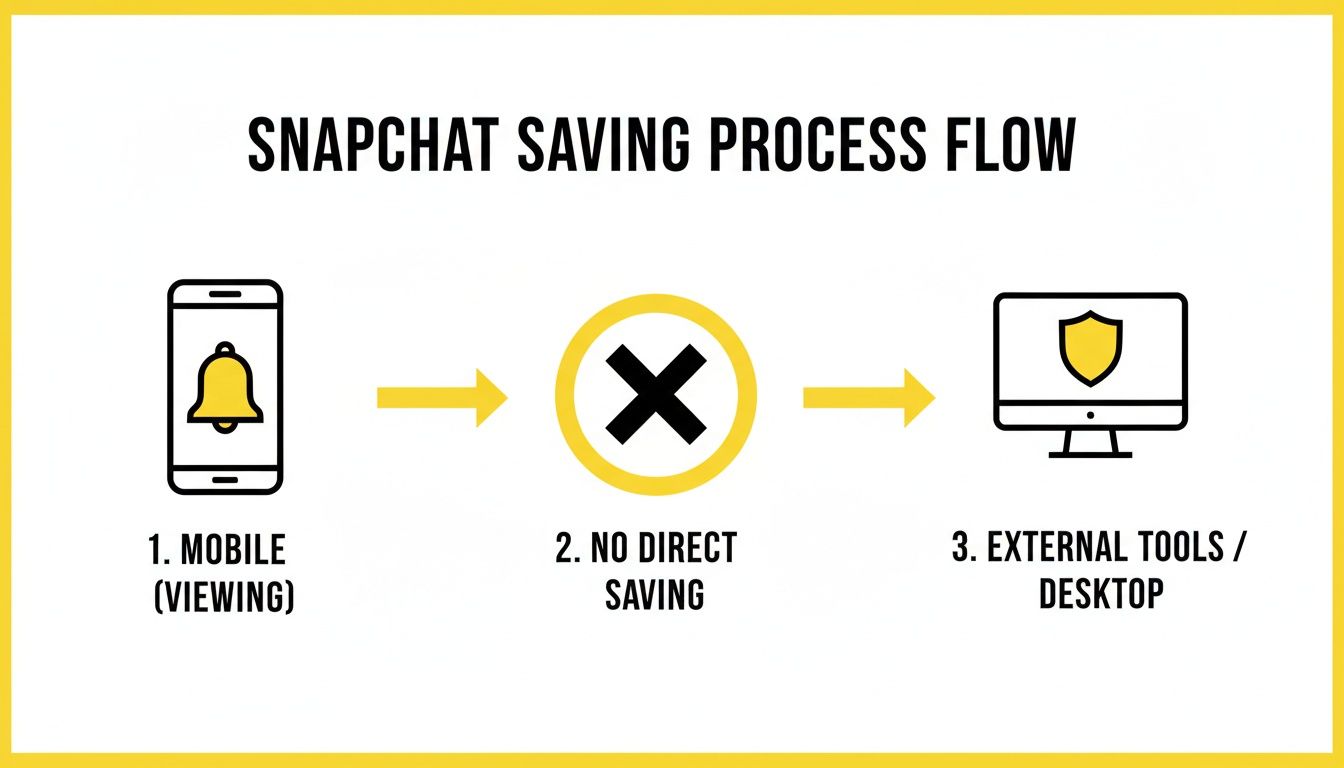
As it shows, trying to save on mobile almost always leads to an alert. The desktop method, however, creates a shielded path where you can archive content without being detected.
Think about what a big deal this is. Every single day, 5 billion snaps are sent and disappear forever after being viewed. The only built-in way to save them is by taking a screenshot, which immediately sends a notification to the sender. It’s a digital tap on the shoulder. This makes a desktop solution more crucial than ever, especially for the 70% of female and 64% of male Gen Z users in the US who live on the platform.
Organizing Your Saved Media
After you've saved a few Snaps, you'll quickly realize you need a system to keep things from getting messy. SnapNinja saves everything to a specific folder on your computer by default. Here are a few tips I've picked up for managing that archive:
- Create Subfolders: I always recommend organizing saved media by the person's name or the date. It makes finding a specific memory or "receipt" way easier down the road.
- Rename Your Files: Don't leave the default gibberish file names. Something simple and descriptive like "Alex_FunnyDogVideo.mp4" is a lifesaver.
- Stick to a Naming System: A consistent format, like
YYYY-MM-DD-[Sender]-[Description], can turn a chaotic folder into a searchable, organized library.
By following these steps, you’ll have a fully functional setup, ready to preserve whatever you need without ever risking your account or tipping anyone off.
Best Practices for Smart and Ethical Archiving

Having the ability to save Snaps without sending a notification is a powerful tool. But let's be clear: this isn't about spying. It's about smart privacy—giving you more control over your own digital footprint and creating a personal archive of memories or important information.
Think of this as a form of personal data management. The real goal is to empower yourself, not to break someone else's trust. Framing your intentions correctly from the get-go is the most important part of this whole process.
When Archiving Makes Sense
There are plenty of perfectly valid reasons to save a Snap. This isn’t about hoarding secrets; it’s usually about holding onto something useful or meaningful that’s designed to disappear.
Here are a few real-world scenarios where saving a Snap is genuinely practical:
- Saving Practical Info: A friend snaps you their new address or a screenshot of directions. Archiving it just makes sense—you have a reliable record you can pull up later without having to ask them all over again.
- Keeping Funny Moments: Your best friend sends a hilarious clip of their dog failing to catch a ball. It’s a classic moment you'll want to rewatch and laugh about together down the road.
- Documenting for Safety: In more serious situations, you might need to keep a record of a conversation for personal safety or as a "receipt." This can be a critical step in protecting yourself.
- Preserving Sentimental Snaps: A family member sends you a sweet, heartfelt message or a photo you want to cherish. Saving it means you can hold onto that memory permanently.
The Golden Rule of Archiving
The ethical line here is bright, clear, and simple: Never share saved content without explicit permission. The second you take a private Snap and post it elsewhere, you’ve gone from personal archiving to a major breach of trust.
Your saved Snaps should be for your eyes only. I always tell people to think of their archive like a personal diary. It’s a private collection of memories and information, not a public library for others to browse.
Breaking this rule isn't just poor form; it can do real damage to your relationships. Respect for the other person's privacy is non-negotiable and the absolute foundation of using a tool like SnapNinja responsibly.
Secure Your Saved Content
Once you start building an archive, keeping it secure is the next crucial step. You've gone to the trouble of saving these memories privately, so the last thing you want is to leave them sitting on an unsecured desktop for anyone to find.
This is especially true if you’re saving anything sensitive. Snapchat’s own security is robust for a reason. In the first half of 2025 alone, their proactive AI detected and enforced a staggering 3,395,968 violations, protecting its 453 million daily users from harmful content. Their enforcement stats are a good reminder of how seriously they take privacy—and you should, too.
A few quick tips can make all the difference: use an encrypted external hard drive, password-protect the folder where you store the files, and back everything up regularly. For a deeper dive into how SnapNinja handles data, you can read about our commitment to user privacy. Following these simple steps ensures your private memories stay exactly that—private.
What to Do When Things Go Wrong (and How to Stay Safe)
Even the most reliable desktop tools can hit a snag. Let's walk through how to handle common hiccups and, just as crucial, how to keep your Snapchat account safe while you're archiving memories.
Fixing Common Glitches
You might occasionally hit a login error or notice Snaps are taking an eternity to load. Don't worry. Nine times out of ten, these are temporary issues, usually caused by a recent Snapchat web update or a simple network glitch on your end.
The first thing I always try is the classic "turn it off and on again." Seriously. Log out of the tool, give your computer a quick restart, and try logging back in. A fresh start solves a surprising number of problems.
If that doesn't do the trick, your next stop should be the developer's website—like the official SnapNinja page—to check for any announcements or recent updates. Good developers are always quick to release patches to keep up with Snapchat's changes. This is a huge part of the Desktop Advantage and what makes a desktop solution a far safer bet than some random mobile app that gets you banned.
Smart Security Habits to Protect Your Account
Knowing how to save a Snap discreetly is one thing, but keeping your account from getting compromised is another entirely. Your privacy should always come first, and a few good habits will make sure your archiving workflow is both smooth and secure.
Here’s a quick security checklist I live by:
- Never, Ever Reuse Passwords: This is non-negotiable. If you use the same password everywhere and another service gets breached, your Snapchat account is suddenly an easy target. I strongly recommend a password manager to create and store unique, complex passwords for everything.
- Be Wary of Public Wi-Fi: That free coffee shop Wi-Fi is great for browsing, but it's a minefield for security. Avoid logging into sensitive accounts like Snapchat on any public network. If you absolutely have to, make sure you're using a reputable VPN to encrypt your connection first.
- Learn to Spot Phishing Scams: Always, and I mean always, download software directly from the official source. Be extremely skeptical of any emails, DMs, or random links promising "free" or "cracked" versions of premium tools. These are almost always phishing scams designed to steal your login info.
A quick pro-tip from experience: A legitimate tool will never ask for your password outside of its own secure login screen. If a pop-up, email, or website asks for it, it's a scam. Trust your gut—it's always better to be too cautious than to lose your account.
By learning how to troubleshoot methodically and sticking to these security fundamentals, you'll have a safe and dependable system for saving your memories. This approach lets you stay in control while keeping your account locked down tight.
Got Questions About Saving Snaps?
If you're still wondering about a few things, you're not alone. Here are the answers to some of the most common questions people ask about saving Snaps without the other person knowing.
Is It Actually Safe to Use a Desktop App Like SnapNinja?
I get this question a lot, and the answer is a firm yes—as long as you're using a reputable desktop client. It’s worlds safer than trying to use a modded mobile app or some sketchy system exploit on iOS or Android. Why? Because those mobile "hacks" are trying to operate right under Snapchat's nose, inside the very environment their security team is built to monitor. That’s a surefire way to get your account flagged, or worse, banned.
A desktop client, on the other hand, runs in a completely separate sandbox on your computer. The mobile app has zero visibility into what’s happening on your PC or Mac. This Desktop Advantage is the whole secret to staying under the radar and keeping your account in good standing. SnapNinja is the only reliable solution that operates this way.
Will This Work for Saving Videos and Stories, Too?
Absolutely. This method isn't just for static photo Snaps. You can view and save every type of media—from quick video Snaps to those long, multi-part Stories—without sending out a single notification.
The process doesn't change whether you're saving a photo or a video. That's the beauty of it. You can archive any memory you want to hold onto, knowing the method is just as private and effective for all of them.
A tool like SnapNinja essentially works by capturing the media as it’s being displayed. Since photos and videos are both just streams of data from your computer's perspective, the software handles them in the exact same way, making it a universal tool for any Snap content.
Can I Use This on My Windows PC and My MacBook?
You bet. The best solutions out there are built to be cross-platform, so they work just as well on Windows as they do on macOS. The people behind these tools know their users are split between different operating systems, so they make sure everyone is covered.
You might notice slight differences during the initial setup—a .dmg file for a Mac versus an .exe file for Windows—but once it's installed, the experience and security are identical. Our guides walk you through the specifics for both, so you’ll be set no matter what kind of computer you use. You can explore the different plans and see how it works for your machine by checking out SnapNinja's pricing and platform support.
What if Snapchat Pushes a Big Update?
Snapchat is always tweaking its app, and major updates can sometimes throw a wrench in the works for third-party tools. This is another area where the Desktop Advantage really pays off. The developers behind a solid, well-supported client like SnapNinja are always on standby to adapt.
A big Snapchat update might cause a temporary hiccup, but a dedicated dev team will usually push out a patch within a short time to get everything working smoothly again. This kind of ongoing support is what makes a desktop solution so much more reliable than a one-and-done mobile hack that gets patched by Snapchat and is never updated again.
Ready to start saving your memories the private, secure way? With SnapNinja, you can archive any Snap or Story right on your desktop without anyone knowing. Get SnapNinja and take control of your Snaps today.