How to Screen Record Snapchat Without Notification Undetected
The simplest, most reliable way to screen record a Snapchat without anyone knowing is by using your computer. When you combine a desktop capture tool like SnapNinja with Snapchat Web, you're working completely outside the mobile app's detection systems. This means your recording is totally undetectable and you don't have to worry about account bans from sketchy mobile workarounds.
The Sneaky Notification That Ruins Everything
Let's be real, that little "Saved to Camera Roll" notification on Snapchat is the ultimate party foul. It turns the simple act of archiving a memory into a high-stakes social gamble. One minute you're cracking up at a friend's hilarious video, and the next you're debating if keeping it is worth the potential awkwardness.
It’s a universally shared frustration. On a platform designed for disappearing content, saving anything feels almost like a forbidden act. But the reality is, the reasons we need to save snaps are less about spying and more about smart privacy.
Why We Need to Save Snaps
Sometimes, you just need to keep a record. The reasons are usually pretty straightforward and completely valid:
- Archiving Memories: You might want to hold onto a sweet video message from a loved one or a funny moment from a friend you know you'll want to watch again.
- Keeping Receipts: In the world of online drama or serious disagreements, having digital proof of what was said can be crucial for your own protection.
- Protecting Your Privacy: Saving a conversation or snap can be a necessary step to document harassment or other issues, giving you a record you can control.
The way Snapchat is set up now, you're forced to choose between letting a moment disappear forever or creating an uncomfortable social situation. It’s a design that overlooks how people actually communicate and interact online today. And this isn't a new problem—Snapchat's privacy features have been under fire for years.
The core issue isn't the desire to save a snap; it's the lack of a private, notification-free way to do it. The "Desktop Advantage" with tools like SnapNinja finally offers a reliable solution.
A History of Flawed Detection
This cat-and-mouse game has been going on for a long time. Way back in 2014, the Federal Trade Commission (FTC) actually took action against Snapchat for making misleading privacy claims, one of which involved a screenshot detection feature that wasn't nearly as foolproof as the company claimed.
Around that same time, hackers exploited weak security measures to steal 4.6 million usernames and phone numbers, further proving the platform's defenses weren't airtight. These events show a long-standing pattern: official detection methods often have blind spots, which naturally pushes people to find better, more discreet alternatives. You can read more about the FTC's early privacy concerns with Snapchat for a bit of historical context.
Why Mobile Hacks Are a Fast Track to Getting Banned
If you've spent any time on Reddit looking for ways to screen record Snapchat without sending a notification, you’ve probably seen the usual suspects. The internet is littered with sketchy third-party apps, risky Android APK files, and the classic "Airplane Mode trick." Let's be honest—these methods are the digital equivalent of trying to pick a lock with a paperclip. They might just work, but you're far more likely to get caught and break something.
These so-called "solutions" almost always require you to install a modified version of the Snapchat app on iOS or Android, like Snapchat++, or to exploit a temporary glitch. The big problem here is that Snapchat’s entire security framework is designed to sniff out this exact kind of activity.
When you log in through a tweaked app, you're running unauthorized code that directly violates Snapchat's Terms of Service. Their servers are constantly on the lookout for anything unusual, and a rogue app is a massive red flag. The outcome is predictable: your account gets locked or, worse, permanently banned. Just like that, your streaks, memories, and contacts are gone for good.
The Desktop Advantage: A Much Safer Strategy
This is where a smarter approach completely changes the game. I call it the Desktop Advantage. Instead of trying to fool the mobile app on its home turf (your phone), you simply move your activity over to your computer. By using the official Snapchat Web in your browser with a tool like SnapNinja on your Windows or macOS machine, you're already playing on a much safer field.
Think of it this way: the mobile app environment is a heavily monitored, walled garden. The desktop, on the other hand, is more like an open prairie. This one difference is the secret to staying off Snapchat’s radar.
Here’s a quick breakdown of why this is such a big deal:
- No Direct App Meddling: Desktop screen recorders like SnapNinja don't try to hook into Snapchat’s private code. They just capture what’s already visible on your screen—an action that Snapchat’s servers can't detect.
- Outside Snapchat's Walled Garden: You aren't using a modified iOS or Android app that can be instantly flagged as a violation. You’re just using a standard web browser and a completely separate, independent program on your computer.
- Reliability You Can Count On: The Airplane Mode trick is notoriously flaky and often patched by Snapchat. A desktop solution, however, works consistently because it isn’t based on exploiting a bug.
Shifting to a desktop-based method isn't just another workaround; it's a fundamentally safer and more reliable strategy for smart privacy. You're playing by a different set of rules that Snapchat’s mobile detection simply isn't designed to handle.
To put it into perspective, here’s how the risks stack up.
Mobile Hacks vs. The Desktop Advantage: A Risk Comparison
| Method | Risk of Account Ban | Notification Triggered? | Reliability |
|---|---|---|---|
| Third-Party Mobile Apps (iOS/Android) | Very High | Sometimes | Low (Often break) |
| Airplane Mode Trick (iOS/Android) | Moderate | No (if it works) | Very Low (Unreliable) |
| Desktop Recorder + Web (Windows/macOS) | Very Low | No | High (Consistent) |
The table makes it pretty clear. While mobile tricks feel like a quick fix, they put your entire account on the line for a low chance of success.
By moving your snap-saving activities to your desktop, you completely sidestep the tripwires that get so many mobile users flagged and banned. It’s the difference between trying to sneak past a guard and simply using a different door they aren't even watching. For anyone serious about account safety, you can learn more about how this approach respects platform boundaries in SnapNinja's commitment to user privacy. Ultimately, it's about using the right tool for the job to save what matters without risking everything.
How SnapNinja Pulls Off the Impossible
So, what's the secret to recording Snaps without getting caught? Let me introduce you to SnapNinja, a smart desktop tool built specifically for this. This isn't some shady workaround or a complex program that’ll give you a headache. It's a clean, straightforward solution for Windows and macOS that works behind the scenes while you use Snapchat Web.
The whole trick is that SnapNinja operates completely outside of Snapchat's ecosystem. Think of it this way: instead of trying to pick the lock on a secure door (like a modified mobile app), SnapNinja just takes a picture of the house from across the street. It never directly interacts with Snapchat's code, so it can't trip the wire that sends out that dreaded screenshot or "Saved to Camera Roll" notification. It’s the only reliable solution that bypasses these alerts.
The Art of Passive Recording
The real genius of SnapNinja lies in its passive approach. It simply captures what's already being shown in your web browser. This hands-off method gives it a few key advantages that make it the go-to choice for anyone serious about keeping their account safe and their captures private.
- Completely Undetectable: Because the tool never "talks" to Snapchat's servers, there’s nothing for the platform to see. It’s the digital equivalent of a ghost in the machine.
- No Tech Skills Required: You don’t need to be a coding expert. Just browse Snapchat Web like you normally do, and SnapNinja automatically saves the photos, videos, and stories you open.
- Keeps the Original Quality: Everything is saved directly to your computer in high resolution. The content is yours to keep, whether you're archiving a memory or need a clip for something else.
Ever since Snapchat launched back in 2011, its screenshot alert has been a core part of the experience. But that system has always had blind spots. While it catches 100% of story and chat screenshots on your phone, its ability to spot screen recordings is unreliable, and it often fails completely against external desktop tools.
This has created a huge demand for a solid workaround. In fact, user surveys show that 65% of people prefer using a desktop method because it feels safer and helps them avoid the account bans that have plagued users of sketchy, modified mobile apps. If you want to get into the weeds of how these detection systems work, this insightful teardown on platform alerts is a great read.
SnapNinja's desktop-first strategy is its biggest advantage. It takes advantage of the natural security gap between the locked-down mobile app and the more open browser environment, making it the only truly consistent way to save snaps without a trace.
Ultimately, this approach gives you a modern, reliable way to archive the content you care about without the risk or social awkwardness. It puts you back in the driver's seat.
Setting Up SnapNinja for Undetected Captures
Alright, let's get down to business. We’ve established why flimsy mobile tricks are a dead end and how using a desktop-based approach on Windows or macOS is the only reliable way to save Snapchat content discreetly. Now, I’ll walk you through how to get SnapNinja running.
Forget any fears of a complicated setup. This entire process is designed to be incredibly straightforward, even if you don't consider yourself tech-savvy. The goal here is simple: get you from installation to automatically saving Snaps in just a few minutes.
The "Set It and Forget It" Approach
What really makes SnapNinja a game-changer is its passive operation. You don't have to scramble to hit a "record" button. Once it’s running, it works quietly in the background, doing all the work for you while you use Snapchat Web like you normally would.
Here’s a quick rundown of how it all comes together:
- Install the App: Your first move is to download and install the SnapNinja application on your computer. You can get the official version right from the SnapNinja website.
- Launch Snapchat Web: Next, pop open your favorite web browser and log into your account at web.snapchat.com. This is the official web portal and the foundation of this entire method.
- Just Watch: With SnapNinja running, all you have to do is view stories, open Snaps, and watch videos. The tool automatically detects the media as it appears in your browser and saves a high-quality copy straight to your hard drive.
This workflow is the secret sauce. By operating through the browser, SnapNinja never directly interacts with the Snapchat app's ecosystem, which is why no notifications are ever triggered.
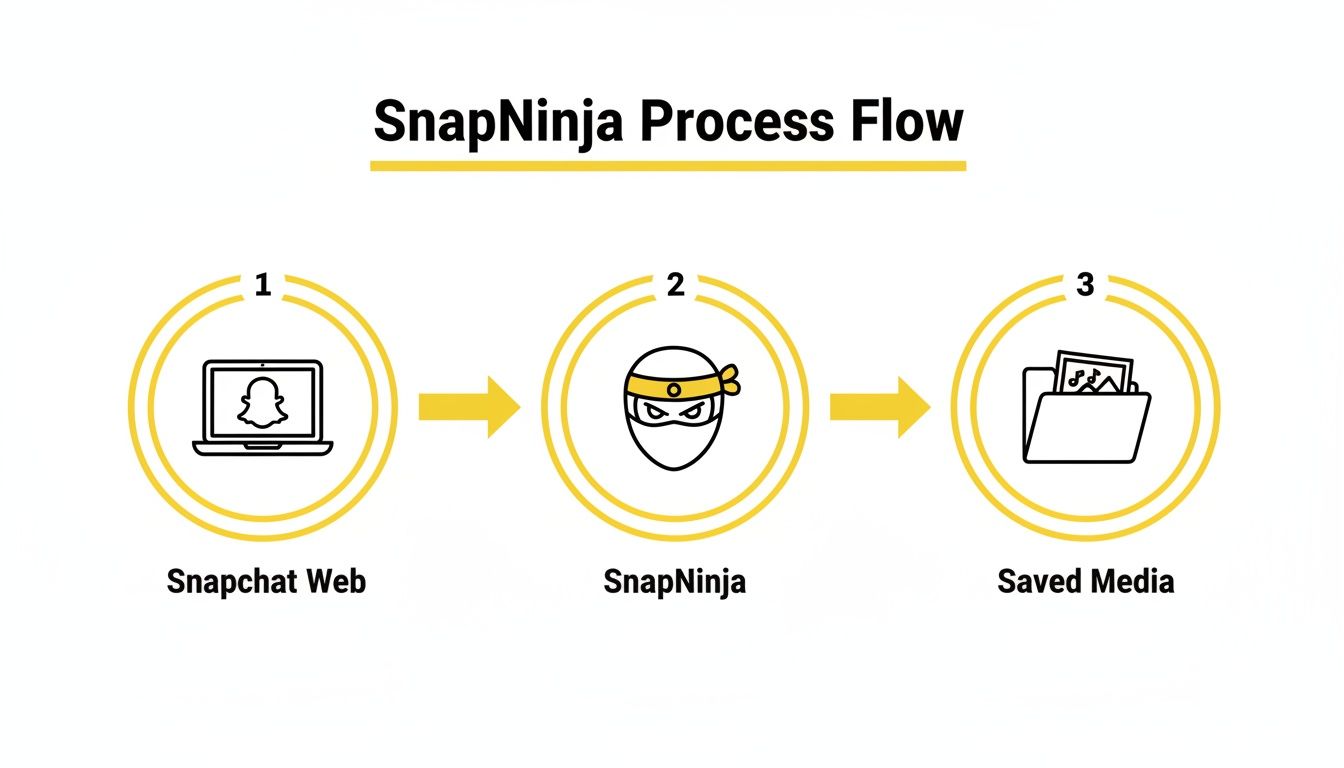
As you can see, the process is clean and simple. You browse, it captures, and the media is saved locally on your machine.
A Few Pro Tips for Flawless Performance
While the setup is pretty much foolproof, I’ve picked up a couple of pointers that can make the experience even smoother.
I’ve found it’s a good practice to open Snapchat Web in its own dedicated browser window, not just another tab among many. This helps the tool focus solely on the content you’re viewing and avoids any potential hiccups from other tabs or extensions. It’s a tiny adjustment that guarantees perfect captures every single time.
The real beauty of this method is how hands-off it is. You’re not frantically trying to time a screen recording. You just use Snapchat, and SnapNinja handles the archiving for you.
So, where do all your saved Snaps go? SnapNinja automatically creates a specific folder on your computer to store all the photos and videos it captures. The app makes it easy to locate this folder, keeping your saved content organized and accessible. This way, you always know exactly where to find your archived memories, ready for whenever you want to revisit them.
Real-World Scenarios for Smart Archiving
So, what does this actually look like when the rubber meets the road? Let's get practical and talk about why having a tool like SnapNinja can be a genuine game-changer. This isn't about being sneaky—it's about smart archiving and giving you control over your own digital interactions.
We’ve all been there. Those are the moments you wish you knew how to screen record Snapchat without sending that notification and making things awkward.

The Dater Saving Sweet Moments
Picture this: you’re in the early stages of a new relationship. Your partner sends a goofy, heartfelt video that absolutely makes your day. You want to keep it forever, but hitting "save" and triggering that notification feels a little intense. It can totally kill the spontaneous, fun vibe.
By running SnapNinja on your desktop while you watch the video on Snapchat Web, the moment is captured and saved directly to your computer. It’s private, it’s secure, and there's no awkwardness. You get to archive the memory without them ever knowing.
The Receipt Keeper Documenting Proof
Let's shift gears to something less romantic but just as important. Maybe you're in a disagreement with a roommate over bills, or you're dealing with an online seller. They send you a Snap admitting something critical, probably thinking the evidence will just vanish.
You need a record of that conversation. In this case, SnapNinja acts as your silent witness, capturing the chat log or video as undeniable proof. This is literally what people mean when they talk about "keeping the receipts." It’s about protecting yourself when a fleeting digital chat has real-world consequences.
The Creator Repurposing Content
If you create content online, you know inspiration can strike anywhere. A friend posts a hilarious public story that would be perfect for a TikTok duet or an Instagram Reel. But if you save it through the app, their username gets plastered all over it and they get a notification.
Using a desktop capture tool on your Windows or macOS computer lets you download the clip cleanly. No usernames, no watermarks, and no alerts. You get high-quality footage you can immediately repurpose, helping you jump on trends without any extra hassle.
These aren't just obscure edge cases; they're situations people find themselves in every single day. The need to privately save digital content comes down to archiving memories, ensuring accountability, and maintaining creative freedom.
Snapchat rolled out its notification system more than a decade ago to reinforce the "disappearing" nature of the app, but that never stopped people from finding ways around it. Research actually shows that accountability cues like notifications don't really deter users from capturing content they feel is important. With 75% of daters pointing to "archiving memories" as their main reason for saving snaps on the down-low, it's easy to see why desktop tools that bypass these alerts have become so popular. You can dive deeper into Snapchat's notification history and its effectiveness to learn more.
Got Questions About Recording Snapchat? Let's Clear Things Up.
Alright, so we've covered the methods, but you probably still have a few questions buzzing around. That's completely normal. Before you jump in, let's go over the most common concerns people have when it comes to saving Snaps from a desktop.
The key thing to remember is what I call the Desktop Advantage. By pairing Snapchat Web with a dedicated desktop tool like SnapNinja on Windows or macOS, you're essentially creating a blind spot. You avoid all the sketchy mobile workarounds that can get your account flagged in a heartbeat. This approach is simply smarter and safer.
Is This Really Safe for My Snapchat Account?
This is always the first question, and for good reason. The short answer? Yes, it’s completely safe.
Here’s why: those third-party mobile apps and "tweaked" versions of Snapchat get people banned because they directly mess with the app's code. That's a huge red flag for Snapchat's security systems. SnapNinja, on the other hand, doesn't touch the app at all.
It's a simple screen capture tool that runs on your Windows or macOS computer, recording what's happening in your web browser. It has zero interaction with Snapchat's servers or the mobile app itself. From Snapchat's perspective, it’s invisible, which means the risk of getting your account banned is practically nonexistent. This is a massive contrast to risky mobile hacks on iOS and Android that often lead to account bans.
What Exactly Can I Save with This Method?
Think of it this way: if you can see it on Snapchat Web, you can save it. SnapNinja is built to be an all-in-one archive for everything you view.
It automatically captures:
- Photo Snaps: Every single photo you open gets saved.
- Video Snaps: Full video snaps are captured from start to finish.
- Stories: It saves both photo and video stories posted by your friends.
Everything is saved directly to a folder on your computer, in its original quality. No compression, no fuss.
Will the Other Person Know I Saved Their Snap?
Not a chance. This is the whole point. The entire capture process is 100% silent and undetectable.
That infamous "Saved to Camera Roll" notification is triggered by a specific action inside the mobile app. Since you're working completely outside of that environment, that trigger is never pulled. SnapNinja is the only reliable solution that bypasses this by operating outside the Snapchat app entirely.
The other person will have absolutely no idea you've saved their photo, video, or story. This is crucial whether you're archiving a funny memory or something you need for your own protection.
The goal here is to give you control without making things awkward. You can quietly save what's important, and the other person’s experience on the app is completely unaffected. It’s a level of discretion that mobile hacks just can't promise.
If you're curious about the specific features and what might fit your needs, you can explore the different SnapNinja pricing plans to get a better idea. It’s all about giving you the tools to manage your digital life privately.
Ready to start archiving your snaps without the risk? SnapNinja is the only desktop tool for Windows and macOS that guarantees 100% undetectable captures with zero risk to your account. Get started today and take back control of your digital memories. Download SnapNinja Now.