The Smartest Snapchat Saver: An Undetectable Desktop Guide
If you're looking for a Snapchat saver that actually works without getting your account banned, you need to think outside your phone. Let's cut the fluff: the only truly private and safe way to save Snaps is from your desktop. While sketchy mobile apps are a minefield of risks, a Windows or macOS setup is the smart play for archiving your memories securely.
Why a Desktop Snapchat Saver is the Only Real Option
Look, you want to save Snaps without getting caught. Forget the shady third-party apps and outdated online hacks—the only reliable method that stays under the radar is a desktop-first strategy.
The Snapchat mobile app is a digital fortress. It’s engineered to do one thing really well: notify people when you screenshot or screen record. That’s the entire point of "disappearing messages." Trying to bypass this on your phone usually means installing a janky, modded app that basically screams "I'm violating the terms of service!" to Snapchat's servers. That's a fast track to getting your account locked.

The Desktop Advantage: A Total Game-Changer
Here’s where the Desktop Advantage comes in. The desktop environment, especially with Snapchat for Web, operates under a different set of rules. This is the loophole a purpose-built tool like SnapNinja leverages perfectly. It works on Windows and macOS, completely outside the mobile app's heavily monitored ecosystem, making it the only solution that bypasses the "Saved to Camera Roll" notification.
This isn't about spying. It's about smart privacy and having control over your digital life. You might want to:
- Archive precious memories from a family member or partner without the social awkwardness of a notification.
- Keep receipts of important conversations or promises that would otherwise vanish into thin air.
- Protect your privacy by saving evidence if you're dealing with bullying or harassment.
A desktop tool lets you sidestep Snapchat's mobile detection systems entirely. You aren't modifying the official app or doing anything that triggers an alert. It’s a passive, silent process that’s invisible to the other person and, more importantly, to Snapchat.
Here's the tech breakdown: Instead of fighting a losing battle against Snapchat's mobile security, you operate where it isn't even looking. SnapNinja captures the media file as your browser downloads it—long before the "viewed" status is ever sent back to Snapchat. It’s a clean intercept, not a hack.
Snapchat Saver Methods: Mobile vs. The Desktop Advantage
Let's break down why a desktop solution is the clear winner for anyone who wants to save Snaps without getting banned.
| Feature | Risky Mobile Apps (iOS/Android) | SnapNinja (Desktop Method) |
|---|---|---|
| Account Safety | High risk of immediate ban. These apps directly violate ToS. | Safe & Undetectable. Works passively outside the app environment. |
| Privacy | Often requires disabling phone security or granting sketchy permissions. | Secure. No need to compromise your phone or personal data. |
| Reliability | Breaks with every single Snapchat update. Highly unstable. | Stable. Less affected by mobile app changes, making it reliable. |
| Ease of Use | Complicated setup (jailbreaking, sideloading APKs). | Simple. Install on your computer, log into Snapchat Web, done. |
It’s not even a contest. Sketchy mobile apps force you to jailbreak your iPhone or sideload a random APK on Android, exposing your device to malware. Even if you get one to work, Snapchat's next update will break it, leaving you high and dry.
The desktop approach with SnapNinja, on the other hand, is clean, secure, and built for the long haul. You don't have to put your phone's security on the line. Just install the software on your computer, log into Snapchat Web as usual, and let it archive everything quietly in the background. It's a true "set it and forget it" solution.
Why Mobile Snapchat Savers Are a Trap (and Will Get You Banned)
If you've ever googled "Snapchat saver," you've waded through a swamp of apps promising stealthy saves. Things like Snapchat++ and other "modded" versions are tempting, but installing them is like painting a giant target on your back for Snapchat's security team.

Let's be blunt: these mobile apps are an aggressive violation of Snapchat's terms of service. They inject unauthorized code into the official app, and Snapchat has gotten incredibly good at detecting this. The second you log in through one of these rogue clients, you’re flagging your account for a temporary lock or, more likely, a permanent ban.
The Security Nightmare of Modded Mobile Apps
Losing your account is bad enough, but these mobile savers also punch a massive security hole in your phone. To even get them running, you have to bypass the very security features designed to protect you.
- Jailbreaking (iOS): This rips down Apple's security walls, leaving your iPhone wide open to malware that can steal data from all your other apps, not just Snapchat.
- Sideloading APKs (Android): When you install an app from some random website, you're trusting an anonymous developer with full access to your phone’s data—contacts, photos, banking app logins, you name it.
You’re essentially handing over the keys to your digital life just to save a few Snaps. It's a terrible trade-off, especially when the safer and smarter desktop method exists.
The bottom line: Mobile hacks are locked in a constant, unwinnable battle with Snapchat. Every time Snapchat pushes an update, the modded app breaks. You're left waiting for a fix, risking detection all over again.
A Long History of Cat and Mouse
This isn't new. The screenshot notification has been a core feature since 2011, and people have been trying to get around it for just as long. This cat-and-mouse game even caught the attention of federal regulators. Back in 2014, the FTC charged Snapchat with deceptive practices after finding that early versions of the app were easily bypassed.
This led to a major settlement and a complete overhaul of Snapchat's security, making their detection methods far more sophisticated. You can read the full history of the FTC's settlement to see how it changed the game.
This is precisely why the Desktop Advantage is so powerful. By shifting the process to a Windows or macOS computer with a tool like SnapNinja, you operate completely outside the app's heavily monitored mobile environment. It isn't a hack; it's a smarter, undetectable way to archive your content without risking your account.
The Desktop Advantage: How This Stays Invisible
So, what’s the secret sauce? How can a desktop tool succeed where countless mobile apps fail? It all comes down to the Desktop Advantage—a core difference in how Snapchat delivers content to a computer versus a phone. This isn't a shady glitch; it's based on the fundamental mechanics of how the web works.
When you use the Snapchat app on your phone, you're inside a walled garden. The app is designed to monitor everything—every tap, swipe, and especially the phone's screenshot function. Mobile "saver" apps have to hook directly into Snapchat's code, which is a massive red flag.
The Power of Passive Interception
On a desktop, the game changes. When you log into Snapchat for Web, your browser has to temporarily download the photo or video file just to display it. This is how every website you visit works.
This is where a clever tool like SnapNinja comes in. It’s designed for Windows and macOS and capitalizes on that exact moment of download. It sits quietly in the background and intercepts the media file as your browser requests it from Snapchat's servers. Think of it as a gatekeeper grabbing the package before it even reaches your front door.
The magic is when this happens. SnapNinja intercepts the media before it's fully displayed and, crucially, before your computer sends the "viewed" receipt back to Snapchat. This timing is what makes the process completely invisible to the sender and Snapchat.
Because SnapNinja operates entirely outside of the Snapchat environment, it leaves no footprints.
- It never takes a screenshot. It doesn't trigger your OS screenshot command, so there’s nothing to detect.
- It doesn't record your screen. Instead of a low-quality capture, it saves the original, high-quality media file.
- It avoids the API. The tool doesn't interact with Snapchat's servers in any unauthorized way that could get you flagged.
This passive approach is what makes it so clean and undetectable. You're just getting a copy of the data stream, not breaking into the system.
Why the Desktop Method Is Future-Proof
This method is so reliable because it's built on the basic principles of how web browsers function. For Snapchat to block this, they would have to fundamentally re-engineer how all web browsers handle media, which just isn't going to happen.
They can and will constantly update their mobile app, patching holes and banning modded clients. But the desktop process is a different beast—it's standardized and consistent. This makes the desktop approach with SnapNinja a far more stable and future-proof solution than the endless cat-and-mouse game on mobile.
How to Get Set Up for Undetectable Saving
Ready to start building your own private archive? Getting SnapNinja up and running on your Windows or macOS computer is incredibly simple. Once it's set up, it's completely hands-off—it just works in the background.
The beauty of this method is its simplicity. You just log into Snapchat Web like you normally would, and the software automatically saves any Snaps you view to a folder on your computer. No extra clicks, no manual saves.
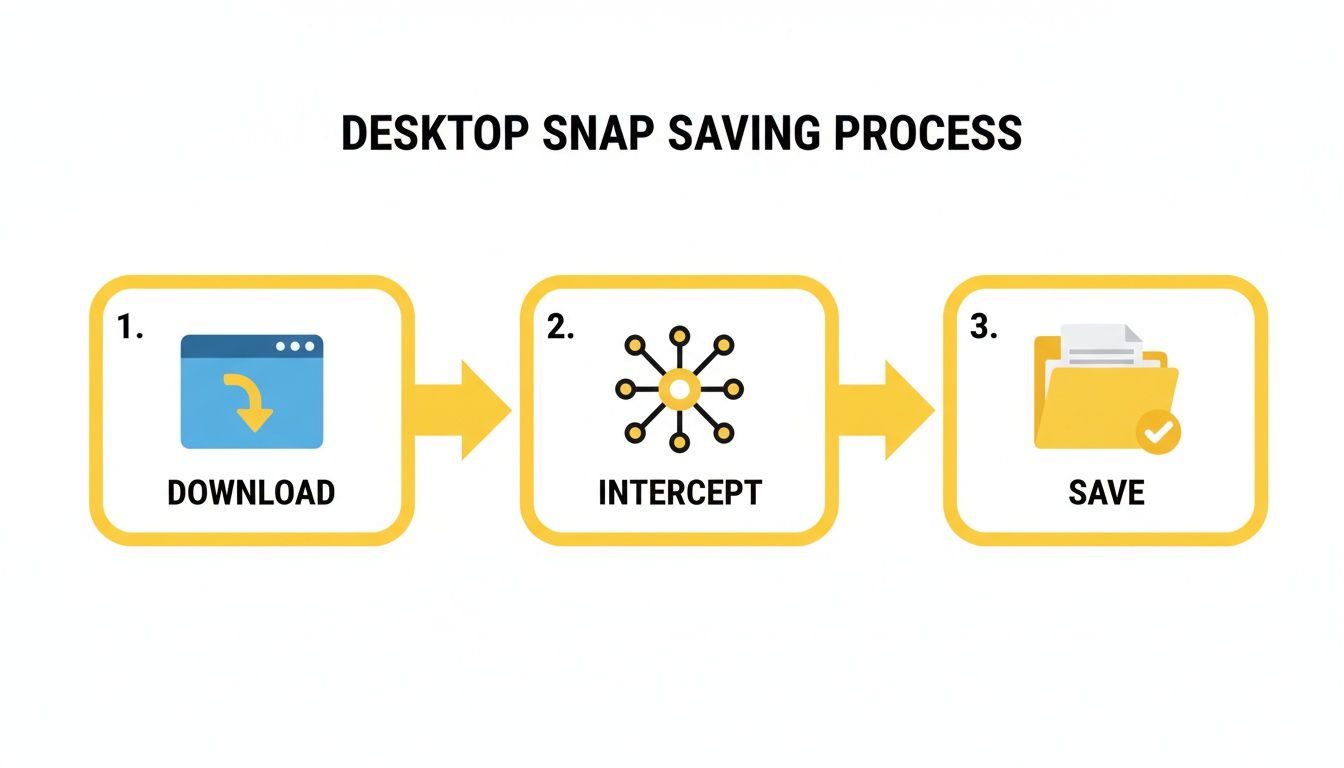
As you can see, the tool grabs a copy of the content as it streams to your computer, never directly interacting with Snapchat's servers or triggering any notifications.
The Quick Setup Guide
Getting started is as easy as installing any other app. No sketchy permissions or confusing configurations needed.
- Download and Install: Head over to the official SnapNinja website and grab the right version for your operating system (Windows or macOS).
- Run the Software: Once it's installed, launch the application. You'll see it running quietly in your system tray or menu bar.
- Log into Snapchat Web: Open your favorite browser and go to
web.snapchat.com. Log in with your Snapchat account. - View and Save: That’s it. From now on, any Snap, video, or Story you open on the web will be automatically and silently saved to your computer.
Pro Tip: The first time you run the software, hop into the settings. You can choose exactly where you want your media saved. I created a dedicated "Snapchat Archive" folder on my desktop to keep everything organized from day one.
Understanding Your Saved Files
SnapNinja is so effective because it works around Snapchat’s core "disappearing" feature. It completely bypasses the screenshot notification system by saving the original media file directly to your computer.
The files are even named in a super helpful way, usually with the sender's username and a timestamp (e.g., username_2024-10-26_15-30-05.mp4). This logical naming makes it incredibly easy to find a specific memory later, turning a fleeting moment into a permanent, organized file in your personal archive.
Why Bother Saving Snaps Anyway? Smart Privacy Explained
Let's get one thing straight: using a tool to save Snaps isn't about being creepy. For most people, it’s about practicality, smart privacy, and regaining control over your digital life. When media is designed to disappear by default, having a personal archive is just plain smart.
Think about it. You get a heartfelt video from a friend—a moment you'd love to keep. But the second you save it, that awkward "You saved this!" notification pops up. A tool like SnapNinja lets you build your own private collection of memories on your own terms.

Keeping the Receipts
Beyond sentimental reasons, there’s a massive protective element here. We've all been there: someone makes a promise or a claim in a Snap, then denies it later. Saving a Snap can be about "keeping the receipts"—having undeniable proof of a conversation that would otherwise vanish.
This becomes crucial in more serious situations. For anyone experiencing online harassment, being able to silently document what's happening is a powerful tool for their own safety and privacy. When an aggressor thinks their messages will disappear, having a record is your best line of defense.
A Game Changer for Creators
If you're a content creator, you know inspiration is fleeting. You might post a brilliant, spontaneous video to your Snapchat Story and later realize it would be perfect for TikTok or Reels. Without a way to save it, that high-quality content is gone forever.
A dedicated desktop saver changes the game, allowing creators to:
- Save their own work in its original quality to repurpose on other platforms.
- Archive viral Snaps for trend analysis without tipping off the original poster.
- Build a content library without relying on clunky, low-quality screen recordings.
It turns Snapchat from a walled garden into another valuable source for your creative workflow. You can check out the pricing options for SnapNinja to see how accessible this utility is for both personal and professional use.
Let’s not forget, Snapchat’s own history is full of privacy issues. A 2013 data leak exposed 4.6 million usernames and phone numbers, which led to FTC charges. You can read more on their official reports about privacy and transparency. This history is a stark reminder that trusting any platform completely isn't always wise; taking control of your own data is smart practice.
Frequently Asked Questions About Saving Snaps
We’ve covered a lot, but you probably still have some questions. This section tackles the most common questions we get about saving Snaps, Snapchat's rules, and how a tool like SnapNinja fits in.
Let's get you some straight answers.
Is It Actually Legal to Save Snaps?
This is the big one, and the answer is nuanced. It really boils down to where you live and what you do with the content you save.
Saving a funny video from a friend for personal use? That’s typically not a legal issue. The trouble starts when you take someone's private content and share it publicly without their permission. That's when you risk crossing into privacy or copyright violations.
The golden rule is simple: be responsible. Use a Snapchat saver for personal archiving, keeping memories, or documenting something for your own records. Never distribute someone's private media without their direct consent.
For a closer look at how a tool can be built around this principle, you can explore SnapNinja's commitment to user privacy.
Could This Method Get My Account Banned?
This question gets to the core of the Desktop Advantage. The risk of getting your account banned while using SnapNinja is practically zero, and here's why: the software is 100% undetectable.
It doesn't hack, modify, or even touch the official Snapchat app or its private API. It just intercepts media files your web browser is already downloading. This is a world away from those shady mobile apps that alter the Snapchat app—the exact behavior Snapchat hunts down. Since SnapNinja works on the outside, there's no suspicious activity for Snapchat to detect.
Does This Work for Videos and Stories Too?
Absolutely. SnapNinja is a complete capture tool. It automatically saves everything you view on Snapchat for Web.
This includes:
- Individual photo Snaps
- Full-length video Snaps
- Every single photo and video from someone's Story
It all happens silently in the background. If you can see it on your screen, it’s being saved to your computer in its original quality.
What if Snapchat Updates Its Website?
Fair question. Any software that works with another platform has to adapt. While a small tweak to the Snapchat website probably won't break anything, a major redesign could require an update.
This is why it's crucial to use a tool that's actively maintained. The team behind SnapNinja pushes out regular updates to stay ahead of any changes. Just make sure you're always on the latest version, and you'll be good to go.
Ready to start building your private archive safely and silently? SnapNinja is the only tool that leverages the Desktop Advantage to save any Snap without a trace. Get started with SnapNinja today!