Your Guide to a Safe Snapchat Story Downloader
Let's be real—you're trying to save a Snapchat story, but every app you find on your phone feels like a sketchy gamble. The smartest way to grab that content is with a desktop application like SnapNinja. Why? Because it works completely outside of Snapchat's official app ecosystem, which is the key to avoiding account bans and keeping your activity under the radar.
Why Mobile Snapchat Downloader Apps Are a Trap
If you've ever looked for a way to save Snapchat stories, you know the drill. You're met with a flood of shady third-party apps on app stores or even shadier websites. They all make the same empty promise: an easy, one-tap way to download stories right to your phone.
The problem is, they're almost all a trap. That isn't an exaggeration.
Snapchat’s mobile app is a fortress. It was built from day one to sniff out any unauthorized software trying to mess with its system. When you install a "tweaked" or "modded" Snapchat client on your iOS or Android device, you're essentially waving a giant red flag. Snapchat's security is constantly scanning for this kind of behavior, and it will find it.
The Fast Track to an Account Ban
Using one of these mobile apps is the quickest way to get your account locked. You might get lucky with a temporary suspension at first—a slap on the wrist. But keep doing it, and you're heading straight for a permanent ban. Imagine losing all your streaks, your memories, and your connections in an instant. It's not worth the risk.
Snapchat has a zero-tolerance policy for apps that break its rules, and these downloaders are public enemy number one.
The core issue is that these apps operate within the same environment (your phone) that Snapchat controls. You're playing an away game on their home turf, and you're destined to lose.
The platform's entire business model hinges on ephemeral content. This fleeting nature is what drives engagement, with 66% of users watching stories from friends daily and over 5 billion snaps created every single day. Snapchat fiercely protects this model, and any tool that undermines it is treated as a direct threat. You can dig deeper into why Stories are so critical by checking out the latest Snapchat statistics.
The Desktop Advantage: A Smarter Approach
So, how do you get around this without putting your account on the chopping block? The answer is to move the entire operation off your phone and onto your computer.
This is what I call the "Desktop Advantage."
A dedicated desktop application for Windows or macOS operates in a completely separate sandbox. The Snapchat mobile app has zero visibility into what’s happening on your computer, which changes everything.
- Completely Undetectable: The mobile app can't scan your PC or Mac for software it doesn't like. Mobile hacks are easy to spot; a desktop method is invisible.
- Safer Login Process: You're not using a hacked client; you're interacting with Snapchat's standard web interface, which is a much safer way to access your account.
- No "Gotcha" Notifications: Since it all happens outside the app, saving a story doesn't trigger screenshot alerts or any other notifications. It's completely discreet.
To make it even clearer why this is the only sensible choice, let's break it down.
Desktop Downloader vs Mobile Apps: A Quick Comparison
Using a desktop tool isn't just a clever workaround; it's a fundamental shift in strategy. It’s about being smarter with your data and protecting your account. The table below shows just how different the two approaches really are.
| Feature | Desktop Method (e.g., SnapNinja) | Mobile Apps/Hacks |
|---|---|---|
| Detection Risk | Extremely low. Operates outside the mobile app's monitoring system. | Extremely high. Directly interacts with the app, triggering security alerts. |
| Account Safety | Safe. Avoids direct violation of the app's terms of service. | High risk. A leading cause of temporary and permanent account bans. |
| Privacy | Private. No notifications sent to the user when you save their story. | Risky. Often triggers screenshot or screen recording notifications. |
| Login Security | Secure. Uses standard web-based authentication. | Insecure. Often requires giving your password to an untrusted third-party app. |
| Functionality | Reliable. Built for one purpose and updated to avoid detection. | Unreliable. Frequently breaks with Snapchat updates and can be malware. |
As you can see, the choice is pretty stark. One path leads to safe, private archiving, while the other is a direct line to getting your account banned. By shifting your activity to a desktop solution, you step out of Snapchat's direct line of sight, keeping your account safe and your actions private.
Meet SnapNinja: The Undetectable Desktop Solution
Given the problems with mobile apps, it's pretty clear we need a completely different approach. The answer isn't just another risky app, but a smarter tool that works on your desktop, far away from Snapchat's prying eyes.
Meet SnapNinja. It's a dedicated application for both Windows and macOS, built from the ground up to be the safest and most reliable way to download Snapchat stories.
Instead of messing with the mobile app directly, SnapNinja works alongside the official Snapchat Web on your computer. This is the Desktop Advantage in action. Since it runs separately, it's completely invisible to Snapchat's security scans. No weird modifications, no sketchy permissions—just a secure, direct way to save the content you care about.
Smart Privacy for Your Memories
It helps to think of SnapNinja less as a "downloader" and more as a personal archiving tool. We've all seen moments we wish we could keep forever—a friend's hilarious reaction at a concert, a sweet family memory, or even important "receipts" from a chat you need to hold onto. SnapNinja was built for exactly that: smart privacy. It gives you the power to create a personal backup of moments that would otherwise vanish.
The demand for tools like this makes sense when you consider Snapchat's sheer scale. With over 3.2 billion total downloads worldwide, the amount of content disappearing every single day is mind-boggling. This naturally creates a need for users to save meaningful stories. You can dig into the numbers on Snapchat's huge user base to get a sense of just how massive it is.
The best part is its discretion. Because SnapNinja operates on your desktop, it completely bypasses those dreaded "Saved to Camera Roll" or screenshot notifications. Your activity stays 100% private.
Here’s a look at the clean, no-nonsense interface you'll be using.
As you can see, the layout is simple and focused. It lets you easily manage and view the content you want to save without any confusing extras. It's designed for one thing: getting the job done efficiently and privately.
The whole process is incredibly smooth. You just log into Snapchat on your web browser like you normally would, and SnapNinja works quietly in the background to capture the stories you view. It’s basically a set-it-and-forget-it solution that puts you in control without putting your account at risk.
You can check out the official SnapNinja app to see how it fits into a desktop workflow. Honestly, it’s the only method out there that truly nails the combination of safety, privacy, and reliability.
How to Download Snapchat Stories with SnapNinja
Ready to start archiving those can't-miss moments without leaving a trace? Getting SnapNinja set up on your computer is surprisingly simple. We're going to walk through everything, from the initial install to grabbing your first story.
Forget complicated technical guides. This is more like a friend showing you a cool trick they just discovered.
Getting Installed and Logged In
First up, you need to get the software on your machine. Head over to the official SnapNinja website and download the installer for either Windows or macOS. The installation itself is standard fare—just a few clicks, and you're all set.
Now for the login, and this is where SnapNinja does things right. It doesn't ask for your Snapchat password inside its own app. Instead, you'll log into the official Snapchat for Web platform directly in your browser. This is a huge plus for security, as your credentials go straight to Snapchat, never to a third party.
Once you’re logged into Snapchat for Web with SnapNinja running in the background, the two sync up automatically. There's no extra step. You just use Snapchat on your desktop like you normally would, and SnapNinja is ready to go.
This image breaks down the difference between the mobile and desktop approach pretty clearly.
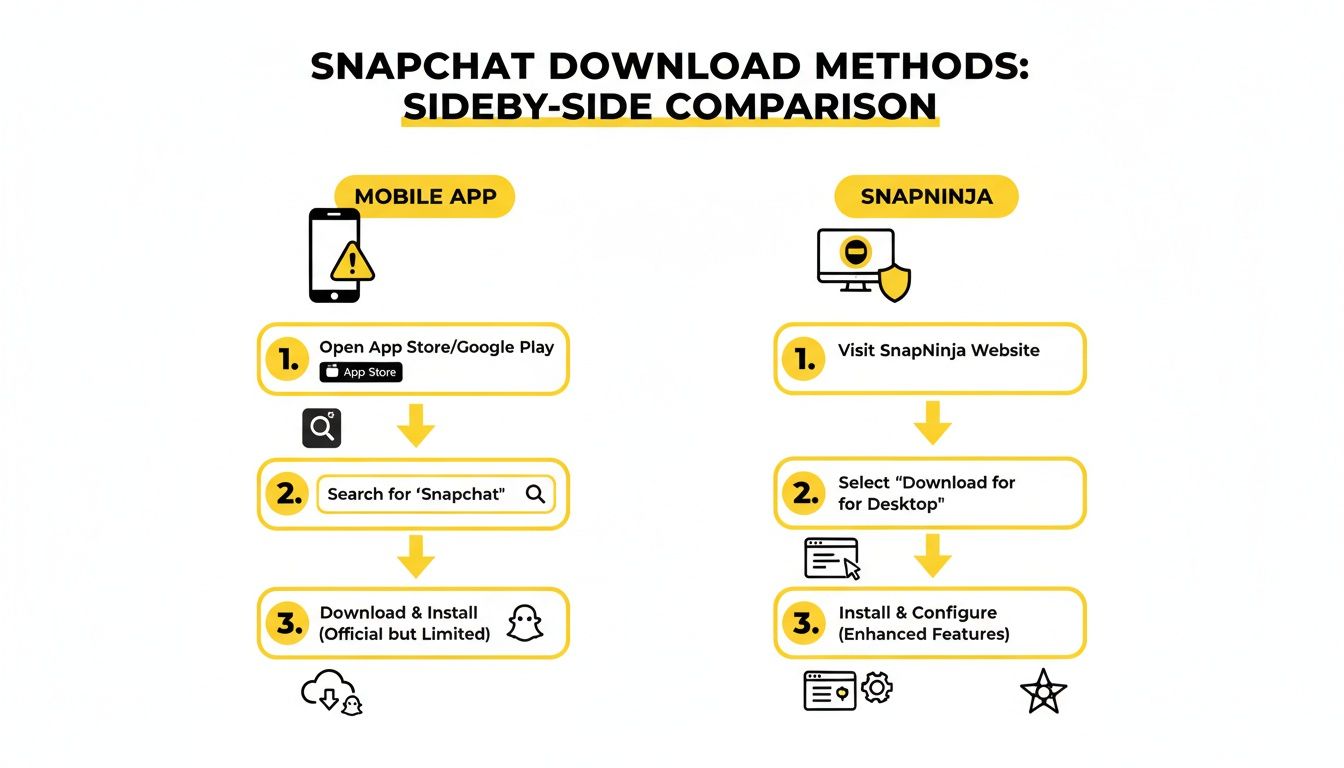
The takeaway here is that using a tool like SnapNinja on your desktop offers a much more private way to save content, avoiding the risks and notifications tied to mobile apps.
Finding Stories in the Interface
SnapNinja keeps its interface clean and uncluttered. You won't find a bunch of confusing menus or buttons because it’s designed to do one thing exceptionally well: be an efficient snapchat story downloader.
When you're on Snapchat Web, you’ll see your friends and their active stories just like you would on your phone. To actually save a story, you don't even have to click a "download" button.
Here’s the magic of how it works:
- Just watch a story: Click on a friend's story to view it in your browser.
- SnapNinja does the rest: As the photos or videos play, the app automatically detects and saves them in the background.
- Check your gallery: The captured Snap shows up in the SnapNinja desktop gallery almost immediately.
That’s literally it. You view it, SnapNinja saves it. This passive approach is what makes the whole process so undetectable.
You're not actually performing a "save" action that Snapchat's servers can log. You're just viewing. SnapNinja handles the archiving on your machine, which is why your friend never gets a notification. It's the ultimate fly-on-the-wall method.
Your First Download: A Real-World Example
Let's walk through a common scenario. Say your friend posted an amazing, multi-part story from a concert last night. You want to save it before it's gone forever, but you definitely don't want them getting a stream of "screenshot" notifications and wondering what you're up to.
With SnapNinja, this is a piece of cake.
You just open Snapchat for Web, find your friend's profile, and click to watch their story. As each clip plays—the band's encore, the crowd going wild, your friend's terrible singing—SnapNinja is silently grabbing each segment and adding it to its gallery.
When you're done watching, you can open the SnapNinja app on your desktop. You'll find every single Snap from that story waiting for you, saved in its original high quality. From there, you can:
- Organize everything: Create folders for different friends, trips, or events.
- Export the files: Save the Snaps as standard MP4 or JPEG files anywhere on your hard drive.
- Build an archive: Keep a private collection of your favorite moments that would have otherwise disappeared.
The whole process feels completely natural because, from Snapchat's perspective, all you did was watch a story. The heavy lifting happens invisibly, leaving you with a perfect copy and no digital footprints.
Advanced Tips and Troubleshooting
Alright, now that you've got the hang of the basics, let's talk about how to make your story-saving workflow even smoother. Using SnapNinja effectively isn't just about grabbing a single clip here and there; it's about building a smart, organized archive of your favorite moments.
A massive time-saver is batch downloading. Instead of clicking on a story, waiting for the download, and then moving to the next, just let them play. As you click through stories from different friends on Snapchat Web, SnapNinja works quietly in the background, grabbing each one. You'll end up with a full collection ready to be sorted at your convenience.
To keep things from getting messy, get into the habit of using folders right inside the SnapNinja app. I like to create dedicated folders for things like "Family Get-Togethers," "Road Trips," or even for specific friends who always post great content. This small step turns a random pile of video files into a searchable personal library, which is a lifesaver when you're trying to find a specific memory months later.
Solving Common Glitches
Look, even the most reliable tools can have an off day. If SnapNinja seems to stumble, don't worry. Most of the time, the problem isn't with the app itself but with the connection between your browser and Snapchat.
The first thing to try? A simple refresh of the Snapchat Web page. That often clears up any temporary communication hiccups.
If you notice a specific story just won't appear as downloadable, it's almost always a syncing problem. The easiest fix is to log out of Snapchat Web completely and then log back in. This forces a brand new session, which usually allows SnapNinja to detect the content properly. Honestly, this classic "turn it off and on again" trick solves over 90% of the issues I've ever seen.
Remember, SnapNinja is a passive tool. If Snapchat Web isn't loading a story for you to see in your browser, the downloader can't see it either. A stable connection to Snapchat is the most critical piece of the puzzle.
Most roadblocks are pretty easy to clear once you know what to look for. I've put together a quick table to help you diagnose and solve the most common snags you might hit.
Quick Troubleshooting Guide
| Problem | Quick Fix | What's Happening |
|---|---|---|
| Login Error | Log out and log back into Snapchat Web. Double-check your password. | Your session with Snapchat has likely expired in the background. |
| Story Not Saving | Refresh the browser page or restart the browser entirely. | A temporary browser glitch is probably blocking the content from fully loading. |
| App Seems Unresponsive | Close SnapNinja from your taskbar or dock and relaunch it. | Like any application, it might just need a quick restart to clear out a minor bug. |
Once you know what to watch for, you can keep your archiving process running without a hitch. The best part about this desktop method is its reliability—it gives you a private, secure way to save your important moments without dealing with the risks that come with sketchy mobile apps.
Using a Downloader Ethically and Safely
When you start using a Snapchat story downloader, it's crucial to approach it with a sense of responsibility and respect. This isn't about spying; it's about what I like to call "smart privacy." Think of it as creating a personal archive of your favorite memories, saving important conversations as "receipts," or just holding onto moments you care about before they disappear forever.
The core idea is to keep things private and personal. Saving your friend's hilarious vacation story for your own laugh later? Totally fine. But reposting their content without asking, using it to bully someone, or breaking their trust crosses a major line. Here's a simple rule of thumb: if you wouldn't be comfortable telling the person you saved their content, then you probably shouldn't do it.

Why SnapNinja Is a Safer Choice
Let's be real: when you use a tool like this, security has to be front and center. A lot of those shady online downloaders are just phishing traps waiting to snatch your login details. They're unreliable, sketchy, and can put your entire account at risk.
This is where the Desktop Advantage I mentioned earlier really shines. SnapNinja is built from the ground up to protect your safety. Here's how:
- No Password Storage: The app never sees or saves your Snapchat password. You're logging in directly through Snapchat's own official web platform, so your credentials stay between you and them.
- Local Operation: Everything SnapNinja does happens right there on your computer. It’s not uploading your data to some random server in the cloud. This means your saved Snaps stay completely private, just for you.
Your data stays on your machine, period. Unlike web-based tools that can be honeypots for hackers, a dedicated desktop app like SnapNinja creates a secure, closed loop for your activity.
If you want to get into the nitty-gritty, you can always check out the full breakdown in the SnapNinja privacy policy, which lays out exactly how your information is handled.
A Tool for More Than Just Memories
It’s interesting to see how the idea of saving temporary content has evolved. It’s not just for personal use anymore. In the world of social commerce, for example, downloaders are becoming a go-to tool for brands. They can turn a 24-hour Story into a permanent asset for things like AR try-on features or one-swipe shops.
By saving trending content before it expires, brands can tap into the 72% of Gen Z users who find new products through their friends' recommendations. It's a powerful way to stay connected.
Ultimately, a good Snapchat story downloader puts you back in control. By picking a secure, desktop-based option and using it responsibly, you can build your own personal archive without risking your safety or anyone else's privacy.
FAQs About Downloading Snapchat Stories
Even after walking through the process, you probably still have a few questions. That's completely normal. Let's dig into some of the most common things people ask about using a desktop tool like SnapNinja to download Snapchat stories.
Will The Person Know I Downloaded Their Story?
Nope, they won't have a clue. This is the biggest advantage of using a desktop tool. Because you're accessing everything outside of the official Snapchat app, none of the usual notification triggers get tripped.
Snapchat has no idea you're doing anything other than just viewing the story in a browser. That means no screenshot alerts and no "Saved to Camera Roll" notifications. Your activity stays completely under the radar.
Is It Safe to Enter My Snapchat Login Info?
It’s smart to be cautious about where you put your login details. A well-built, reputable app like SnapNinja understands this and is designed with security in mind. It never asks for your password directly or stores it anywhere.
Instead, the login process happens on Snapchat's official website. You're authenticating with them, not the tool. This keeps your credentials safe. Be very careful with sketchy web-based downloaders that ask you to type your password into their own forms—that’s a huge red flag for a phishing attempt.
Can I Download Stories from a Private Account?
You can only download stories from accounts you're already friends with. Think of it this way: if you can't see their story on Snapchat normally, a downloader tool won't be able to either.
These tools don't magically bypass Snapchat's privacy settings. If an account is private and you aren't on their friends list, or if they've specifically blocked you from seeing their Story, the tool simply won't have access. It works within the permissions you already have.
Why Is a Desktop Downloader Safer Than a Mobile App?
This all comes down to how Snapchat polices its platform. The official mobile app is built to constantly scan your phone for any unauthorized third-party apps or weird modifications. If it detects something fishy, it flags your account, and that can lead to a quick, permanent ban.
A desktop application runs in its own sandbox, a completely separate environment that the Snapchat app on your phone can't see or monitor. This isolation is what makes it fundamentally safer—it’s an undetectable method for saving stories without putting your account on the line.
This separation gives you the freedom to archive important moments without that constant worry of losing your account. Taking a look at the SnapNinja pricing options can show you how this secure approach is a solid long-term strategy for keeping your digital memories safe.
Ready to start saving stories privately and securely? SnapNinja is the undetectable desktop solution you've been looking for. Download it now at https://snapninja.app.