Snapchat Video Download: The Smart Way to Archive Your Memories
So, you're looking for a solid way to download a Snapchat video. Let's cut right to it: the best and safest method is using a desktop tool that hooks into Snapchat Web. This approach completely dodges the mobile app’s detection systems, which means the sender is never notified.
Why Your Approach to Saving Snaps Matters
Let's be real, you’re here because you want to archive a Snapchat video, but you know it’s a minefield. Trying to screen record or use some sketchy third-party mobile app is the fastest way to alert the sender, or worse, get your account banned. Snapchat's mobile app is a fortress, specifically designed to sniff out any funny business on your phone.
This isn't about spying; it's about smart privacy and having control. Maybe you want to archive a hilarious memory from a friend, keep receipts of an important conversation, or just save information shared in a Snap. For that, you need a method that actually works without compromising your privacy or your account.
The Desktop Advantage Explained
The real solution is to get off your phone entirely. When you move the process to a desktop environment like Windows or macOS, you’re operating outside the Snapchat app’s direct line of sight. This is exactly how tools like SnapNinja work. It syncs with Snapchat Web to grab the video data before the app’s notification triggers can ever fire.
This desktop-first strategy is fundamentally safer for a few big reasons:
- No Account Flags: It doesn’t interact with the Snapchat app in a way that raises red flags, unlike mobile hacks that violate the terms of service and can lead to a ban.
- Total Anonymity: The sender gets zero notifications. No "screenshot" alert, no "screen recording" warning—nothing. It bypasses the dreaded "Saved to Camera Roll" notification.
- High-Quality Downloads: You get the original video file, not a pixelated, low-quality screen recording.
The whole point is to create a private archive of your memories—or keep receipts—without putting your account at risk or letting anyone know. The desktop method is really the only way to do that reliably.
Since it first launched, Snapchat has become a video machine. Its daily active users are on track to hit 460 million in early 2025, a boom driven almost entirely by its video features. That massive user base just highlights the need for private, secure ways to manage personal content. You can dig into the platform's incredible growth in this detailed Snapchat usage report.
Why Mobile Apps Get You Banned (And Desktop Tools Don't)
Ever tried one of those third-party Snapchat saver apps on your phone? If so, you've probably learned the hard way that Snapchat's security team doesn't mess around. The mobile app is a fortress, built with sophisticated tripwires designed to catch anything that looks like unauthorized activity.
Using a tweaked app or even just a screen recorder is like waving a giant red flag. The official Snapchat app has deep hooks into your phone's operating system, whether it's iOS or Android. It can see what other processes are running, detect when screen recording is activated, and sniff out sketchy apps trying to mess with its code. The second it senses something is up, it sounds the alarm—either by notifying the sender or, worse, by locking you out of your account.
The Trap of Mobile "Hacks"
Those mobile apps promising discreet saves are almost always a dead end. Many require you to "sideload" them, bypassing the official app stores, which is a huge security risk on its own. Once installed, they try to intercept or modify how the real Snapchat app works, and that’s a behavior Snapchat actively hunts down and shuts down.
Here’s the typical downward spiral:
- Instant Betrayal: The sender gets that dreaded "Saved to Camera Roll" notification because the action still happens inside Snapchat's monitored space.
- The Lockout: Snapchat’s system flags the unauthorized app and locks your account, forcing you to delete the hack and reset your password.
- Permanent Ban: If you keep trying, you risk getting your account banned for good. These mobile hacks are the number one cause of account bans for this kind of activity.
Screen recording isn't the foolproof workaround it used to be, either. Newer versions of the Snapchat app are smart enough to detect when your phone's built-in screen recorder is running while you're viewing a Snap.
The Desktop Advantage: A Smarter Approach
This is where switching to a desktop tool completely changes the game. When you use an application like SnapNinja on your Windows or macOS computer, you’re not touching the mobile app at all. You're working in a completely separate environment that Snapchat's mobile security has no visibility into or control over.
The concept is pretty simple: Instead of fighting the app on its home turf (your phone), you move the entire operation to neutral ground (your desktop). This isn't a "hack"—it's an intelligent way to access and archive your data safely and undetectably.
A desktop tool works with Snapchat Web. It doesn't need to crack the app's code. Instead, it securely watches the network traffic between your computer and Snapchat’s servers, identifying and capturing the video data stream directly. The video file is downloaded straight to your computer without ever triggering the in-app function that sends a "save" notification.
Because the entire process happens outside the mobile ecosystem, Snapchat has no way to detect it. This is the only reliable method for protecting your privacy and keeping your account perfectly safe.
Using SnapNinja for Safe, One-Click Downloads
So, we've established why desktop tools are the smarter, safer way to go. But what does that look like in practice? It's not some complicated, techy process. It’s actually surprisingly simple. Let’s walk through how to use a tool like SnapNinja, the only reliable solution built specifically to make downloading Snapchat videos a straightforward, safe affair on your desktop.
The whole point is to shift the entire operation onto your Windows or macOS computer. This simple change is what keeps your account out of trouble and your downloads private, because you're working completely outside the mobile app's heavily monitored environment.
This is the core safety principle in a nutshell: messing around with third-party apps on your phone often gets you banned, but a proper desktop tool like SnapNinja keeps your account secure and undetectable.
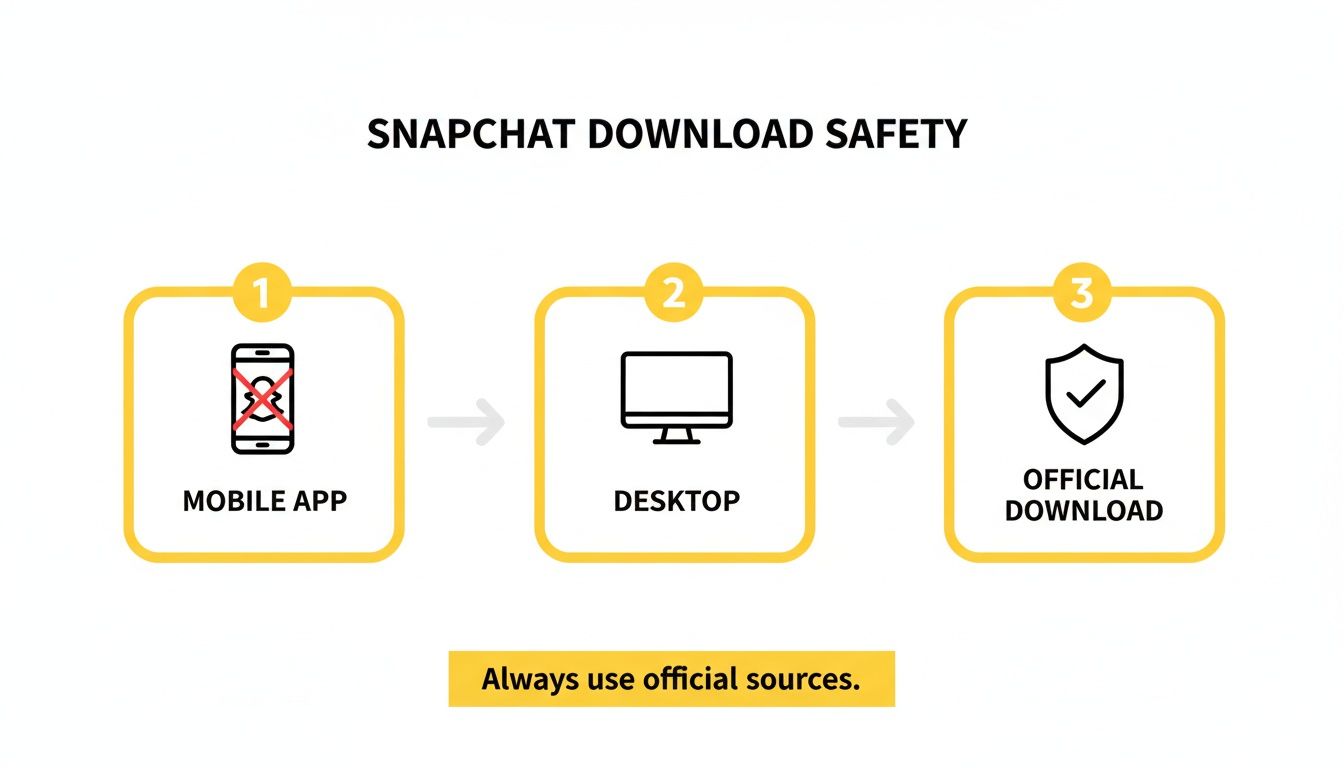
As you can see, keeping the process on your desktop is the key to flying under Snapchat's radar.
Getting Set Up
First things first, you need to get the tool on your computer. This is a simple download-and-install job, just like any other trusted application.
- Download and Install: Your first stop should be the official SnapNinja website. Grab the right version for your Windows PC or Mac. A quick word of advice: always download software directly from the developer. Third-party sites can bundle in malware or outdated versions, so stick to the source.
- Launch the App: Once it’s installed, open it up. You'll see a clean, simple interface that's basically a secure, purpose-built browser for Snapchat.
Right away, you'll notice it doesn't ask for your Snapchat password. Instead, it provides a secure window for you to access Snapchat Web on your own.
Here's a critical privacy point: SnapNinja never sees or handles your login credentials. You're logging directly into the official Snapchat website through its interface, keeping your password strictly between you and Snapchat.
Logging In and Locating the Video
With the app running, you just need to connect to your account through the official Snapchat Web portal.
You'll be looking at the same Snapchat login page you'd see in any web browser. Go ahead and enter your username and password. After you log in, your Snapchat Web interface pops up inside the SnapNinja window, with all your chats and Stories ready to go.
Now, just navigate to the conversation or Story with the video you want to save. It could be a private Snap a friend sent you or a video from someone's public Story—just find the content you want to archive.
The One-Click Download
This is where the tool does all the heavy lifting for you. As you view a Snap or Story, SnapNinja is already working behind the scenes.
- It automatically detects video content. As soon as a video starts to load, the tool identifies the stream.
- A "Download" button appears. You'll see a simple button pop up right next to the video. No need to dig into developer tools or copy-paste links.
- Click to save. Just hit that button, and the video saves directly to your computer in its original quality.
And the best part? The person who sent the Snap gets zero notifications. Because the download is happening on your desktop at the network level, it completely sidesteps the "Saved to Camera Roll" alert that the mobile app would trigger.
As a pro-tip, I always recommend creating a dedicated folder on your desktop for all your downloaded Snaps. You can usually set a default download location in the app's settings. It’s a small step that prevents a lot of headaches later when you're trying to find a specific video. Think of it as building your own clean, organized archive of memories—or receipts.
Best Practices for Managing Your Snapchat Archive
Alright, so you've successfully downloaded your Snapchat videos. Now what? If you're not careful, your downloads folder can quickly become a digital junk drawer. This is where a little bit of smart archiving makes all the difference, turning a chaotic mess into a library of memories you can actually find and enjoy.
Think of it like being the curator of your own life's highlight reel. The first step is creating a folder structure that makes sense to you. You could organize clips by date (2024-10-Snaps), by who sent them (Snaps_from_Alex), or by event (Halloween_Party_2024). The whole point is to find any video you're looking for in seconds, not minutes.
Keeping Your Archive Accessible and Usable
Once you have your folders sorted, you might hit another snag: file formats. Snapchat videos don't always download in a format that plays nicely with every device or video editor. That's why converting them to a universal format like MP4 is a pro move.
Luckily, there are some fantastic free tools for this:
- HandBrake: This is a powerhouse open-source converter for Windows and macOS. It gives you incredible control over quality and file size if you want to get granular.
- VLC Media Player: More than just a player, VLC has a surprisingly handy "Convert / Save" feature that’s perfect for quick and easy format switches.
Getting your videos into the MP4 format means you can edit them in pretty much any program, play them on any device, and share them without the classic "I can't open this" headache.
Backups and the Golden Rule of Reposting
Your archive is only as secure as its backup. Hard drives fail—it's not a matter of if, but when. I always recommend using a cloud service like Google Drive or Dropbox for your most cherished clips. Most services have a free tier that gives you plenty of space to start with.
But the most important practice here isn't technical at all—it's ethical. Just because you can save a video privately doesn't automatically give you the right to blast it across the internet. Always, always respect the sender's privacy. Reposting someone's content without their explicit permission is a huge breach of trust.
This whole process is about archiving memories and protecting your privacy, not about exposing private moments. And keep in mind, these files add up. A single one-minute Snapchat clip can eat up anywhere from 20MB to 50MB, with HD versions easily hitting 100MB. Managing this data responsibly is what separates a digital hoarder from a true archivist. If you're curious about the numbers, you can find more insights into Snapchat's data usage on TheBitJoy.com. Being a good archivist means protecting both the files and the people in them.
Troubleshooting and Staying Smart
Even the most straightforward tools can sometimes throw you a curveball. Don't worry, most issues are a quick fix and you'll be back on track in a minute. Let's walk through a few common snags you might hit and how to solve them.
Think of that frustrating login loop you sometimes get when trying to use Snapchat Web through a desktop tool. If you find yourself stuck, the age-old advice usually works: just turn it off and on again. Close the application completely, then take a moment to clear your web browser's cache and cookies. Relaunching the tool after this quick reset almost always sorts out any pesky session conflicts.
What to Do When Downloads or Playback Fail
Another common headache is when a download simply won't start, or the video file you save ends up corrupted and won't play. This usually boils down to one of a few simple things.
Before you get too frustrated, run through this quick checklist:
- Is Your Internet Stable? A weak or flaky Wi-Fi connection is the number one reason downloads fail. Make sure you have a solid connection before you hit the button.
- Are Your Tools Up to Date? Outdated software can cause all sorts of strange compatibility problems. Double-check that both your web browser and the desktop tool itself are running the latest versions.
- Could It Be Your Video Player? If a video looks glitchy after downloading, the problem might not be the file itself. Try opening it with a different media player, like the super-reliable VLC. Your computer's default player might just be missing the right codecs.
Honestly, running through these simple steps will solve 99% of the issues I see people run into.
A quick word on security: The whole point of using a dedicated desktop tool is to keep your account and your data safe. Always get your software from the official source. Sketchy download sites are infamous for bundling malware with their files, which completely defeats the purpose of being careful.
Privacy, Security, and Using Content Responsibly
Speaking of being careful, it's really important to think about the why behind what you're downloading. These methods are perfect for archiving personal memories or keeping a record of important info. They aren't for grabbing someone else's private moments without their consent.
If you want to get into the nitty-gritty of how a tool handles your information, you should always be able to review its policies. For example, you can read the SnapNinja privacy policy to understand exactly how your data is managed.
Snapchat has come a long way since it first launched Stories back in 2015. That feature, with its 10-second ephemeral video clips, completely changed the game. It drove so much user growth that by May 2019, the app saw a staggering 41.5 million downloads in a single month, thanks in large part to those viral video filters. This history, detailed in a great Snapchat growth report on TheSocialShepherd.com, just goes to show how powerful this content is—and why it’s so important to be responsible with it.
Got Questions About Downloading Snapchat Videos?
You're not alone. When you're thinking about saving something from Snapchat, a few key questions probably pop into your head. It's smart to be cautious, so let's tackle the most common concerns head-on with some straight answers.
Will The Sender Know I Saved Their Video?
Nope. And that's precisely why the desktop advantage is the only way to go. A solution like SnapNinja works entirely outside of the Snapchat mobile app's ecosystem. The code that triggers that "Saved to Camera Roll" or screenshot notification is baked into the app on your phone.
When you use your computer and work through Snapchat Web, the video is grabbed at the network level before the app's notification system can even react. As a result, the sender has no idea you've saved anything. It completely bypasses the notification system.
Is It Safe to Use My Snapchat Login with a Third-Party Tool?
This is a great question and something you should always ask before using any service. The good news is that reputable desktop tools are designed with smart privacy in mind. They don't want your password.
Instead, they open a secure, isolated browser window that loads the official Snapchat Web login page. You're logging directly into Snapchat's system, not the tool itself. The app then uses your active session to do its job without ever seeing or storing your credentials. Just be sure you’re downloading the software directly from its official website to avoid any sketchy, modified versions.
Can I Do This on My iPhone or Android?
No, and that’s a key part of what makes this method work so well. The entire safety net here is built on avoiding your mobile device. Any app you find on iOS or Android that claims it can save Snaps without detection is playing a risky game against Snapchat's ever-watchful security systems.
Those mobile "hacks" are what get accounts flagged and eventually banned. By sticking to a desktop application on your Windows PC or Mac, you completely bypass that mobile surveillance, making it the only truly safe and undetectable way to go.
Here's the deal: Mobile hacks put your account on the line and almost always lead to a ban. The desktop advantage comes from operating in a blind spot that Snapchat's mobile app can't monitor, keeping your privacy and your account safe.
Is It Actually Legal to Download Snapchat Videos?
The legality really hinges on what you plan to do with the video. Archiving a hilarious clip from a close friend for your own private collection is typically not an issue. The problems start when you take someone's private video and splash it all over the internet without their consent.
Doing that can get you into some murky legal waters, potentially violating privacy and even copyright laws. The golden rule is simple: respect the sender's privacy. Use these tools to archive memories, not for public distribution. For a deeper dive into the ethical guidelines, you can always check out a service's policies, like these terms of sale.
Ready to start building a private archive of your favorite Snaps without looking over your shoulder? SnapNinja gives you the safest and most dependable way to download any Snapchat video on your desktop, completely undetected.