How to Save a Snapchat Picture Without Them Knowing: The Smart Privacy Guide
Forget everything you think you know about saving Snaps on your phone. Those old tricks are a one-way ticket to getting caught and potentially banned. The only truly reliable way to save a Snapchat picture without them knowing is to get off your phone entirely. A desktop tool like SnapNinja works on Windows and macOS, operating outside of Snapchat's app, which makes archiving Snaps 100% undetectable. It's the smart, safe way to keep your account out of trouble and protect your privacy.
Why Mobile Tricks for Saving Snaps Are a Dead End
Snapchat’s entire brand is built on one simple promise: your messages disappear. To protect that, they’ve built a fortress of security features. If you’ve tried the old airplane mode hack or downloaded one of those sketchy third-party apps, you already know they just don't work anymore.
Snapchat's detection goes way beyond just looking for a simple screenshot. The app is deeply integrated into your phone's operating system, actively monitoring for any sign of screen recording or suspicious activity. The second it detects something, that notification goes out, and the sender knows exactly what you did.
The Constant Cat-and-Mouse Game
Trying to outsmart Snapchat on your phone is a losing battle. It’s the fastest way to get your account flagged, temporarily suspended, or even permanently banned. You're playing a cat-and-mouse game on their home turf, and they're always ten steps ahead.
This constant back-and-forth makes saving anything—whether it's a funny moment with a friend or an important "receipt" from a conversation—a high-stakes gamble you just can't win.
The hard truth is simple: Saving Snaps safely isn't possible on your phone. The real solution requires a change in strategy, moving the entire process away from the mobile platform where Snapchat has total control.
This evolution in detection has become a major headache for Snapchat's 453 million daily active users. What was a simple screenshot trick back in 2014 has turned into a serious privacy showdown. Today, the app’s 'Ghost Defense' AI system is incredibly sophisticated and patches mobile workarounds almost as soon as they appear. You can learn more about how Snapchat's security has advanced to shut these methods down.
The Mobile Risk vs Desktop Advantage Showdown
The core issue is that anything you do on your iOS or Android device happens under Snapchat's watchful eye. The app has deep-level permissions to see exactly what's going on. This table breaks down why mobile hacks fail and the Desktop Advantage always wins.
| Feature | Risky Mobile Apps (iOS/Android) | SnapNinja (Windows/macOS) |
|---|---|---|
| Detection Risk | Extremely High. Snapchat's app directly monitors screen activity and system functions. | Zero. The desktop method is invisible because it works completely outside the mobile app's environment. |
| Account Safety | Poor. High risk of account suspension or a permanent ban for violating terms of service. | Excellent. No risk to your account because your actions are never detected. |
| Reliability | Unreliable. A simple app update can break the method instantly, leaving you exposed. | Consistent. Works independently of Snapchat app updates, ensuring long-term reliability. |
| Privacy | Questionable. Many third-party apps are filled with malware or steal your data. | Secure. Your data and credentials stay on your own computer, never shared. |
Ultimately, the desktop advantage is clear. By moving your activity to a platform like Windows or macOS and using a dedicated tool like SnapNinja, you sidestep Snapchat's entire security system. It’s not about hiding what you’re doing—it’s about operating in a space where they can’t even see you.
The Desktop Advantage: A Notification-Proof Strategy
If you're serious about saving a Snapchat picture without the sender ever knowing, the real answer isn't on your phone—it's on your computer. I call this the Desktop Advantage, and it's a fundamentally smarter and safer way to go because it completely sidesteps Snapchat’s mobile detection systems.
When you use the Snapchat app, you're playing in their sandbox. They built the sandbox, they make the rules, and they can see every move you make. But when you shift over to your Windows PC or Mac, you’re changing the game entirely.
Why Your Computer Is Your Best Ally
Tools like SnapNinja are designed to work with Snapchat Web in your desktop browser. This is the crucial part. It operates completely outside of the mobile app's world, where all of Snapchat's powerful detection systems live. Those systems are built for iOS and Android, constantly on the lookout for screen recordings, screenshots, and shady app modifications.
On a desktop, those triggers just aren't there in the same capacity. SnapNinja doesn't actually take a screenshot in the traditional sense. It intercepts the raw media data—the actual photo or video file—as it's being sent to your browser.
Think of it this way: the save happens entirely between your browser and your hard drive. There's no signal sent back to Snapchat's servers that a save ever happened, which makes the whole process 100% invisible to the person who sent you the Snap.
This isn't about spying; it's about smart privacy. It gives you the power to archive a funny memory, keep a personal record, or save a "receipt" without setting off any alarms. It's the difference between recording a TV show on a DVR (a clean, direct copy) and filming your television with a camera (a clumsy, obvious workaround).
A Fundamentally Undetectable Method
The real magic is in how the media gets captured. Most mobile hacks try to fool the app, which is a game you'll eventually lose. The Desktop Advantage doesn't try to fool anything. It just plays on a different field where the rules governing mobile notifications simply don't apply.
Here’s how it works in a nutshell:
- You open a Snap on Snapchat Web, and it loads in your browser like any other picture or video.
- As the media is being displayed, SnapNinja grabs the source file directly from the data stream.
- The file saves right to your computer. No screenshot is taken. No notification is generated. For the sender, the Snap just disappears as it normally would, with no trace of it being saved.
This isn't some temporary glitch or a loophole that's going to get patched next week. It’s a structural advantage that comes from the basic way web browsers handle media. Because everything you do is contained on your own machine and never interacts with the mobile app's triggers, SnapNinja offers a reliable and future-proof way to save content. It’s truly the only solution that bypasses the "Saved to Camera Roll" notification by operating outside the Snapchat app environment.
Your Guide to Privately Saving Snaps with SnapNinja
Alright, let's get down to the nuts and bolts. Using SnapNinja isn't some complex technical nightmare; it's actually a pretty straightforward process to get up and running on your Windows or macOS computer. This is how you can start archiving memories or keeping records on your own terms, without any of the usual stress.
We're going to walk through the entire setup together. From the initial download to the moment you see snaps saving automatically and silently to your hard drive, I'll guide you through it. Forget about those risky mobile workarounds—this is the clean, safe, and undetectable way to handle things.
Getting SnapNinja Installed and Running
First things first, you need to grab the software itself. Head over to the official website and download the correct version of SnapNinja for your operating system. The installation is a simple click-through process, just like any other trusted app you’d install on a PC or Mac. No weird permissions, no sketchy add-ons.
Once it's installed, the next step is connecting it to your Snapchat account. SnapNinja works directly with Snapchat Web, so you'll need to log into your account in a browser like Chrome or Firefox. As soon as you're logged in, the software detects your active session and links up automatically. It’s designed to be a "set it and forget it" kind of tool.
This diagram shows the basic flow: content comes from Snapchat through your browser, and SnapNinja snags it and saves it directly to your computer.
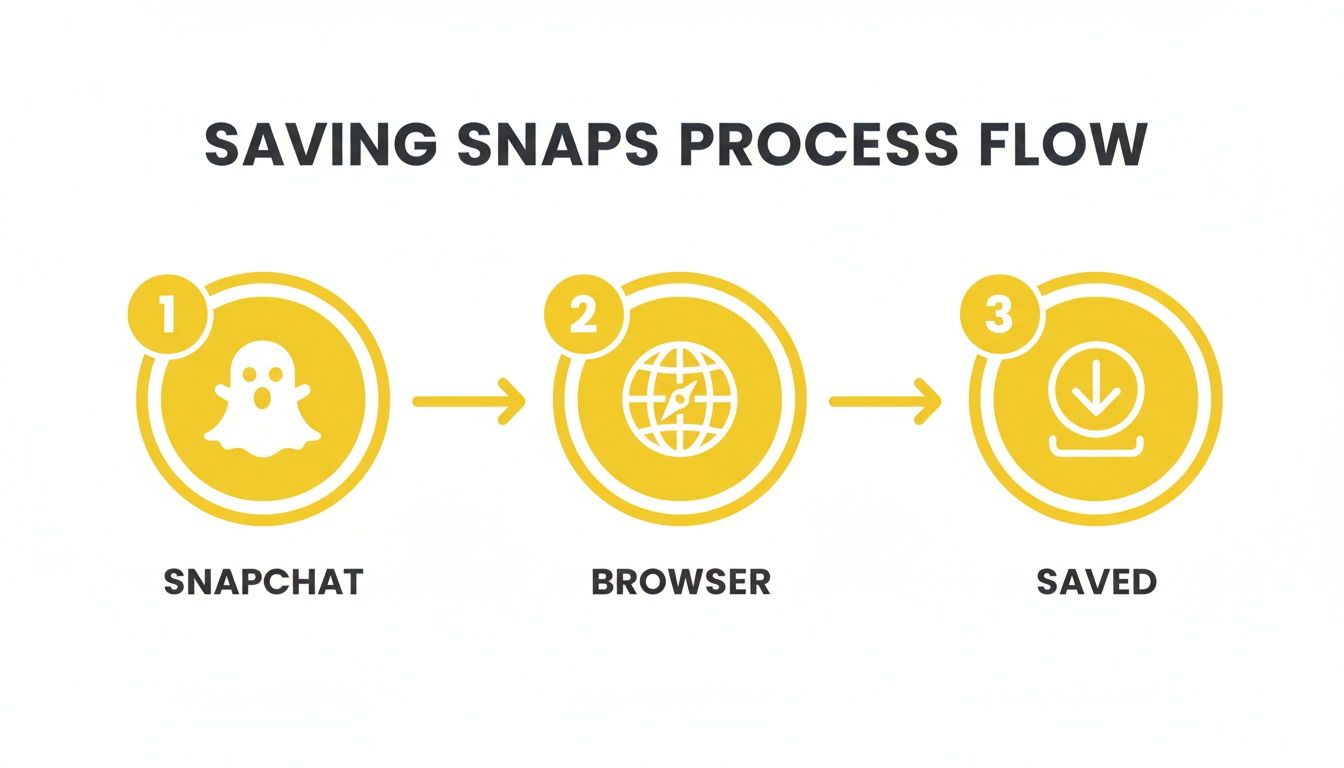
The key takeaway here is that this entire process sidesteps the mobile app. Since the app is where all the screenshot detection happens, you completely avoid triggering any notifications.
Configuring Your Automatic Saves
With SnapNinja running in the background, the real magic begins. You don't actually have to do anything to save the snaps. The software just quietly monitors the media you view on Snapchat Web.
- Photos: When you open a photo Snap, SnapNinja instantly intercepts the file and saves it to a designated folder on your computer.
- Videos: The same thing happens with video Snaps. The full video is downloaded in its original quality.
- Stories: It also captures both photos and videos from friends' Stories as you click through them.
You have complete control over where these files end up. Here's a pro tip: create a dedicated "Snap Archives" folder right away. This helps keep everything organized by date and sender, turning fleeting moments into a neat, private collection you can look back on.
The beauty of this system is how passive it is. You just use Snapchat Web like you normally would, and SnapNinja handles all the saving silently. There's no button to press, no special action to take, and most importantly, no notification is ever sent to the other person.
Once you have this set up, you'll have a fully automated system for archiving any content you view. It’s a powerful feeling, knowing you can preserve any moment you want without the risk of an awkward notification or, even worse, getting your account flagged.
So, When Would You Actually Use This?
It’s easy to think of saving snaps in a sneaky way, but the truth is, there are a ton of perfectly normal and practical reasons you'd want to archive a photo or video. This isn't about spying; it's about having control over your own digital memories and information. Tools like SnapNinja are built for these real-life moments.
Let's walk through a few scenarios where knowing how to save a Snapchat picture without the other person knowing is genuinely useful.
Cherishing Personal Moments
We've all been there. You're in a relationship, and your partner sends a hilarious, sweet, or just plain perfect snap. It's one of those little moments that captures everything.
But asking them to save it can feel a bit clunky. It breaks the natural, spontaneous flow of the conversation. Being able to quietly archive that snap lets you hold onto those genuine, fleeting memories for yourself. You can build a private collection of the inside jokes and candid smiles that make your relationship special, turning those temporary digital blips into lasting keepsakes.
A Game-Changer for Creators and Marketers
If you're a content creator, social media manager, or marketer, you know that Snapchat is a treasure trove of what's currently trending. The ability to download a video or story—cleanly, with no watermark or notification—is incredibly valuable for research.
It lets you analyze what makes a piece of content go viral, gather inspiration for your own TikToks or Reels, or just keep an eye on what your competitors are doing.
This is basically a professional intelligence-gathering tool. It gives creators an efficient way to get ideas and study trends without leaving a digital footprint.
This is more important than ever. After Snapchat’s big user surge back in 2014, its screenshot notifications now trigger on 100% of direct device captures. That’s a huge deal when you’re talking about an app with over 453 million daily users. Billions of snaps disappear every single day, and for professionals, being able to archive them is a must. You can read more about how Snapchat's notification system works on accio.com.
Self-Protection and Keeping the Receipts
Then there’s the serious side of things: personal safety and having proof. In the fast-moving world of online chats, sometimes you need a record of what was said. This is the art of "keeping receipts."
Think about these situations:
- Verbal Agreements: Someone makes a promise or agrees to something in a snap. Saving it means you have a record to refer back to.
- Online Disputes: If you’re dealing with harassment, bullying, or a nasty argument, having an unaltered record of the conversation can be your only line of defense.
- Critical Info: Ever been sent an address, a confirmation code, or important instructions in a snap that’s about to disappear? Archiving it is just practical.
In these cases, SnapNinja becomes a tool for your own privacy and protection. It gives you a reliable way to document interactions for your own records, making sure you have the evidence you need if things go south. It’s about being proactive and staying in control of your digital records.
Navigating the Ethics of Saving Ephemeral Content
Alright, let's talk about the elephant in the room. Using a tool like SnapNinja to save content that’s meant to disappear comes with some big responsibilities. This isn't about being sneaky or violating someone's trust. It's about exercising smart privacy and having control over your own digital life.

The whole idea behind using a desktop app for this is for your own personal use. Maybe you want to archive a hilarious video from a friend, save important info someone sent you, or simply "keep receipts" for your own peace of mind and safety.
Think of it as your own secure digital archive. The photos and videos you save are meant for your eyes only, not to be passed around or used to make someone uncomfortable.
The Clear Line Not to Cross
There's a massive difference between personal archiving and malicious behavior, and it’s a line you should never cross. We strongly advise against using any tool to harass, blackmail, embarrass, or share someone's private snaps without their crystal-clear permission. That’s not just a breach of trust; it can land you in serious legal hot water.
SnapNinja is a tool for smart privacy. It's designed to give you control over media sent to you, not to take control away from others. Always lead with respect for the other person's privacy.
A Framework for Responsible Use
So, how do you stay on the right side of things? It all boils down to your intent. Before you save anything, just ask yourself why you're doing it.
- Saving a sweet message from a loved one? That's just archiving a memory. Perfectly fine.
- Documenting a threatening message? That’s about your personal safety. A valid reason.
- Planning to blast it on social media to shame them? That’s crossing the line. Big time.
This simple gut check helps ensure you're using the tool as intended—to better your own digital experience without hurting anyone else's. If you want to dive deeper into how your data is handled, you can check out the full privacy policy on their site.
At the end of the day, the power is in your hands. Using it wisely is what keeps the online world a more trustworthy place.
Answering Your Questions About Saving Snaps Undetected
Let's cut right to it. You probably have some questions about how all of this works, especially when it comes to keeping things private and safe. Here are the straightforward answers you're looking for.
Is This Really Safe and Undetectable?
Yes, it is. The secret sauce is that SnapNinja works with Snapchat Web on your computer, not the mobile app. This is a huge deal because Snapchat’s most aggressive detection features are all built into the phone app.
By operating on your desktop, the tool never has to tamper with the app itself. Those other risky mobile apps try to modify Snapchat from the inside, which is a surefire way to get your account flagged and banned. This desktop method is completely external, so there’s zero risk of an account ban. Snapchat's mobile security simply can't see what's happening on your computer.
Does It Work for Videos and Stories?
Absolutely. This isn't just for static photo Snaps. It's designed to archive everything you can see on Snapchat Web.
That means it seamlessly saves:
- Regular photo Snaps
- Full-length video Snaps
- Entire Stories, including every photo and video clip inside them
Best of all, you get the actual media file in its original, high-res quality saved directly to your hard drive. No more dealing with fuzzy, low-quality screenshots.
What if I Have Trouble Setting It Up?
The setup is designed to be pretty smooth, but occasionally a browser permission setting might need a quick tweak. Our main guide walks you through those simple, one-click fixes.
But you're never on your own. If you run into a snag, dedicated support is there to get you sorted out. You can also explore different plans to see what level of support is included by checking out our pricing page.
Why This Matters: Snapchat’s AI is constantly scanning for suspicious activity on mobile devices. In the first half of this year, their system took action on 3,395,968 violations across 1,709,224 accounts. This shows just how tightly they control the mobile environment and why a desktop approach is the only way to fly under the radar. You can dig into the numbers yourself in Snapchat's transparency reporting.
Can I Use This on My iPhone or Android?
No—and that’s a good thing. The Desktop Advantage is what keeps your account safe and your actions private.
Trying to save Snaps on a phone puts you directly in the line of fire. You're fighting a losing battle against Snapchat's powerful detection systems. A dedicated desktop tool like SnapNinja is the smart play because it ensures everything you do remains completely invisible to both the sender and Snapchat’s security team.
Ready to start saving Snaps the smart and private way? SnapNinja is the only tool that guarantees 100% undetectable saving right from your desktop. Check it out today at https://snapninja.app and finally take control of your digital memories.