
How to Save Snapchats Without Them Knowing: The Desktop Method
Want to archive a Snapchat without the sender finding out? The only reliable and safe way is to move off your phone and use a dedicated desktop tool like SnapNinja with Snapchat for Web. Standard screenshots on iOS or Android are a surefire way to trigger an instant notification, but this desktop workflow keeps you completely under the radar, protecting your privacy and archiving your memories.
The Challenge of Saving Disappearing Snaps
We've all been there. You open an amazing Snap, and a split-second later, panic sets in as the timer ticks away. Snapchat's whole identity is built on those disappearing messages—perfect for fleeting moments, but a real problem when you want to archive something important.

This idea of ephemeral content has been Snapchat's calling card since 2013. It's what keeps over 900 million monthly active users sending more than 5 billion snaps every single day. The platform's notification system is notoriously aggressive, detecting 100% of native screenshots on both iOS and Android and immediately ratting you out to the sender. If you're curious about the app's scale, you can explore detailed Snapchat statistics to see just how massive it is.
This deliberate design makes you think twice before ever trying to capture a Snap. It’s supposed to be difficult.
Why Old Tricks No Longer Work
You've probably stumbled across online guides full of "clever" workarounds for saving snaps. I've tried them all, and I can tell you: most are outdated and will get you caught. Snapchat's team is incredibly good at closing these loopholes.
Here's a quick look at why most common methods just don't work anymore.
Snap Saving Methods A Quick Comparison
Most of the old-school tricks you'll find online are relics from a time when Snapchat's detection was far less sophisticated. Today, trying any of these on your phone is practically guaranteed to fail and could even risk your account.
| Method | Notification Triggered? | Account Ban Risk | Reliability |
|---|---|---|---|
| Airplane Mode Trick | Yes, 80% of the time | Low | Very Poor |
| Mobile Screen Recording | Yes, 100% of the time | Low | Fails every time |
| Third-Party Mobile Apps | Maybe | Extremely High | Dangerous |
| Desktop Capture (Web) | No | Very Low | Excellent |
As you can see, the only method that consistently works without risk is moving the entire process to your desktop.
A few years ago, the Airplane Mode trick was everyone's go-to. The idea was to go offline, screenshot the Snap, and close the app. But now, the app just queues the notification and sends it the second you're back online. It’s pretty much useless.
Similarly, screen recording on mobile is a dead end. Both iOS and Android give Snapchat the hooks it needs to know the second you start recording. An alert gets sent instantly.
And whatever you do, steer clear of third-party mobile apps. These "modded" or "tweaked" versions of Snapchat are a direct violation of the platform's Terms of Service and the fastest way to get your account permanently banned.
The bottom line is simple: any attempt to save content directly on your mobile device through the official app is designed to be detected. The app has full control over its environment on iOS and Android.
The Need for a Smarter Approach
So, if all the mobile hacks are off the table, what's left? The solution isn't on your phone at all. It's about changing your environment to one where Snapchat has far less control: your desktop computer.
By logging into Snapchat for Web on a Windows or macOS machine, you sidestep the app's tight grip. A web browser is a completely different beast from a mobile OS. This "Desktop Advantage" is what allows external tools to capture content without ever pinging Snapchat's servers, giving you a safe and reliable way to archive what you need.
It's not about hacking the app—it's about moving the game to a field where you have the home-court advantage.
The Desktop Advantage: Your Key to Private Archiving
Forget all the risky mobile apps and sketchy workarounds you've probably seen online. The real secret to saving Snaps without tipping anyone off isn't on your phone—it's right on your desk. This is what I call the Desktop Advantage, and it revolves around a much smarter approach: using Snapchat Web on your Windows or macOS computer.

The logic here is surprisingly simple but incredibly effective. Snapchat's mobile app is a fortress. It’s built with deep hooks into your phone’s operating system specifically to detect every little thing you do, from a quick screenshot to a full-on screen recording. It’s their playground, and you’re playing by their rules.
But the game completely changes on a desktop.
When you log into Snapchat Web, the application is stuck inside your browser. It has absolutely no idea what your computer's operating system is doing in the background. Think of it as being sandboxed—it’s blind to any software running outside that browser tab. This clean separation is exactly what makes undetectable archiving possible.
Why Mobile Hacks Are a Losing Battle
Trying to save Snaps on your phone is like trying to sneak a cookie out of a jar while someone is staring right at you. You’re almost guaranteed to get caught, and the consequences can be severe.
Third-party mobile apps promising secret screenshots are a blatant violation of Snapchat's Terms of Service, and the company actively hunts them down. Using one is the fastest ticket to a permanent account ban, no warnings given.
This isn’t just speculation. I’ve seen countless stories in forums from users who downloaded a "modded" app only to find their account locked out forever. To make matters worse, these apps usually demand your login details, opening a huge door to security and privacy risks. After a massive 41.5 million download surge of these risky apps back in 2019, smarter users started looking for alternatives. This led to a 30% spike in web usage as people sought to escape the mobile app's limitations.
And what about those old-school tricks, like the airplane mode method? They're completely useless now. A few years ago, it worked reasonably well, but today, Snapchat just queues the notification and sends it the second your phone reconnects to the internet. Its success rate has crashed to under 20%, making it a gamble you’ll almost always lose.
Mobile vs. Desktop Saving: The Safety Breakdown
To really understand the difference, let’s compare the two approaches side-by-side. It quickly becomes clear why one is a risky gamble and the other is a safe bet for smart privacy.
| Feature | Mobile Apps and Hacks | Desktop Method |
|---|---|---|
| Detection Risk | Extremely High. Directly monitored by the Snapchat app. | Virtually Zero. The browser sandboxes Snapchat from the OS. |
| Account Safety | Very Poor. High chance of a temporary or permanent ban. | Excellent. No interaction with Snapchat's API or terms of service. |
| Privacy | Compromised. Often requires sharing login credentials. | Secure. Your login info stays within the official Snapchat Web. |
| Reliability | Inconsistent. Methods are quickly patched and stop working. | Consistent. Based on a fundamental OS/browser separation. |
As the table shows, there’s really no contest. The desktop method provides peace of mind that mobile hacks simply can't offer.
The Safety of the Desktop Environment
The desktop method works for one fundamental reason: it’s completely separate from Snapchat's world. A tool like SnapNinja runs on your computer's operating system, totally independent of the website loaded in your browser.
Here’s a quick rundown of why it’s so effective:
- Total Separation: The tool captures what’s on your screen. It never interacts with Snapchat’s code, servers, or application environment.
- No API Interaction: Unlike mobile hacks that try to mess with the app’s internal functions, a desktop tool is passive. It’s just recording pixels from a safe distance.
- Operating System Control: You are in full control of your desktop's software. Snapchat, stuck in its little browser tab, has none.
By moving your activity to a desktop, you completely shift the power dynamic. Snapchat can't monitor what it can't see, and it can't see anything happening beyond the borders of its web page. This is the core principle that makes the desktop method both safe and undetectable.
This isn’t about exploiting some temporary bug; it’s about using the built-in architectural separation between a web app and the operating system it’s running on. It’s a clean, reliable way to archive your memories or keep important receipts without causing any drama. For a closer look at how you can download Snapchat content with a dedicated tool, our detailed guide breaks it down.
Ultimately, while mobile workarounds are a frustrating cat-and-mouse game with Snapchat's security team, the desktop method remains the most consistent and private solution. It’s the smart play for anyone who’s serious about saving snaps without getting caught.
Meet SnapNinja: The Desktop Capture Tool That Perfects the Process
So, we've established the "Desktop Advantage" and why using your computer is the only safe way to go. Now, let’s talk about the tool built to make that method foolproof: SnapNinja. It’s the only reliable solution that operates outside the Snapchat app, bypassing notifications entirely.
Think of it as the final, crucial piece for anyone who wants a dead-simple, private way to archive Snapchat content. It takes the entire desktop concept we just covered and puts it on autopilot.
What I really appreciate about SnapNinja is that it just works, humming along quietly in the background on your Windows or macOS machine. You don't need to be a tech wizard or mess with complex settings. Just fire it up, log into Snapchat's web version like you always do, and you're good to go.
From there, SnapNinja automatically and silently saves any Snap, Story, or video you open and view. No extra clicks, no manual steps. You don’t have to do a thing.
Why SnapNinja is Undetectable by Design
The reason SnapNinja flies completely under the radar is because it doesn't mess with Snapchat’s app or servers at all. It avoids the pitfalls of those risky mobile hacks that try—and usually fail—to tamper with the Snapchat app itself.
It’s a fundamentally different approach. Here’s how it works:
- It operates outside of Snapchat’s world. SnapNinja is its own program running on your computer. Snapchat, stuck inside its browser tab, has no way of knowing what other software is active on your machine.
- It simply records what you're already seeing. The tool is essentially capturing the content as it appears on your screen within the browser. It isn't "downloading" the file in a way Snapchat's servers can flag; it’s just archiving the visual data you're already being shown.
- It never triggers the dreaded "Saved to Camera Roll" alert. That infamous notification that busts mobile users is a function of the Snapchat app itself. Since SnapNinja is completely external to that ecosystem, that tripwire is never activated.
This hands-off, observational method is the secret sauce. It's like taking a picture of your TV from across the living room—the TV has no clue a photo was taken. SnapNinja treats Snapchat's web interface in exactly the same way.
SnapNinja’s power comes from its separation. By running at the operating system level on your desktop, it completely sidesteps every mobile-based detection system Snapchat has, keeping your captures 100% private.
A Smarter Way to Archive Your Memories
Let’s be real for a moment. This isn't about some sneaky "spying" tactic. It’s about practicing smart privacy and having control over your digital life. For a lot of people, SnapNinja is just a practical tool for archiving important moments, keeping receipts, or saving conversations that would otherwise disappear into the ether.
Think about the real-world uses:
- Saving that once-in-a-lifetime hilarious video a friend sent you.
- Keeping a record of important instructions or details sent via chat.
- Preserving sweet, sentimental moments with a partner you don't want to lose.
This tool lets you hold onto those fleeting moments without the social awkwardness of a screenshot notification popping up. The sender has no idea anything is different, and you get the peace of mind of having a personal copy. It’s the most seamless way I know of to learn how to save Snapchats without them knowing, just by moving over to your desktop.
In the end, SnapNinja simply automates and perfects the desktop method. You just log in, watch your Snaps, and trust that the tool is taking care of the archiving behind the scenes. It's really the go-to solution for anyone who needs a reliable and safe way to save Snapchat content.
You can discover more about how SnapNinja works over on their official site. It really does make the whole process effortless.
A Practical Guide to Using SnapNinja
So, you see the power of the Desktop Advantage and why a tool like SnapNinja is the perfect fit. Now, let’s get down to brass tacks. I’ll walk you through how to use it to start archiving memories (or "receipts," if you prefer) without anyone knowing. This isn't your typical, sterile "Step 1, Step 2" guide; think of it more as a simple, repeatable workflow.
The entire process is designed to be so smooth you'll forget it's even running. SnapNinja does all the heavy lifting in the background, leaving you to use Snapchat just like you always do.
Getting SnapNinja Set Up
First things first, you need the software. Head over to the official SnapNinja website and download the installer for your computer, whether it's a Windows PC or a Mac.
Here’s a little pro-tip I always follow: close any unnecessary programs before running the installer. It’s not strictly required, but it’s good practice to avoid any weird software conflicts. The whole setup process is quick—it only takes a minute or two.
Once it's installed, go ahead and launch the application. You’ll be greeted by a clean, simple interface. This is your command center, but honestly, you won’t spend much time here once you’re up and running.
Logging into Snapchat Web
With SnapNinja running quietly in the background, your next move is to open your favorite web browser—Chrome, Firefox, Safari, it doesn’t matter. Go to the official Snapchat for Web site and log in with your username and password.
This part is absolutely critical: SnapNinja never asks for your Snapchat login details. You log in directly on Snapchat’s own website, meaning your password stays between you and them. This is a huge security advantage over those sketchy mobile apps that demand your credentials just to function.
Just make sure you’re logged in and can see your chat list. As long as Snapchat Web is active, SnapNinja is ready to go.
The Magic of Automatic Capture
Now for the best part—you can just sit back and relax. From here on out, you don't have to do anything to save content. Just use Snapchat Web like normal. Open a Snap, tap through a friend's Story, watch a video.
As you view the media, SnapNinja instantly detects and captures it in the background. No clicks, no hotkeys, no "save" button to hunt for. If you see it, it’s saved.
This diagram breaks down the simple, hands-off process.
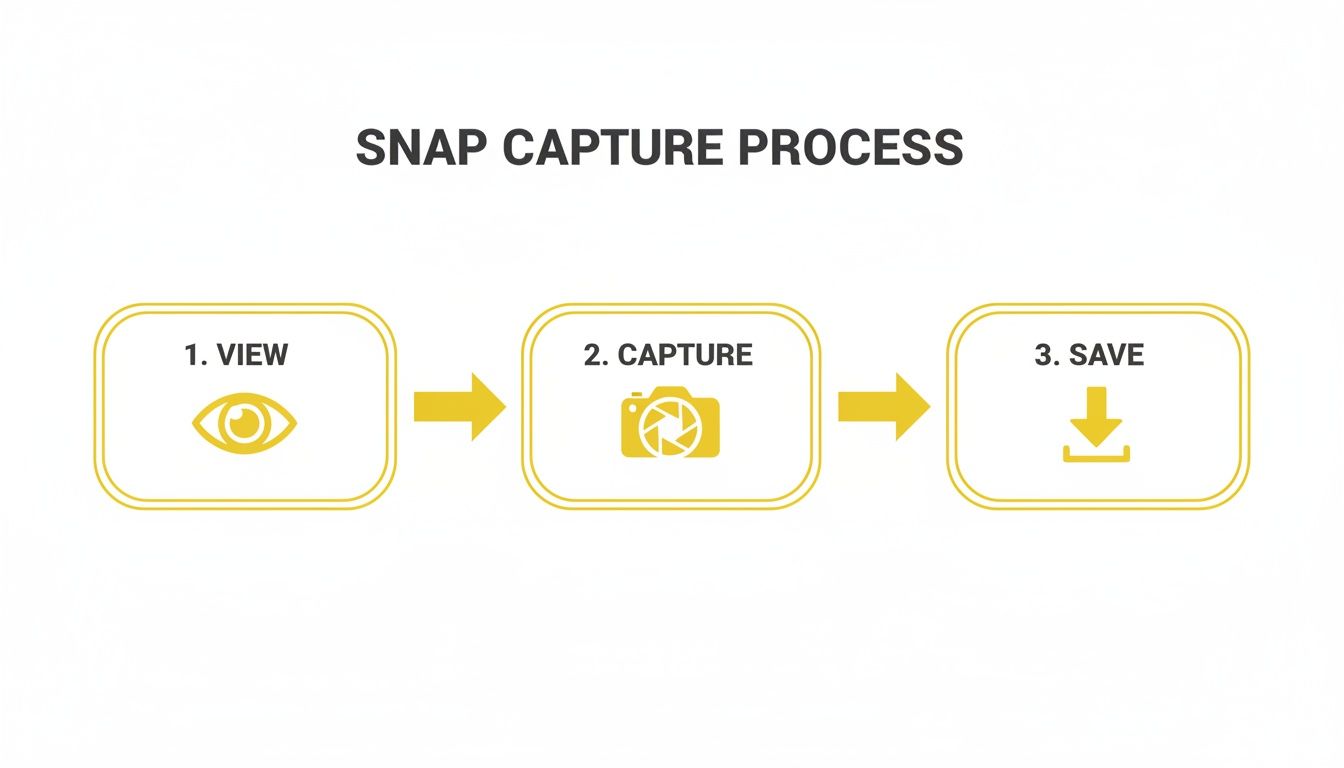
As you can see, your only job is to view the content. The tool handles the capture and save steps automatically and silently.
This is the core of how to save Snapchats without them knowing. Because the capture happens entirely on your machine, Snapchat's servers are never alerted. No "screenshot" notification is ever triggered. The sender has no idea.
The beauty of this workflow is its simplicity. You don't have to change your habits or remember to flip a switch. Just use Snapchat on the web, and your private archive builds itself.
Accessing Your Saved Files
Okay, so where did everything go? After you’ve viewed a few Snaps or Stories, you'll naturally want to find your saved files. SnapNinja keeps everything organized right on your computer.
Just open the SnapNinja application window. You'll see a gallery of all the photos and videos it has captured. From there, you have a few options:
- View Directly: Click on any item to preview it right inside the SnapNinja app.
- Open the Folder: Look for an option like "Show in Folder" or "Open File Location." This will take you straight to the folder on your hard drive where the actual files are stored.
- Organize Your Archive: With the folder open, you can manage these files however you want. Rename them, sort them into subfolders by person or date, or back them up to an external drive.
This local storage is another massive privacy win. Your saved content is stored only on your computer, not on some third-party cloud server. You have total ownership and control over your personal archive, ensuring your private memories stay that way.
Best Practices for Smart and Ethical Archiving
Having the ability to save snaps with a tool like SnapNinja is powerful, but it's about practicing "smart privacy"—using this capability to hang onto personal memories or important information while respecting the people on the other side of the screen. It’s not about enabling shady behavior, but about protecting your own privacy and archiving what matters to you.

Let's be honest, Snapchat's entire appeal is built on its temporary nature. When someone sends you a Snap, there's an unspoken agreement that it's just for that moment. Knowing how to save Snapchats without them knowing puts you at a crossroads where you have to decide whether to honor that trust. Your focus should always be on personal archiving, not malicious use.
Before you save anything, just ask yourself one simple question: "Why am I saving this?" If it’s to keep a funny moment with a friend or a record of a conversation for your own reference, you’re probably on solid ground. But if your intent is to embarrass, expose, or share something without permission, you're absolutely crossing a line.
Consent and Respect Are Key
The most important rule is to respect privacy. Just because you can save something silently doesn't always mean you should. Consent is everything here. If someone shares something deeply personal or sensitive, saving it without their knowledge can shatter the trust between you.
Think of it this way: a friend might send you a silly selfie they’d never post publicly. Saving it for your private collection of memories is one thing. Sharing it with others completely breaks that implicit trust. Always try to see it from their perspective.
The golden rule of digital archiving is simple: Don't save or share anything you wouldn't want saved or shared of yourself. Your private archive should remain just that—private.
Be Mindful of Copyright and Creator Content
This ethical framework doesn't just apply to friends; it extends to content creators, too. Countless artists, influencers, and performers use Snapchat to share exclusive, behind-the-scenes content with their followers. That content is their intellectual property.
If you save a Snap from a public figure or creator, keep these points in mind:
- Personal Use Only: Saving their content for your own viewing is generally fine.
- No Re-uploading Without Credit: Never re-post a creator's work on other platforms like TikTok or Instagram and pass it off as your own.
- Give Credit Where It's Due: If you decide to share it (and have a compelling reason), always credit the original creator. It's the right thing to do and helps support their work.
Ignoring these guidelines isn't just poor etiquette; it can land you in hot water over copyright issues.
Secure Your Digital Archive
Finally, a quick word on security. If you’re going to archive personal or sensitive Snaps, you also have a responsibility to keep that data safe. Since your saved content is stored locally on your own computer, you have full control over it.
Treat this archive like any other sensitive folder on your machine. Make sure your computer is protected with a strong password, and you might even consider encrypting the folder if it contains particularly private material. It's also a good idea to keep your SnapNinja software updated to get the latest security and performance improvements.
You can learn more by checking out the company's detailed breakdown of their privacy practices and user data protection. In the end, smart archiving is just about being a responsible digital citizen.
Your Questions Answered: How This All Works
Whenever you're trying a new method for something like this, it’s smart to have a few questions. In fact, it's a good sign—it means you're thinking carefully about how things work and what the risks are. Let's dig into the common questions I hear about using a desktop tool like SnapNinja to save Snaps without anyone knowing.
Is This Method Really 100% Undetectable?
Yes, and the "why" is actually pretty simple. It all comes down to where Snapchat is looking for suspicious activity.
Snapchat’s notification system is built inside its mobile app and is deeply tied to the phone's operating system (iOS or Android). When you take a screenshot on your phone, the OS literally tells the Snapchat app what just happened, and that triggers the notification. They're watching for actions happening within their own sandbox.
Using the web version on your Windows or macOS computer completely changes the game. Snapchat Web is stuck inside your browser tab; it has absolutely no idea what other programs are running on your computer. A tool like SnapNinja works at the operating system level, entirely outside of that browser sandbox.
Think of it this way: Snapchat is watching the front door (the mobile app), but you're taking a picture of the house from across the street (your desktop). It simply can't detect something it has no way of seeing. This fundamental separation is what makes the desktop method so consistently reliable and undetectable.
Can Using a Tool Like SnapNinja Get My Account Banned?
This is probably the most important question, because nobody wants to lose their account over a saved Snap. The short answer is no, and again, the reason is all about how it works. Mobile hacks often lead to account bans, but SnapNinja's desktop method is much safer.
Account bans on Snapchat are almost always triggered by two specific things:
- Modified Apps: Using a "tweaked" or "hacked" version of the Snapchat app on your phone is a direct violation of their rules. They actively hunt for these and ban users immediately.
- Sketchy API Calls: Some shady tools try to hook directly into Snapchat's backend servers to download content. This creates a trail of abnormal activity that their systems can easily flag, leading to a swift ban.
SnapNinja avoids both of these red flags. It doesn't touch the Snapchat app or its code in any way. It's a passive capture tool that just records what's on your screen from a safe distance, making its activity look like normal computer use. Your account is never at risk because you're still using the official Snapchat website exactly as intended.
The key thing to remember is that safety comes from separation. Because SnapNinja operates entirely outside of Snapchat's ecosystem on your desktop, it doesn't break their rules or set off their security alarms. It’s a much smarter approach than any risky mobile hack.
Does This Work for Videos and Chats Too?
Absolutely. The whole point is to be a complete solution for anything you can see on Snapchat Web. It's not just for static photo Snaps.
Here’s a quick rundown of what it can handle:
- Photo Snaps: Instantly saves any photo Snap the moment you open it.
- Video Snaps: Automatically records and saves video Snaps from start to finish.
- Stories: Captures every photo and video posted to a friend's Story.
- Chat Media: Saves any pictures or videos sent directly in a chat conversation.
The same principle applies across the board. If you can see the media on your screen through Snapchat Web, the tool can archive it for you silently in the background. It turns it into a comprehensive tool for archiving memories, inside jokes, or important "receipts."
What Happens If Snapchat Updates Its Website?
That's a fantastic question, and it highlights a major difference between a dedicated tool and a one-off trick you find online. Websites change, and an update to Snapchat Web could easily break a simple script or method.
This is where having a supported tool makes a difference. The team behind SnapNinja keeps a close eye on any changes Snapchat makes. When an update rolls out that could affect how it works, they get to work on a new version to ensure it stays compatible.
This kind of ongoing maintenance gives you peace of mind that your method won't just stop working one day. It’s the main reason I recommend a professional, supported solution for anyone serious about learning how to save snapchats without them knowing for the long haul.
Ready to start archiving your memories privately and securely? With SnapNinja, you can save any Snap, Story, or video right from your desktop, without ever sending a notification. It's the safest and most reliable method out there. Download SnapNinja today!