
How to Save Snapchat Videos Without Them Knowing: The Desktop Method
Ever felt that gut-punch when a perfect Snapchat video disappears into thin air? You’re definitely not alone. The whole point of Snapchat is that moments are fleeting, but that core idea often runs counter to our simple desire to archive memories, keep receipts, or just hang onto a hilarious clip.
The Problem with Disappearing Memories

Snapchat’s greatest feature is also its biggest frustration. That amazing story your friend posted? It’s gone in 24 hours. A sweet video message from someone important? Gone. This isn’t about spying; it’s about taking back control and practicing smart privacy.
Think about it this way: you wouldn't buy a photo album that sets its own pictures on fire. So why is it the default for our digital lives? The need to save a Snapchat video is about more than just hoarding content—it's about personal archiving and protecting your privacy.
Why Built-In Options Aren't Enough
Sure, Snapchat has its "Memories" feature, which is great for saving your own Snaps to their cloud. But what about the videos other people send you? The platform is built from the ground up to make saving other people's content a massive headache. Even when you do manage it, Snapchat loves to send that dreaded "Saved to Camera Roll" notification, which can make things… awkward.
This limitation puts users in some really frustrating spots:
- Losing Sentimental Moments: A one-of-a-kind video message from a loved one could be gone forever before you even think to save it.
- Missing Proof of Conversation: In a disagreement, the proof you need to set the record straight simply vanishes. This is exactly what people mean when they talk about "keeping receipts."
- Can't Repurpose Great Content: Creators see fantastic, viral-worthy videos on Snapchat all the time, but there's no simple way to download them to use in a TikTok or an Instagram Reel.
The real problem is a clash between Snapchat’s “disappearing content” philosophy and our very human need to remember and protect important moments. The platform’s tools are built to serve their idea, not your needs.
The Search for a Better Way
This constant cycle of frustration is why so many people are looking for a reliable method to save Snapchat videos. The go-to solutions, like screen recording on your phone, are basically a trap. They often get your account flagged or banned because they hook directly into the app, leaving behind digital footprints that Snapchat’s system is designed to spot.
This is where the Desktop Advantage comes in. By shifting the entire process over to a Windows or macOS computer, you’re working completely outside of the mobile app’s sandbox. A tool like SnapNinja works with Snapchat Web to capture content without ever interacting with the mobile app's code. It's a method that flies under the radar, respects your privacy, and keeps your account safe, finally giving you the power to archive your memories on your own terms.
Why Mobile Screen Recorders Will Get You Banned
It sounds like the most obvious solution, doesn't it? Just hit the screen record button on your phone or fire up a third-party app. It feels like a harmless shortcut, but it's probably the single riskiest thing you can do if you want to keep your Snapchat account. This isn't just a vague warning; mobile hacks often lead to account bans.
Think of the Snapchat app as its own locked-down ecosystem. When you run a mobile screen recorder or a modded app like Snapchat++, you’re trying to pry open a door that's designed to stay shut. These tools have to hook deep into your phone's operating system (iOS or Android) to intercept what's being displayed on the screen.
Snapchat's security is specifically designed to look for those hooks. The app is constantly on the lookout for unauthorized processes trying to tap into its data stream. The moment it finds one, it flags your account.
Leaving Digital Fingerprints
Every action you take on your phone leaves a trace, and trying to record Snapchat’s content is like leaving muddy footprints all over a clean floor. Modded apps are the most blatant offenders, as they tamper with Snapchat's code to stop it from sending screenshot or recording notifications. This is a massive violation of the platform's rules, and Snapchat’s servers can spot these modified app signatures almost instantly.
But even "legitimate" screen recorders are a huge problem. They create system-level processes that Snapchat is hardwired to recognize as suspicious activity. Here’s a quick rundown of why these methods are so easy to catch:
- API Conflicts: Mobile recorders often tap into the same system APIs that Snapchat uses to render its own videos. This creates a detectable conflict that the app’s security can easily spot.
- Modified App Signatures: Apps like Snapchat++ have a completely different digital signature from the official app. When you log in, Snapchat can immediately tell you're using a counterfeit version.
- System-Level Monitoring: Snapchat has permission to see how it interacts with the phone’s OS. If another app is constantly monitoring its screen output, that’s a clear red flag.
Here's the bottom line: you’re trying to capture the video inside the very environment Snapchat controls. It's a battle you're destined to lose.
The real problem is that mobile-based solutions try to fight Snapchat on its home turf. They operate within the iOS or Android environment, where Snapchat’s detection systems are at their strongest. It's like trying to sneak a camera into a high-security building—the guards are trained to spot exactly what you're doing.
The Inevitable Consequences
When you use these methods, it’s not a question of if you’ll get caught, but when. The fallout can range from a minor inconvenience to a major headache, especially if you have years of memories saved to your account.
First, you might get a warning and a 24-hour lockout. If you keep pushing your luck, you risk a permanent ban, losing everything—your friends, your memories, and your username. That's a high price to pay for saving a few videos. This is exactly why the smartest way how to save video from snapchat means getting off your phone entirely.
The only truly safe method is to move the action to a place where Snapchat has zero visibility: your desktop. By using a tool like SnapNinja with Snapchat Web on a Windows or macOS computer, you aren’t modifying the app or hooking into any mobile system processes. You are simply capturing what’s displayed on your monitor, an action that is completely external and invisible to Snapchat’s security. This is the Desktop Advantage—and it's the key to saving content without ever putting your account at risk.
So, we've established that mobile screen recorders are a minefield and modded apps are a fast track to getting your account banned. What's the real secret to saving a Snapchat video without getting caught? It’s not about finding a cleverer mobile app—it’s about getting off your phone entirely.
This is what I call the desktop advantage.
The whole strategy revolves around shifting your activity to a place where Snapchat's mobile security simply can't see you: your Windows or macOS computer. By using Snapchat Web, you can view Snaps and Stories in a browser, totally separate from the heavily policed environment of the mobile app.
When you're on a desktop, you completely sidestep their surveillance system. The app isn't there to monitor your computer's background processes, hunt for screen recording software, or validate app signatures. You're effectively invisible.
Why the Desktop Method Stays Undetected
The elegance of the desktop approach is its simplicity. Instead of trying to hack, modify, or trick the Snapchat app itself, you're just capturing what’s already being displayed on your own monitor. It’s a fundamentally different process that Snapchat’s mobile-first security just isn't built to stop.
Think of it this way: the mobile app is like having a security guard inside your house, watching every move you make. A desktop tool, on the other hand, is like someone taking a photo of your house from the street. The guard inside has no idea it's even happening.
This is the core principle that makes a tool like SnapNinja work so well. It operates exclusively on your desktop, working in tandem with Snapchat Web.
- No App Modification: SnapNinja never touches, alters, or interacts with the Snapchat app's code. It's a completely separate program running on your computer.
- No System Hooks: Unlike mobile recorders that "hook" into the guts of iOS or Android to intercept data, the desktop method is external. It just records what's on the screen.
- Zero Notifications: Since the capture happens far outside the app's world, no "Screenshot" or "Saved to Camera Roll" notifications are ever triggered. The sender never knows.
This isn’t just a clever workaround; it’s a much smarter, safer way to practice what I call "smart privacy"—archiving your own data on your own terms, without raising a single red flag.
The Desktop Advantage isn't about exploiting a loophole. It's about changing the playing field. By moving to a desktop, you operate in a space where you have full control, and Snapchat’s mobile security has zero jurisdiction.
The Growing Need for Off-Platform Saving
Let's be clear: the desire to save Snapchat content isn't some niche interest. It's a massive, unspoken trend driven by the platform's incredible growth and its own recent limitations.
Snapchat has become a global hub for disappearing media. By 2025, it reported over 460 million daily active users and more than 900 million monthly active users, with a staggering 5 billion Snaps created every single day. As the platform pushes everyone to save content to its Memories feature, it recently announced a catch: free access would be capped at 5GB.
This move is clearly designed to nudge heavy users toward paid plans, which naturally makes off-platform saving methods like desktop capture much more appealing. You can read more about Snapchat's explosive growth and user trends on podbase.com.
This is exactly the gap a tool like SnapNinja fills. It gives you a secure, private way to archive content without being cornered into a paid cloud subscription or risking your account with sketchy mobile hacks. You can see how SnapNinja's plans offer a different approach to owning your digital memories.
To really see the difference, a quick comparison helps put it all into perspective.
Mobile Hacks vs. Desktop Method: A Quick Comparison
This table breaks down why a dedicated desktop tool is a world apart from trying to pull off a risky save on your phone.
| Feature | Mobile Apps & Screen Recorders | SnapNinja (Desktop Method) |
|---|---|---|
| Detection Risk | Very High - Interacts directly with the app, leaving digital footprints. | Extremely Low - Operates externally, invisible to Snapchat's mobile security. |
| Notification Trigger | Yes - Almost always triggers a screenshot or screen recording alert. | No - Completely silent. The sender is never notified. |
| Account Safety | High Risk - Frequently leads to warnings, lockouts, or permanent bans. | Safe - Does not violate Snapchat's Terms of Service for app modification. |
| Platform | iOS / Android | Windows / macOS |
| Method | Modifies or hooks into the mobile app's internal processes. | Captures the screen content displayed by Snapchat Web. |
The takeaway is clear: while mobile solutions might seem convenient, they come with a huge risk of detection and account suspension. The desktop method, by design, is a fundamentally safer and more reliable way to save your content.
How to Use SnapNinja to Save Videos
So, you get it. Saving snaps on your phone is a risky game, and the desktop is the only truly safe way to go. Now, let’s get into the good stuff—actually using SnapNinja to archive videos without tipping anyone off.
The whole point of this tool is to be incredibly straightforward. You don't need a computer science degree to get it running. The idea is to set it up once and then just let it do its thing in the background while you use Snapchat Web on your computer.
Getting SnapNinja Set Up
First things first, you need to get the app on your computer. This is as simple as installing any other software you trust.
Just head over to the official website and download the SnapNinja application for your Windows or macOS machine. The installation is clean—no sneaky bloatware or confusing steps. Follow the on-screen prompts, and you'll be up and running in less than a minute.
Once it's installed, fire up the application. You'll see a clean, minimal interface that’s built for one job: capturing media securely and privately.
Logging In Through the Secure Browser
This is the most critical part of the process, the piece that keeps your account safe. SnapNinja doesn't just record your screen; it gives you a dedicated, secure browser environment to log into Snapchat Web. This is a big deal because it completely isolates your Snapchat session, preventing any weird conflicts or data leaks with your normal browser.
Inside the SnapNinja app, you'll find a familiar login screen for Snapchat Web. Go ahead and enter your username and password, just like you would on the official site. The connection is secure and goes directly to Snapchat—SnapNinja is just the private window you're looking through.
After you log in, your Snapchat feed will pop up, looking exactly as you'd expect. From here, you can chat with friends, view stories, and watch video snaps just like always. The difference is, SnapNinja is now working for you automatically.
The real beauty of this method is that it’s completely passive. You don’t have to think about hitting "record" or "capture." Simply viewing the content is all it takes to save it. SnapNinja sees any video or story that plays and immediately saves a copy to your computer.
How It Automatically Saves Videos
This is where the magic happens. As you're browsing Snapchat Web through the SnapNinja window, the tool is silently running in the background. It instantly detects when a video Snap or a Story starts playing.
Without you lifting a finger, it captures and downloads the content in its original quality. No compression, no watermarks, and most importantly, no "Saved to Camera Roll" notification is ever sent to the other person.
This process really shows the power of stepping outside the mobile app's walled garden. Think about the numbers driving the search for "how to save video from Snapchat." Roughly 60% of users watch video content, and 66% view Stories. That’s a staggering amount of media designed to vanish. With a single 10-second Snap eating up to 5MB of data and over 5 billion Snaps created daily, it’s no wonder people want a way to keep high-quality clips without sending up a flare.
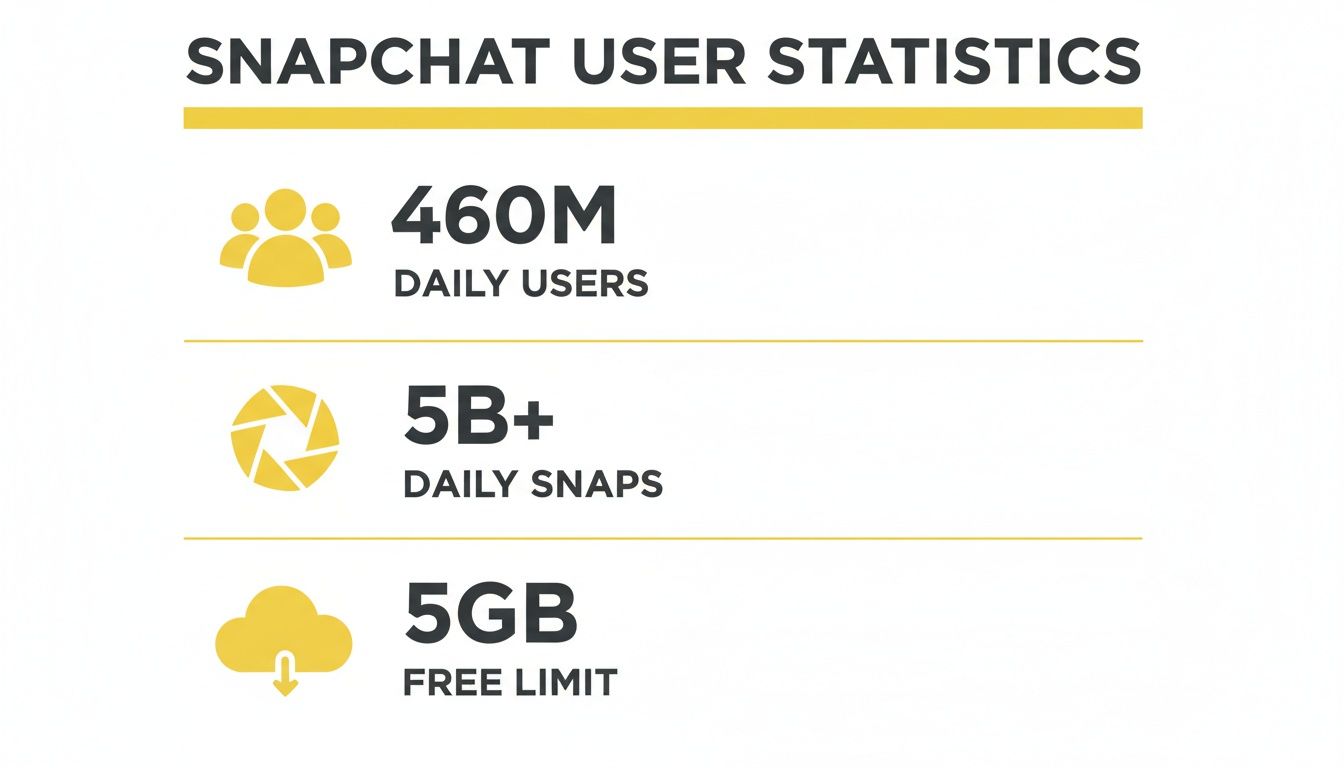
The platform's massive daily traffic and built-in ephemerality create a clear need for a private, off-platform way to archive things.
Accessing Your Saved Files
Okay, so where do all these saved snaps end up? SnapNinja keeps everything neat and tidy for you. The app automatically creates a dedicated folder on your computer to store all the videos and photos it captures.
You can get to this folder right from the SnapNinja interface. Everything is saved with a clear filename, so you won't have to guess what you're looking at later. This local storage approach is key—your files stay on your machine, under your control.
Here’s why this system works so well:
- Automatic Archiving: Forget about remembering to save stuff. If you see it, you save it.
- High-Quality Copies: Videos are kept in their original resolution, making them perfect for looking back on or even using elsewhere.
- Local and Secure: Your files are on your hard drive, not some random cloud server, keeping your private media private.
From installation to archiving, the entire workflow is designed to be effortless. You just use Snapchat on your desktop like you normally would, and SnapNinja handles the saving for you—quietly and safely.
When Does Saving a Snapchat Video Really Matter?

We've covered the technical side of things, but let's talk about why you'd even need to do this. Saving a Snapchat video isn't just a neat trick; it’s driven by real-life situations. People turn to tools like SnapNinja for smart, private archiving every day, transforming fleeting digital moments into something they can hold onto. This isn't about spying—it's about having control.
Think about it. We’re talking about everything from saving irreplaceable family videos to protecting yourself in a conversation where the stakes are high. These aren't obscure edge cases; they're the everyday reasons a reliable desktop tool becomes so valuable.
Keeping Priceless Memories
Your best friend lives halfway across the country and sends you a Snap story of their surprise proposal. It's raw, it's emotional, and it's absolutely perfect. But in 24 hours, it's gone forever, just a fading memory.
This is the classic case for smart archiving. By using a tool like SnapNinja on your computer, you can save that entire story in its original quality. The best part? Your friend never gets a notification, so there’s no awkwardness. You’ve privately preserved a moment that means the world to you, building a personal archive of your life's most important events.
The Modern-Day Receipt
The whole idea of "keeping receipts" became a cultural phenomenon for a reason. In a world of disappearing messages, having proof of what was said can be critical for your own peace of mind and personal security.
Imagine you're hashing out the details of a freelance project with a client on Snapchat. They agree to specific terms in a video Snap, but a little voice in your head worries they might change their story later. A mobile screenshot would tip them off and could strain the relationship, but letting that proof vanish feels way too risky.
This is where the Desktop Advantage becomes a personal security tool. You can quietly archive the entire video chat on your Mac or PC, creating a timestamped record that you control. It's your own private insurance policy, stored locally on your machine, just in case.
A Tool for Creators and Social Media Managers
If you're a content creator, you know that trends pop up and disappear overnight. A viral video or a hilarious story from another creator might be the perfect spark of inspiration for your next TikTok or Reel.
But by the time you sit down to really analyze it, the Snap is long gone. Smart archiving completely solves this problem, allowing creators to:
- Build an Inspiration Library: Save amazing Snaps and Stories to study what makes them so effective.
- Analyze Competitor Content: Keep an eye on what others in their niche are doing without letting them know you're watching.
- Repurpose Content (Ethically): Download clips for reaction videos or commentary, which is standard practice on platforms like YouTube.
For these professionals, SnapNinja isn't just about memories; it's an essential tool for market research and content strategy.
The Reality of Disappearing Messages
Snapchat's temporary nature was built for privacy, but it has also created a huge need to learn how to save video from snapchat without the other person knowing. This is especially true in the high-stakes worlds of dating and online drama. Consider that in the U.S., about 54% of teens are on Snapchat weekly, and with over 5 billion voice notes sent in the U.S. alone, the sheer volume of sensitive, disappearing content is mind-boggling.
Now, Snapchat is even starting to charge for larger Memories archives—bundling up to 5TB with its paid plans. This combination of high-stakes chats and new paywalls is pushing more people to find desktop tools that can save Snaps without triggering alerts. You can see more data on Snapchat's communication trends in a breakdown from TechCrunch.
At the end of the day, these real-world examples show that saving Snaps is rarely about bad intentions. It’s about preserving memories, protecting yourself, and simply having control over your own digital life. It's about being smart and private in a world where everything is designed to disappear.
Answering Your Top Questions About Saving Snapchat Videos
You're probably wondering about a few key things before trying a desktop method to save Snaps. I get it. Let's walk through the most common questions I hear so you can feel confident about what you're doing.
Is This Method Really Undetectable?
Yes, and here’s the simple reason why: SnapNinja works on your computer, totally separate from the Snapchat mobile app. It’s designed for Snapchat Web, which runs in a standard browser.
Think of it this way: the mobile app is built to detect screen recorders and other sketchy apps on your phone. It has deep hooks into the phone’s operating system. On a desktop, those hooks just aren’t there. SnapNinja is just capturing what’s on your screen; it never touches Snapchat's code, so there's literally nothing for their system to "see."
Could My Account Get Banned for This?
This is always the number one concern, and it comes back to what I call the Desktop Advantage. Snapchat's security is laser-focused on identifying modified mobile apps or screen recorders on your phone. That's where almost all account bans come from.
Since SnapNinja is a desktop tool working with Snapchat Web, you’re not breaking the rules about modifying their app. You aren't hacking or cracking anything. You're just recording media being displayed on your own computer, which keeps you off Snapchat's radar and your account safe.
The real difference is this: messing with the mobile app is like playing on Snapchat's home field, where they have all the advantages. The desktop method brings the game to your turf, where you’re in control and they have no visibility.
What’s the Quality of the Saved Videos Like?
It’s excellent. SnapNinja was built to grab the video at its original resolution, exactly as it's streamed to your browser.
You avoid that fuzzy, compressed look you often get from a janky screen recording. The tool saves a clean, high-quality copy, perfect for keeping a personal archive or even using a clip somewhere else. The whole point is to save the memory exactly as you first saw it.
Does This Work for Private Snaps and Stories?
It sure does. This method works for any video you can see on Snapchat Web. That covers pretty much everything:
- Private Video Snaps: Videos sent just to you in a chat.
- Public Stories: The 24-hour stories from friends and creators you follow — or use a Snapchat story downloader tool if you only need stories.
- Chat Media: Any videos sent back and forth in a conversation.
If the video plays inside the SnapNinja browser on your desktop, it gets saved automatically and silently. It’s a complete solution for building a personal archive, no matter how the video was sent to you. If you're curious about how we handle user data, you can check out our SnapNinja's privacy-first design.
Ready to start saving your Snaps the smart and safe way? SnapNinja is the only desktop solution that works without being detected, keeping your account secure and your privacy intact.