How to Screenshot on Snapchat Without Them Knowing Safely
If you want to screenshot a Snap without the other person knowing, the absolute fastest and safest way is to do it on a computer. Forget all the old mobile tricks like airplane mode—they're easily detected now. Using a desktop tool completely sidesteps the app's notification system, letting you archive Snaps privately and securely.
Why Your Phone Is the Riskiest Place for Snapchat Screenshots
You’ve probably seen them—the countless online "hacks" for secretly screenshotting on Snapchat. They all sound convincing at first glance: flip on airplane mode, fire up a screen recorder, clear your app cache, or even just take a picture of your screen with another phone.
Let’s be blunt: those mobile tricks are a relic of a bygone era. Trying them today is a surefire way to get your account flagged.
Snapchat's detection AI has gotten incredibly sophisticated, especially on iOS and Android where it has deep access to the operating system. The app is no longer just looking for a simple screenshot command; it’s actively hunting for any suspicious behavior.
The Mobile App Is Watching
When you use Snapchat on your phone, the app has a serious home-field advantage. It can monitor a whole host of activities that signal you're trying to sneak past its privacy features. This is how it catches you, even when you think you’ve been clever.
The app is built to spot red flags, including:
- System-Level Screen Recording: Most built-in and third-party screen recorders on iOS and Android send up system-level flags that Snapchat reads instantly.
- Sudden Connectivity Loss: The "airplane mode" trick is one of the oldest in the book, and Snapchat’s developers plugged that hole years ago. The app just waits for you to reconnect to the internet and then sends the notification.
- Unusual App Behavior: Force-quitting the app or clearing the cache still leaves a digital footprint. Snapchat’s system logs these actions and can connect them with unopened Snaps, resulting in a delayed notification or even an account warning.
Trying to outsmart the mobile app is a constant cat-and-mouse game you're almost guaranteed to lose. Each update makes these old tricks more obsolete and puts your account at greater risk.
The Real Danger of Mobile Workarounds
Getting caught isn’t just about the other person getting a notification. If you repeatedly try these methods, you could face a temporary account lock or, worse, a permanent ban. Snapchat’s terms of service are crystal clear about prohibiting the use of third-party apps or modifications to get around its features.
In the end, what seems like a simple trick is actually a huge gamble with your account's standing. This is precisely why moving the entire process off your phone isn't just a better option—it's the only reliable one left. By shifting to a desktop environment, you step out of the app’s heavily monitored playground entirely.
The Desktop Advantage: A Smarter Way to Archive Snaps
Trying to screenshot on your phone is like walking through a minefield. One wrong move, and bam—the notification is sent. The smartest approach is to get off the battlefield entirely. This is where your desktop comes in.
By logging into Snapchat Web on a Windows or macOS computer, you’re stepping outside of the mobile app's tightly controlled environment. It’s a completely different ballgame.
Why Desktops Are Snapchat's Blind Spot
Here's the simple truth: Snapchat's mobile app is deeply integrated into your phone's operating system. It has special permissions on both iOS and Android that let it know the instant you take a screenshot. The web platform, however, is just another website running in your browser. It doesn't have that same level of invasive access to your computer.
This single difference is what makes discreetly saving snaps not just possible, but far safer.
Think of it this way. The mobile app is like a security guard standing right over your shoulder, watching your every tap and swipe. Snapchat Web is more like a security camera pointed only at the front door—it has no idea what you're doing in the rest of the house.
This separation is what gives us an opening. A specialized tool like SnapNinja operates in that "rest of the house," completely outside the browser's direct line of sight. It captures the screen content without ever touching Snapchat's code in a way that would raise a red flag.
You get a perfect, high-quality copy of the Snap or chat, and on their end? Nothing. No screenshot notification, no "Saved to Camera Roll" message, and no awkward conversations.
Key Takeaway: The desktop method isn't some temporary glitch. It's a strategic approach that takes advantage of the fundamental technical limitations of web platforms compared to native mobile apps. It’s the most reliable way to preserve memories or keep receipts without setting off alarms.
By moving from the high-surveillance world of your phone to the relative freedom of your desktop, you drastically reduce your risk. While many mobile hacks can get your account flagged or even banned, a purpose-built desktop solution is designed to be undetectable. It’s about being smart with your privacy and maintaining control over your own digital interactions.
A Practical Guide to Using SnapNinja for Safe Captures
So, you see the problem with mobile tricks and the clear advantage of moving things to your desktop. Now, let’s talk about how to actually do it. This is your complete guide to using SnapNinja, the tool that makes the desktop method incredibly simple and safe.
Forget about those clumsy workarounds or complicated setups. SnapNinja is a dedicated desktop client designed for one specific job: archiving Snaps and Stories from your Windows or macOS computer without ever tipping off the sender. It’s the real answer to taking screenshots on Snapchat discreetly and effectively.
How Does It Actually Work?
The secret to SnapNinja's success is that it operates completely outside of Snapchat’s direct line of sight. When you view content on Snapchat Web, it streams to your browser. Your computer's built-in screenshot tools (like Snipping Tool or Command+Shift+4) interact with the operating system in ways that modern browsers can sometimes detect and report back.
SnapNinja is different. It grabs the visual data at a lower level, essentially capturing the pixels on your screen before Snapchat's web servers even have a chance to notice. Think of it like taking a photo of your TV screen from across the room instead of trying to hack the TV itself. Snapchat, the TV in this analogy, has no idea a picture was taken.
This process completely sidesteps the dreaded "took a screenshot" notification. From the sender's perspective, you just viewed their Snap. Nothing more.
This visual flow breaks down the core concept—moving from the high-risk mobile environment to a much safer desktop workspace.
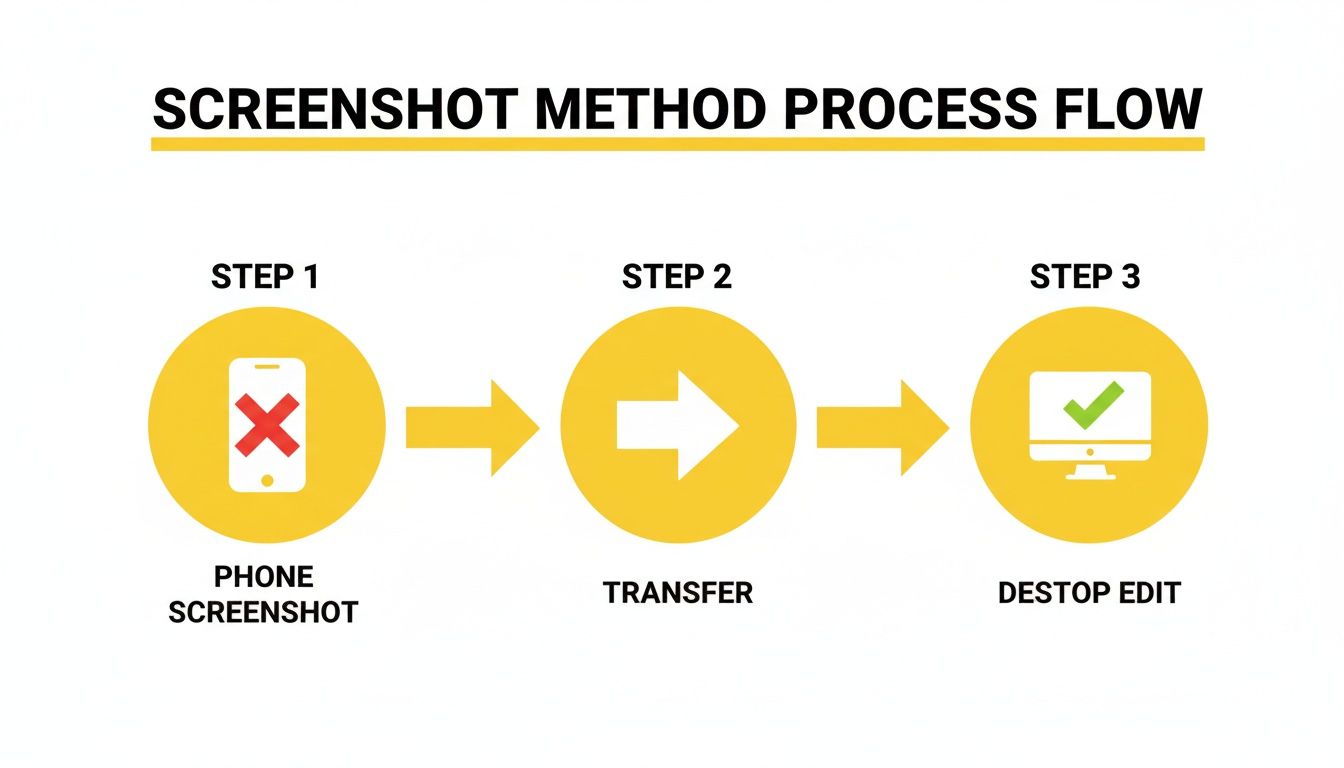
The logic is simple: you’re shifting the action from a device that’s heavily monitored (your phone) to a private space (your computer) where you have more control.
Getting Started With SnapNinja
Setting everything up is a breeze. There's no complex installation process or tech jargon to decipher. The entire experience is designed to be intuitive, even if you’re not particularly tech-savvy.
Here’s a quick look at what the process involves:
- Download and Install: First, you’ll want to head over to the official SnapNinja website to grab the client for your computer, whether you’re on Windows or macOS.
- Log In Securely: Once it's installed, launch the app. You'll log into Snapchat Web through SnapNinja’s secure, self-contained browser. This is a critical step because it keeps your login details safe and ensures you’re operating within its protected environment.
- View and Capture: From there, just use Snapchat Web like you normally would. Open a Snap, watch a Story, or read a chat. SnapNinja just hums along in the background, ready to capture content with a single click or even automatically, saving it directly to your computer.
The key takeaway: SnapNinja operates independently of the Snapchat app. It isn't a "hack" or a modified version that could get your account flagged. It’s a smart, external tool that gives you the privacy you need without breaking Snapchat's rules.
Mobile Methods vs. The Desktop Advantage (SnapNinja)
Let's put this into perspective. You've probably heard of mobile "tricks" like using Airplane Mode or screen recorders. While they might sound clever, they’re a huge gamble. Snapchat’s mobile app is constantly being updated specifically to detect and block these very methods.
In contrast, the desktop approach with a dedicated tool like SnapNinja is built on a more fundamental and stable principle. Here's a quick comparison that shows why it’s the only truly reliable solution.
| Feature | Mobile Methods (Airplane Mode, Screen Recorders) | Desktop Method (SnapNinja) |
|---|---|---|
| Detection Risk | Extremely High. The mobile app is designed to detect these tricks, often sending immediate or delayed notifications. | Extremely Low. Operates outside the app's monitored environment, making detection on the web platform virtually impossible. |
| Account Safety | Risky. Trying these methods can lead to account warnings, temporary locks, or even a permanent ban for violating the terms of service. | Safe. It doesn't modify the Snapchat app or use prohibited third-party software, keeping your account out of harm's way. |
| Reliability | Inconsistent. A trick that works today could be patched by a Snapchat update tomorrow, making it completely unreliable. | Consistent. Based on the fundamental way web browsers work, offering a stable and long-term solution. |
| Content Quality | Variable. Screen recordings can be pixelated or laggy, and other methods might fail to capture the full image or video correctly. | High Quality. Captures the content exactly as it’s displayed on your screen, ensuring a crisp, clean copy. |
Ultimately, choosing a desktop solution is about playing smarter, not harder. While mobile hacks are a cat-and-mouse game based on exploiting temporary security flaws, the desktop advantage is a strategic approach that simply works. It’s the best way to save memories or keep records while maintaining your privacy.
Ready to give it a try? You can find all the details and download the tool directly from the official SnapNinja website.
Staying Undetected and Understanding the Risks
Using a desktop workflow is a huge step up for smarter privacy, but staying ahead means knowing the rules of the game. Snapchat isn't standing still. Its detection algorithms are constantly being updated, and understanding the risks is just as crucial as having the right tool. This isn't about being paranoid; it's about being prepared so you can operate discreetly and keep your account safe.
The platform's security has become incredibly sophisticated. Simple tricks that might have worked a few years ago are now totally obsolete. Today, Snapchat uses an advanced, AI-driven system to sniff out anything that seems out of the ordinary. It's all about pattern recognition—spotting behavior that doesn't look like a typical user.
The Rise of AI Detection
Snapchat's internal AI, which some have dubbed 'Ghost Defense,' is the main reason most mobile workarounds are dead in the water. This system is always on the lookout for suspicious activity, like weird app-switching patterns, screen overlays, or unusual data requests.
It’s ruthlessly efficient, blocking over 99% of the secret screenshot methods that were popular before 2023. These security patches were rolled out aggressively, especially after the platform saw a 38 million daily active user growth spurt from its 414 million base in late 2023. More users meant more incentive to lock things down. You can dig into Snapchat's growth and security updates over on SQ Magazine.
This is precisely where the advantage of using a desktop tool like SnapNinja comes in. By moving your activity outside of Snapchat's heavily monitored mobile app, you sidestep those AI red flags right from the start.
Key Insight: Staying undetected isn't about finding a temporary glitch anymore. It's about choosing a method that operates fundamentally outside of Snapchat's primary surveillance zone. The desktop environment gives you that critical separation.
How to Avoid Raising Flags
Even with a safe method, you need to be smart about how you use it. The goal is to blend in, not to stand out. Overusing any tool can create patterns that, while not directly tied to screenshot detection, could still draw unwanted attention to your account.
Here are a few tips to keep a low profile:
- Don't Overdo It: Capturing every single Snap from one person back-to-back can look like bot activity. Use the tool selectively for the moments you actually want to save.
- Stick to Reputable Tools: Only use trusted desktop software like SnapNinja. Sketchy, unvetted programs could be hiding malware or using risky methods that put your account security on the line.
- Keep Up Normal Activity: Make sure you're still using Snapchat on your phone for regular chats and viewing stories. An account that only ever logs in from the web to view Snaps might eventually look suspicious.
At the end of the day, your privacy is what matters most. By understanding both the tool and the platform, you can confidently save memories without putting your account in jeopardy. You can learn more about how SnapNinja is built to protect your data by reading our detailed privacy policy.
Archiving Memories and Practicing Smart Privacy
Let's shift the perspective here. This isn't about "spying" or tricking anyone. It’s about smart privacy and having the ability to safely archive your own digital life. Snapchat is built on moments that disappear, but some of those moments are just too valuable to let go of forever.
Think about why you'd genuinely want to save a Snap. It’s rarely about anything dramatic. Most of the time, it's about holding onto a great memory, keeping a record of important information, or even protecting yourself.
The Real Reasons for Saving Snaps
The reasons for wanting to save a Snap are as diverse as the content itself. You aren't just saving a random photo—you're capturing a feeling, a crucial piece of info, or a personal record.
Here are a few real-world situations where this becomes a necessity:
- Holding Onto a Memory: A friend posts a hilarious, once-in-a-lifetime video to their story, and you just know you'll want to look back at it and laugh years from now.
- Keeping Receipts: Someone sends you an address, a flight confirmation number, or other key details in a chat. Saving it is just practical; it ensures you have a reliable copy you can find later.
- Ensuring Personal Safety: In more serious cases, a Snap might contain something that feels threatening or makes you uncomfortable. Having a private, secure copy can be an essential part of keeping yourself safe.
The ability to privately archive content gives you control over your own digital interactions. It’s about building a personal library of moments that matter to you, on your terms, without breaking the sender’s trust.
Finding a Balance with Privacy
Using a tool like SnapNinja gives you that control, but with it comes the responsibility to be ethical. This isn't a license to blast someone's private content all over the internet or use it to cause harm. The whole idea is to keep a personal copy for your own use.
The key is to honor the sender's original intent. They sent that Snap to you, expecting it to stay private. By using a secure desktop method, you can keep a copy for yourself without ever alerting them or making it public. You're just turning a temporary digital moment into a permanent personal memory.
This approach helps you find that tricky balance on a platform designed to be temporary. You get to keep what’s important to you while still playing by the unwritten rules of digital etiquette. For those who need this kind of control and privacy, you can see the different options available in the SnapNinja pricing plans.
Got Questions? We’ve Got Answers
We've walked through the tech, the methods, and the risks. But you probably still have a few questions floating around. Let's clear up some of the most common ones so you know exactly where you stand.
Is It Actually Legal to Screenshot on Snapchat?
This is a huge question, and the answer is layered. Taking a screenshot for your own personal use—say, to save a hilarious photo a friend sent you—is generally not illegal. Think of it like a private photo album.
But the game changes completely if you share that screenshot without the other person's consent. That's when you can wander into sticky legal territory involving privacy violations or copyright issues. This guide is all about responsible, personal archiving. Never, ever use saved content to harass, blackmail, or cause harm.
Can Snapchat Really Detect a Desktop Tool Like SnapNinja?
Right now, the answer is a solid no. A well-built desktop tool like SnapNinja is designed from the ground up to be invisible to Snapchat's web platform. It’s a completely different beast from those risky mobile app hacks.
Here's the key difference: these tools capture your screen's display, not the app's internal data. They operate outside the sandbox that Snapchat is built to monitor. This is precisely why they don't trigger alerts. Of course, tech is always evolving, so using a tool that stays updated is crucial for staying safe long-term.
Is My Snapchat Account Going to Get Banned for This?
The biggest advantage of the desktop method is how low-risk it is. Those old mobile tricks, like the airplane mode method or sketchy third-party apps, are direct violations of Snapchat’s rules. Their systems are actively looking for that kind of activity, and trying them is a roll of the dice.
The desktop approach is just fundamentally safer. You're not meddling with the Snapchat app itself or using forbidden software that raises red flags. While I can't promise anything is 100% foolproof forever, using a dedicated desktop tool is by far the most reliable way to keep your account out of trouble. It’s about being smarter with your approach.
Ready to save your Snaps privately and without the stress? With SnapNinja, you can capture any photo, video, or chat right from your desktop, completely undetected. Get started today at snapninja.app.