How to Screenshot Snapchat Without It Showing: A Guide to Smart Archiving
So you're looking for a way to screenshot a Snap without the other person finding out. Here’s the deal: the answer isn't on your phone. The only real, safe solution involves using a desktop application like SnapNinja on your Windows or macOS computer. Forget about risky mobile "hacks" like airplane mode or sketchy third-party apps—those are a fast-track to getting your account flagged or even banned.
The only truly reliable and safe method works by moving the whole process away from your phone's ecosystem, and that’s the desktop advantage.
The Undetectable Way to Archive Your Snapchat Memories
Let's cut to the chase. You have a good reason for wanting to save a Snap. Maybe it's a hilarious photo you want to keep, an important piece of information for a project, or just a digital "receipt" from a conversation. This isn't about spying; it's about smart privacy—having a personal archive and controlling your own digital interactions.
The biggest hurdle is Snapchat's incredibly sophisticated screenshot detection. When notifications were first introduced way back in 2014, you could get around them with simple tricks. Those days are long gone. The app now uses a complex, multi-layered system that plugs directly into system-level functions on both Android and iOS. This allows it to instantly tell the sender about any capture attempt, making all those old hacks you see on Reddit and TikTok completely useless. You can get more details on how Snapchat's detection evolved and why those old methods just don't work anymore.
Why Mobile Workarounds Are a Bad Idea
Trying to outsmart the app on its home turf—your smartphone—is a game you're going to lose. Here’s a quick breakdown of why those popular "hacks" are a direct path to an account suspension or a permanent ban:
- The Airplane Mode Trick: This is completely obsolete. The app simply queues the screenshot notification and sends it the second your phone is back online.
- Third-Party Mobile Apps: Be very careful here. Shady apps promising secret screenshots almost always require you to log in with your Snapchat credentials, which is a massive security risk. Snapchat’s system is built to detect and flag these unauthorized clients almost immediately.
- Built-in Screen Recorders: Both iOS and Android now have detection hooks that alert Snapchat the moment a screen recording starts. You won't get away with it.
Key Takeaway: Any method that directly interacts with the Snapchat app on your phone is detectable. It's just not worth the risk to your account.
The Desktop Advantage
The only truly safe and undetectable solution is to shift the entire process from your phone to your computer.
This is why we're focusing on the "Desktop Advantage." When you use a desktop tool like SnapNinja for Windows and macOS, you're operating in a space that Snapchat's mobile-first security isn't watching.
It works because you aren't technically taking a screenshot within the app's framework. Instead, you're viewing the content through a secure, separate portal that operates outside the Snapchat app environment. It’s a clean, effective, and safe way to archive what's important to you without breaking trust or risking your account.
Method Comparison Mobile Hacks vs Desktop Solution
Still not convinced? The differences become pretty clear when you see them side-by-side. Trying to find a workaround on your phone is a constant cat-and-mouse game with Snapchat's security team. A desktop solution sidesteps the game entirely.
| Feature | Risky Mobile Hacks (Screen Recorders, 3rd Party Apps) | Desktop Method (SnapNinja) |
|---|---|---|
| Notification Trigger | High risk of sending an immediate or delayed notification. | None. The capture happens outside the mobile app's monitored environment. |
| Account Safety | Extremely high risk of account suspension or permanent ban. | Safe. Does not violate Snapchat's ToS regarding unauthorized clients. |
| Reliability | Fails frequently as Snapchat updates its detection methods. | Consistently reliable and updated to work with the latest versions. |
| Data Security | Potential for malware or credential theft from sketchy apps. | Secure. Your credentials are not stored or exposed to third parties. |
Ultimately, the table shows that while mobile hacks might seem like a quick fix, they carry significant and often permanent risks. A dedicated desktop tool is built for one purpose: to provide a safe and reliable way to archive content without compromise.
Why Mobile Apps Will Get Your Account Banned
It’s a tempting shortcut, I get it. You find a third-party site promising a "tweaked" mobile app that lets you screenshot Snapchat without anyone knowing. Take it from me: don't do it. These apps are the single fastest way to get your account locked, suspended, or even permanently banned.
Think about it—Snapchat’s entire security model is built to protect its mobile app ecosystem. They’ve poured years and countless resources into creating defenses on iOS and Android specifically to catch unauthorized activity.
When you install one of these modified apps, you’re not just adding a simple tool. You're running a counterfeit version of the Snapchat client that hooks directly into the official code. To Snapchat's automated security systems, this is a massive red flag. It’s like trying to sneak into a bank vault wearing a cheap disguise; you’re not fooling their cameras for a second.
The Technical Red Flags
So, how does Snapchat sniff these apps out so easily? It’s not magic. It’s a combination of smart, persistent security checks that are nearly impossible to bypass on a mobile device.
- Unusual API Behavior: Rogue apps often make server requests in a weird sequence or format that the real app never would. This odd pattern is a dead giveaway to their systems.
- Failed Signature Checks: Every official app has a unique digital signature. Modified apps can't fake it, and Snapchat's servers instantly spot the mismatch.
- Huge Phishing Risk: Let’s not forget that many of these apps ask for your login details. You’re essentially handing your username and password to a completely unknown developer. It’s a huge security risk.
Snapchat is not messing around. According to its latest Transparency Report on enforcement actions, the platform took action on 3,395,968 violations in just the first half of the year. These weren't manual reviews; their automated systems flagged over 1.7 million unique accounts. That’s how aggressively they hunt for this stuff.
The Inevitable Consequence: A Banned Account
What usually happens is a temporary suspension at first, along with a stern warning. If you ignore it and keep trying, a permanent ban is almost guaranteed. A quick search on Reddit will show you endless stories of people who lost years of memories and streaks just because they trusted a sketchy app.
The Bottom Line: Trying to trick the Snapchat app on its home turf—your phone—is a losing battle. The platform's detection systems are just too good, and the risk of losing your entire account is far too high. The only truly safe way to operate is to get off the mobile playing field entirely.
Meet SnapNinja: The Desktop Advantage

If you've realized that trying to outsmart Snapchat on your phone is a losing battle, you're not alone. So, what's the real solution? You have to change the playing field. The most reliable and genuinely safe way to capture Snapchat content without the other person knowing is to get off your phone and onto your computer.
This is the whole idea behind SnapNinja, a dedicated app for both Windows and macOS. It lets you log into your Snapchat account in a secure bubble, completely separate from your mobile device. Don't think of it as some sketchy "hack." It's more like a secure, private portal to your account that operates entirely outside the heavily monitored world of iOS and Android.
That separation is what makes it work. Snapchat’s notification system is designed to catch specific triggers inside the mobile operating system—think of system-level hooks on iOS or specific permissions on Android. SnapNinja sidesteps all of that. From Snapchat's point of view, no screenshot is ever taken because the alert simply isn't created.
Why a Desktop App Is Your Best Bet
Trying to find a workaround on your phone is like trying to hide something from a warden while you're both locked in the same cell. The system is built to catch you. A desktop application isn't even in the prison.
Here’s why that matters:
- Truly Undetectable: Your activity is invisible to Snapchat’s notification system because it all happens outside the mobile app's environment.
- Keeps Your Account Safe: You're not using a modified or "tweaked" version of the app, which is a surefire way to get banned. You're just accessing your account through a different, clean channel.
- No "Saved to Camera Roll" Alert: That classic notification that gives the whole game away? It's a mobile-only function. It simply doesn't exist in the environment SnapNinja creates, because the app operates outside the Snapchat app environment.
By moving to a desktop workflow, you completely change the rules. Snapchat is watching for a fight on mobile ground, and you're choosing to be somewhere else entirely.
How It All Works
The process couldn't be simpler. Instead of tapping to open a Snap on your phone, you just view it through the SnapNinja interface on your computer. The app captures the content directly as it's received and saves it right to your hard drive, never touching your phone's screenshot function.
You're not just taking a picture of your screen; the tool intelligently saves the media file itself. This is perfect for archiving memories, keeping records of important conversations, or just having a personal backup of things shared through Snaps. It’s about giving you control without putting your account on the line.
For anyone tired of the cat-and-mouse game with risky mobile tricks, you can see exactly how SnapNinja provides a safe desktop alternative.
Alright, you get why using your desktop is the smartest play for saving Snaps without tipping anyone off. Now, let's roll up our sleeves and walk through how to actually use SnapNinja. Getting it set up is simple, but I’ll guide you through it so you can go from downloading the app to saving your first Snap without a single worry.
First things first, you need to grab the software. SnapNinja is built from the ground up for desktop, so you'll want to head over to their official website to download the installer for Windows or macOS. This isn't some sketchy browser plugin or a tweaked phone app; it's a dedicated, secure program for your computer, which is exactly why it works so well.
Once it's downloaded, installing it is no different than any other software you trust. Double-click the file, follow the prompts, and you're done. No weird permission requests or complicated hoops to jump through.
Getting Logged In for the First Time
Fire up the application, and you’ll land on a secure login screen. This is where you'll plug in your Snapchat username and password. I know, it can feel a little strange typing your credentials into a third-party app, but SnapNinja is designed to act as a secure gateway. It talks directly to Snapchat's servers to log you in without ever storing your password.
It's really no different than logging into your Instagram account on a friend's tablet. You're simply authenticating your session. The key difference is that SnapNinja does this inside its own protected desktop environment, which is the secret sauce that keeps it invisible to Snapchat’s notification system.
Once you’re in, you’ll see a clean, simple layout of your new Snaps. Here’s the most important tip I can give you: do not open the Snap on your phone first! The entire strategy relies on viewing it through SnapNinja before your mobile app can mark it as "opened."
How to View and Save Snaps
The interface is incredibly straightforward. All your unopened Snaps are listed and ready to go. Just click on one to open it, and this is where the real magic kicks in. The Snap, whether it's a photo or a video, appears on your screen, and SnapNinja automatically saves the file to a folder on your computer.
You won't find a "screenshot" button anywhere because you don't need one. The capture is automatic.
This isn't just a simple screen grab. SnapNinja saves the actual media file itself. That means you get the original, full-quality image or video, free of any compression artifacts or screen clutter. It’s the purest way to preserve a memory.
This automatic process works perfectly for all kinds of Snapchat content:
- Image Snaps: Instantly saved as high-resolution image files (like a JPG or PNG).
- Video Snaps: Saved as complete video files (usually an MP4) that you can watch whenever you want.
- Stories: You can browse and save content from your friends' Stories just as easily as you can with direct Snaps.
To give you a better idea of what you can do, here’s a quick rundown of the tool's core capabilities.
SnapNinja Feature Checklist
| Feature | Description | Benefit |
|---|---|---|
| Anonymous Viewing | View Snaps and Stories without triggering a notification. | Your viewing activity remains completely private and undetectable. |
| Automatic Capture | Automatically saves the media file upon opening a Snap. | No need for manual screenshots; you get the original file effortlessly. |
| High-Quality Saves | Captures the original, uncompressed image or video file. | Preserves memories in their highest possible quality, without artifacts. |
| Cross-Platform Support | Available for both Windows and macOS operating systems. | Works on the desktop you already use, regardless of your OS. |
| Secure Login | Authenticates directly with Snapchat servers without storing credentials. | Your account information stays safe and is never compromised. |
This table highlights just how focused the tool is on doing one thing and doing it well: providing a safe, high-quality way to save your Snaps.
Troubleshooting Common Hiccups
Even the smoothest software can have a hiccup now and then. The most common issue you might face is a login error. This usually happens when Snapchat sees you logging in from a new device or location and asks for verification—totally normal. If it happens, just check your email or phone for a verification code from Snapchat, enter it in the app, and you'll be good to go.
Here's another practical tip: get in the habit of organizing your saved content. SnapNinja saves everything to a default folder, which can get messy fast. I recommend moving the files into your own folders every once in a while, maybe sorted by who sent them or the date. It makes finding what you're looking for much easier later on. To see which features fit your needs, you can check out the different options on the SnapNinja pricing page.
Smart Privacy: An Ethical Guide to Saving Snaps
Having a tool like SnapNinja in your back pocket gives you the ability to archive your memories, but it also comes with the responsibility to use it wisely. This isn't about spying. It’s about practicing what I call "Smart Privacy"—taking control of your digital life for the right reasons.
Think about the practical side of things. You might need to save a Snap that has crucial information, like an address for a party or a flight confirmation number. Or maybe it’s just a hilarious moment with a friend that you want to keep forever. In more serious situations, it can even be about keeping "receipts" to protect yourself in online conversations. The goal here is a personal archive, not a secret collection of other people's stuff.
Getting started with a desktop tool like SnapNinja is incredibly straightforward: just download, log in, and you're ready to capture.
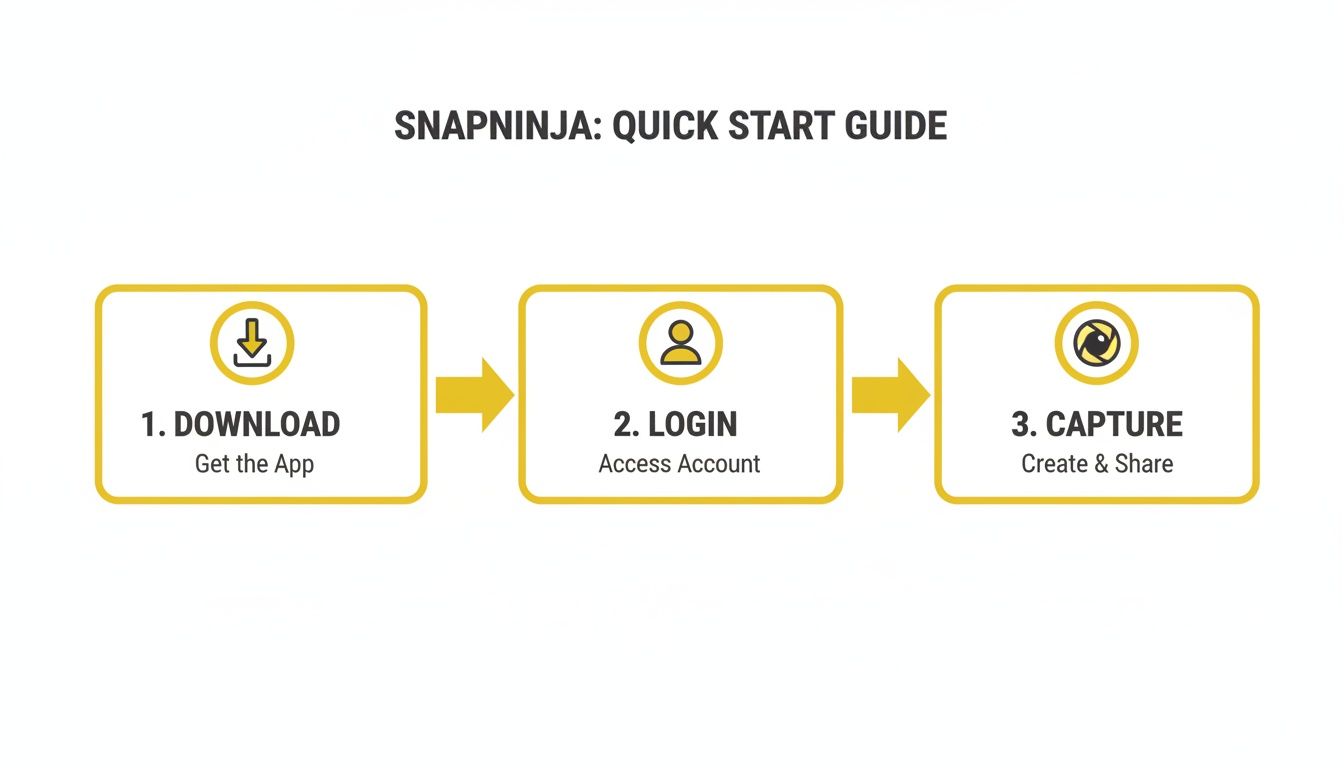
This simple workflow is the key. By moving everything to your computer, you sidestep the notification triggers built into the mobile app entirely.
When and Why to Save Snaps
The golden rule here is consent and transparency. Even though SnapNinja is undetectable, the best policy is usually an open one. Let your close friends know you save your favorite moments. You'll find most people are cool with it once they know your intentions are good.
Here are a few clear, ethical reasons you might want to save a Snap:
- Archiving Cherished Memories: That one perfect, funny video from your best friend or a sweet message from a partner.
- Keeping Important Information: Saving login details, event plans, or addresses that were sent in a message designed to disappear.
- Protecting Yourself: Documenting conversations that you might need later for personal safety or to clear up a misunderstanding.
Smart Privacy is really about one thing: your digital life should be under your control. Having a personal archive of your interactions is a big part of that, as long as it's done ethically and with respect for the people you're talking to.
Understanding Snapchat's Culture of Consent
Snapchat's entire platform is built on a foundation of consent and transparency. It’s a major reason why 70% of female Gen Z engagement happens there. The whole system is designed to notify you—senders get an alert for chat screenshots, and you can see exactly who viewed your story. This framework builds trust among its 453 million daily active users by reinforcing the expectation of private, temporary communication. You can learn more about the platform's approach to user trust and see why these features are so central to the experience.
Using a tool like SnapNinja ethically means respecting this culture. This guide is strictly for personal archiving and protection—never for malicious use or breaking someone's trust. If you want to see our full commitment to responsible use, you can review our privacy policy and user guidelines. The goal is empowerment, not exploitation.
Your Top Questions About Saving Snaps Safely
When it comes to Snapchat, privacy is a big deal. You've probably got a ton of questions about how to save content without setting off alarms. Let's get them answered so you know exactly what you're doing.
Are Desktop Apps Like SnapNinja Really Undetectable?
The short answer is yes, and here’s why. Desktop solutions like SnapNinja work because they operate completely outside of the environment Snapchat is designed to police: your phone.
Snapchat’s security is heavily focused on what happens within its iOS and Android apps. It hooks into the operating system itself to detect when a screenshot is taken or a screen recorder is running. When you access your account from a desktop computer, you sidestep that entire system. The app simply isn't looking for those activities on a Windows or macOS machine, which makes this approach invisible to its detection mechanisms.
What if I Just Use Airplane Mode or a Screen Recorder on My Phone?
Honestly, don't even try it. Those old-school tricks are completely patched and are a surefire way to get your account flagged. Snapchat's developers are smart, and they closed these loopholes years ago.
- The Airplane Mode Trick: This just delays the notification. The moment your phone reconnects to the internet, the app tattles, and the other person gets the screenshot alert. You haven't fooled it at all.
- Built-in Screen Recorders: This is even riskier. Snapchat is now built to detect when screen recording software is active. Trying this is one of the quickest ways to earn a temporary suspension or, even worse, a permanent ban.
The Bottom Line: Trying to outsmart the app on its own turf—your phone—is a battle you'll lose. The system is designed to catch you. The only reliable strategy is to change the playing field entirely by moving over to the desktop.
Could I Get Into Legal Trouble for Saving Someone's Snap?
This is where common sense and ethics are crucial. If you're just saving a funny chat with a friend or a memory for your own personal use, you're almost certainly in the clear. The trouble starts when you share that content without permission.
Distributing someone's private Snaps can land you in some serious hot water, potentially violating copyright and privacy laws. This is especially true if the content is sensitive or used for bullying, public shaming, or any kind of malicious activity. This guide is about personal archiving—keeping things for your own records, not for hurting others. Always, always respect people's privacy and consent.
Ready to start archiving your Snapchat memories the smart and safe way? SnapNinja provides the only trustworthy desktop method to save Snaps without triggering any notifications. Give SnapNinja a try today and experience the desktop difference for yourself.