How to Secretly Save Snaps Without Anyone Knowing
Let's be real—we've all seen a Snap and wished we could keep it. The problem is, that screenshot notification pops up and immediately makes things awkward. The best way to secretly save Snaps is to use a desktop tool like SnapNinja alongside Snapchat Web. This method works outside the mobile app’s detection system, so the sender is never notified.
Why You Might Want to Privately Save Snaps

The idea of saving Snaps can get a bad rap, but it’s rarely about spying. It’s about "smart privacy"—taking control of your own digital memories and interactions. Snapchat’s whole thing is disappearing messages, which is great for casual chats. But it also means priceless moments can be lost forever.
Think about it. Maybe you got a heartfelt video message from a family member you want to archive. Or you need to keep a digital "receipt" of a conversation for personal or business reasons. Sometimes, it’s just about saving a hilarious, once-in-a-lifetime moment with a friend without killing the vibe with that dreaded screenshot alert.
Archiving Your Digital Life
Privately saving Snaps is essentially building a personal digital filing cabinet. We don’t think twice about saving important emails or text messages, and Snapchat conversations can be just as meaningful. Having a way to archive these moments puts you in control of your own history.
This is especially true for moments with:
- Sentimental Value: Saving a video of a friend’s goofy dance or a sweet goodnight message. These are the modern equivalent of photo album entries.
- Practical Records: Keeping a receipt of a transaction, a business agreement, or an important address someone shared in a chat.
- Personal Privacy: Documenting conversations that might become important later, making sure you have a record if you ever need one for your own protection.
This isn't about violating trust; it's about smart privacy. You're choosing which memories are worth preserving for your own personal archive, ensuring that what's important to you isn't erased by a timer.
Maintaining the Natural Flow
Let’s face it: the screenshot notification is a total interruption. It instantly changes the dynamic of a conversation, making the other person self-conscious or wonder why you're saving their Snap. Knowing how to secretly save Snaps means you can preserve what’s important to you without making things weird.
Ultimately, the goal is to manage your digital life with more intention. By framing it as personal archiving and smart privacy, you shift from a mindset of sneakiness to one of empowerment. For anyone serious about this, understanding the privacy implications is a great first step. You can read more about responsible data handling and ethical tool use in our privacy policy.
The Desktop Advantage: Why Mobile Hacks Almost Always Fail

If you've ever gone down the rabbit hole of trying to save Snaps, you've seen the promises: modded apps, sketchy screen recorders, and "tweaked" clients for your phone. Let's be blunt—they're the fastest ticket to getting your Snapchat account permanently banned. It's not a risk; it's a matter of when.
The Snapchat mobile app is a digital fortress. On both iOS and Android, it’s built to detect any unauthorized activity. It knows the second you use your phone's built-in screenshot function, and it's even better at sniffing out third-party apps trying to mess with its operations. These mobile "hacks" are a direct violation of Snapchat’s terms of service, and its anti-cheat system is notoriously aggressive.
Why Your Phone Is a Trap
Think of the official Snapchat app as its own private kingdom. It has complete control over everything that happens within its walls. When you install a modded version or run a screen recorder that claims to be "invisible," you're trying to smuggle a Trojan horse into a system specifically designed to find and destroy it.
Here’s why those methods are doomed to fail:
- Deep OS Integration: The app is woven directly into your phone’s operating system. It uses low-level system calls to monitor screen activity, which is how it triggers that screenshot notification instantly.
- Relentless Updates: Snapchat's security team is in a constant arms race with developers of these modded apps. A tool that works one day is often patched out the next, leaving you with a banned account.
- Digital Fingerprints: Every unauthorized app leaves behind a unique signature. Snapchat’s servers are great at identifying these fingerprints, making your account an easy target during the next ban wave.
The bottom line is this: on mobile, you are playing on Snapchat's home turf. Their app has every advantage, and trying to outsmart it there is a losing game that puts your account and all its memories on the line.
The Desktop Method: A Much Safer Approach
This is precisely where the Desktop Advantage comes into play. By shifting over to Snapchat Web on a Windows or macOS computer, you move the whole operation to a neutral environment. Snapchat’s web interface is far more limited and doesn't have the same invasive surveillance powers as the mobile app.
Using a dedicated tool like SnapNinja on your desktop completely changes the equation. It operates outside the Snapchat app environment and never even touches the mobile app's code. Instead, it works alongside your web browser, capturing the media as it's displayed on your screen.
From Snapchat's perspective, all it sees is a user watching a Snap in their browser. That's it. No red flags, no alarms. This is the only truly reliable way to secretly save Snaps without tripping the system. You can get a deeper dive into the mechanics with our guide on using a Snapchat downloader safely.
Risk Comparison: Mobile Hacks vs. Desktop Method
It’s easy to see why so many users get their accounts banned. The temptation of a quick mobile fix is strong, but the risks are astronomical. Here's a clear breakdown of the difference.
| Feature | Mobile Apps (iOS/Android Hacks) | Desktop Method (SnapNinja) |
|---|---|---|
| Detection Risk | Extremely High. Directly interferes with the official app, which is easily detected by Snapchat's security. | Extremely Low. Operates outside the mobile app's "fortress," interacting only with the web stream. This is why it's safer and undetectable. |
| Account Safety | Very Poor. A leading cause of temporary suspensions and permanent account bans. | Very High. No direct interaction with the app means no violation triggers for Snapchat's anti-cheat system. |
| Reliability | Unreliable. Constantly breaks with every Snapchat update, requiring you to find new versions that may be infected with malware. | Consistent. Based on stable web technology that is far less prone to sudden, breaking changes. |
| Privacy/Security | Huge Risk. Sideloading unknown apps exposes your device to malware, spyware, and potential data theft. | Secure. Runs on your own Windows or macOS computer, giving you full control without installing suspicious software on your phone. |
Ultimately, the choice comes down to risk versus reward. While mobile hacks promise convenience, they deliver a near-guaranteed ban and expose you to serious security threats. The desktop method requires a few extra minutes to set up but provides a safe, reliable, and discreet way to save the Snaps that matter to you.
Meet SnapNinja: The Smart Way to Save Snaps
So, you want to archive Snaps without triggering alerts or risking your account. The trick is to stop trying to beat Snapchat on its home turf—the mobile app—and instead, leverage the Desktop Advantage. That's where a tool like SnapNinja comes in.
SnapNinja is a clean, simple desktop program for Windows and macOS that works alongside the official Snapchat Web. It's the only reliable solution that bypasses the "Saved to Camera Roll" notification because it operates completely outside the Snapchat app environment. It was designed from the ground up for anyone who just wants a safe, reliable way to keep their memories.
How It Works Its Magic
The whole idea behind SnapNinja is refreshingly simple: it operates completely outside the ecosystem that Snapchat monitors so heavily. While you're browsing Snaps, videos, or Stories on your computer, the tool quietly captures the media in the background and saves it directly to your hard drive.
What makes this approach so effective is how subtle it is. The entire saving process happens on your desktop, far away from the mobile app's prying eyes. It never trips any of Snapchat's security mechanisms.
The person on the other end gets zero notifications. No screenshot alerts, no "Saved to Chat" messages... nothing. To them, it looks like you just viewed their Snap like anyone else would. It's completely discreet.
This desktop method cleverly sidesteps the detection systems that make mobile workarounds so risky. Snapchat's security is hyper-focused on its iOS and Android apps, which leaves the web version as a less-fortified back door. SnapNinja leverages this "Desktop Advantage" to give you a genuinely safe way to save what's important to you.
Key Features That Actually Matter
What makes SnapNinja a solid choice is its no-nonsense approach. It’s not bloated with extra features you’ll never use; it's designed to do one thing and do it perfectly.
Here’s a quick rundown of what you get:
- Totally Undetectable: Because it’s a desktop tool for Windows and macOS, it remains invisible to Snapchat's mobile-focused detection. Your account stays off their radar and safe from getting flagged or banned.
- Automatic Saving in the Background: You don’t have to remember to save anything. Just view Snaps on the web version as you normally would, and SnapNinja automatically archives them for you. It’s a "set it and forget it" solution.
- High-Quality, Clean Downloads: The tool saves everything in its original quality, whether it's a photo or a video. You won't find any weird compression artifacts or watermarks—just the original file.
For anyone who cares about both their memories and their privacy, this is easily one of the most effective and secure methods out there. If you're ready to start building a private archive, you can find everything you need on the official SnapNinja website. It's the straightforward, powerful tool for smart, private use.
How To Secretly Save Snaps With SnapNinja
Alright, let's get into the nitty-gritty. You want to build a personal archive of your favorite Snaps, and you need a method that’s straightforward, safe, and actually gets the job done. I'm going to walk you through getting a tool like SnapNinja set up on your desktop, whether you're a Windows or macOS user.
The whole idea here is simplicity. You won't have to mess with complicated technical settings or be some kind of computer guru to make it work. We'll start with the download and install, then I'll show you how it seamlessly integrates with Snapchat Web.
Getting Started: Installation and Setup
First things first, you've got to install the software. Just head over to the official website and grab the right version for your computer. The installation is as standard as it gets—a few clicks, and you're all set.
Once it's installed, go ahead and launch the application. You’ll be greeted by a clean, simple interface. This is a good moment to just confirm that the program is running properly before you dive into Snapchat. Look for a small icon in your system tray (on Windows) or menu bar (on Mac) to see that SnapNinja is active and waiting in the background. That little icon is your green light.
Now for the most important part: logging into Snapchat Web. Open your go-to browser—Chrome, Firefox, Safari, whatever you use—and navigate to web.snapchat.com. Log in with your standard credentials. This is the core of the desktop method; you're using an official Snapchat service, which is why it's so much more reliable and secure than shady third-party mobile apps.
Using SnapNinja: The "Set and Forget" Method
With SnapNinja running in the background and Snapchat Web open, you're officially ready to go. The real beauty of this tool is its automation. There's no "record" button to hit for every single Snap.
You can now just browse through your chats, watch your friends' Stories, and view video Snaps exactly like you normally would. As soon as the media loads in your browser, SnapNinja automatically detects it and saves a high-quality copy to a dedicated folder on your computer. You don't have to lift a finger. Just view it, and it's saved.
This workflow diagram breaks down just how simple the process is.
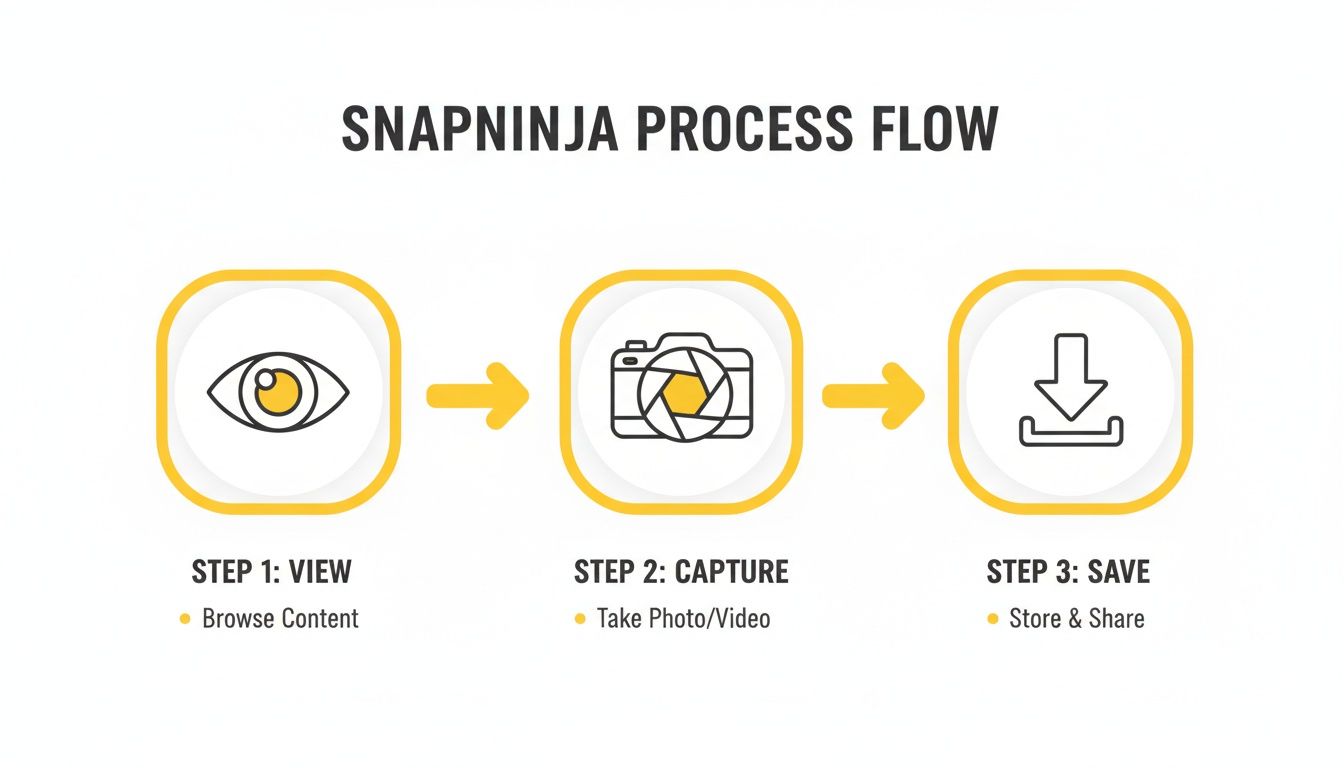
As you can see, your only job is to view the content. The tool handles the capture and saving entirely on its own.
Finding and Organizing Your Saved Media
So, where does everything end up? SnapNinja automatically creates a folder on your computer to store all your saved media. You can usually find it in your "Documents" or "Downloads" folder, clearly labeled for easy access.
Here are a few tips I've learned for managing a growing archive:
- Create Subfolders: As you start saving Snaps, I highly recommend creating subfolders organized by friend, date, or event. It makes finding a specific memory down the road a whole lot easier.
- Check the Folder Regularly: After your first few uses, it's a good idea to pop into the folder and make sure you see the files appearing. This is a quick way to confirm everything is working just as it should.
- Back It Up: If you're saving genuinely important memories, treat them like any other important file. Make sure to back up the folder to an external hard drive or a cloud storage service.
The need for users to have more control over their own data isn't new. Back in December 2013, Snapchat was hit by a massive data breach that exposed the usernames and phone numbers of 4.6 million users. The fallout was significant, leading the FTC to file charges against the company for deceptive practices, including misleading claims about screenshot detection.
As a result, Snapchat was forced into a settlement that required it to implement a comprehensive privacy program monitored for 20 years. This history highlights why a tool that puts control back in your hands is so valuable. With 75% of its audience under 34, many users are simply looking for a way to save a sentimental Snap or a viral Story without setting off alarms. You can read more about the FTC settlement and its privacy implications for the full context.
Using Your Power Responsibly
Alright, so now you know how to save Snaps without anyone knowing. This gives you a lot of control, but it's crucial we talk about the responsibility that comes with it. There’s a world of difference between archiving a precious memory for yourself and doing something malicious. That's a line we absolutely cannot cross.
A tool like SnapNinja is meant for personal use—think of it as a secure digital archive for your life. It’s perfect for saving a funny video from your best friend, keeping a record of a business chat, or documenting something important for your own records. It is not a tool for spying, harassing, or plastering someone's private moments all over the internet without their permission.
A Simple Code of Conduct
At the end of the day, respecting privacy just comes down to basic empathy. You have to consider the person on the other end of that Snap. Before you even think about what to do with a saved Snap, run it through a quick mental checklist.
- Never, ever share without consent. This is the number one rule. If a Snap was meant only for you, making it public is a huge betrayal.
- Don't use it for malicious purposes. Using saved content to blackmail, embarrass, or harass someone isn't just unethical—it can land you in serious legal trouble.
- Think about their perspective. Just ask yourself, "How would I feel if someone shared this Snap of me?" If the answer is anything less than "I wouldn't care at all," then you already have your answer. Don't do it.
The bottom line is simple: just because you can save something secretly doesn't mean you have the right to share it. Your personal archive should stay exactly that—personal.
The Legal and Platform Minefield
Saving content for your own eyes is one thing, but distributing it is where things get complicated, and fast. When you share someone else's content without their permission, you can wander into legal gray areas like copyright infringement or violating privacy laws, which vary depending on where you are and what the content shows.
Snapchat itself is also taking violations more seriously than ever. Their latest Transparency Report revealed they took action on over 7.3 million reports of violative sexual content in just six months, with a median response time of only one minute. While the desktop method we've discussed sidesteps their screenshot detection, distributing that content puts you squarely on the radar of their moderation teams. You can read the full breakdown of their enforcement in the Snapchat H1 2025 Transparency Report.
Ultimately, you’re in control. Use this knowledge to safeguard your own memories and interactions, but always act with respect and integrity.
Frequently Asked Questions
It's natural to have questions when you're thinking about saving Snaps. You want to be sure you're doing things the right way—safely and without causing any issues. I've been in this space for a while, and I've heard just about every question there is. Here are the answers to the ones that come up most often.
Is SnapNinja Really 100% Undetectable?
Yes, it is, and the secret lies in the Desktop Advantage. SnapNinja was built from the ground up to work only with Snapchat Web on a computer, whether it's Windows or macOS.
Here’s why that matters: Snapchat’s notification system is baked directly into its iOS and Android mobile apps. SnapNinja operates completely outside of that system. Since it never touches the mobile app's code, there's nothing for Snapchat to detect. From their end, it just looks like you're watching Snaps in your browser. The sender is never any the wiser.
Will I Get My Account Banned for Using This?
This is a big one, and the short answer is no. Almost every account ban you hear about comes from people using sketchy, modified versions of the Snapchat mobile app on iOS or Android. Those "tweaked" apps are a massive red flag for Snapchat's security.
SnapNinja is different. It's a standalone desktop program that works with the official Snapchat Web interface, not against it. It doesn't modify anything or break any rules in a way that gets you noticed. This desktop method is a much safer approach than trying to hack the mobile app, which often leads to an account ban.
The bottom line is simple: Stick to the desktop and avoid unauthorized mobile apps. That's how you keep both your memories and your account safe.
Can I Use SnapNinja on My iPhone or Android?
I know it would be convenient, but SnapNinja is a desktop-only tool for Windows and macOS for a very important reason: your safety. This design choice is what makes the whole thing work so well and avoids account bans.
If there were a mobile version for iOS or Android, it would be going head-to-head with Snapchat's detection systems on their home turf. That's a losing battle that would put your account at huge risk. The Desktop Advantage is genuinely the only reliable way to fly under the radar and keep your account in good standing.
What Kind of Media Can I Actually Save?
Basically, if you can see it on Snapchat Web, you can save it. SnapNinja is designed to grab any visual media you come across, so you can build out a full personal archive without missing anything.
This includes things like:
- Private Photo and Video Snaps: The one-on-one snaps people send you directly.
- Public and Private Stories: All the daily stories from your friends and even content from public accounts you follow.
As long as the Snap or Story loads in your web browser while the tool is running, it gets saved automatically to your computer in its original, high-quality format.
Ready to start saving your favorite Snaps without the risk? With SnapNinja, you get a 100% undetectable solution that just works. Ditch the sketchy mobile apps and build your personal archive the right way. You can get started right now over at snapninja.app.