The Undetected Guide To Your Snapchat Link Download
Ever tried to find a real snapchat link download method and just hit a wall of sketchy apps and dead ends? I've been there. The only reliable way I've found is using a desktop tool that works with Snapchat Web. This approach dodges the massive risk of getting your account banned by shady mobile apps and, more importantly, it completely avoids those awkward screenshot notifications.
The Problem with Disappearing Snaps
Let's be real: Snapchat's disappearing messages are both its coolest feature and its biggest headache. One minute you're watching a hilarious video or reading an important message, and the next, poof—it's gone. Vanished into the digital void, leaving you wishing you'd saved it. This is exactly why so many of us are hunting for a solid way to archive certain Snaps.
This isn't about spying. It's about having control over your own digital life and conversations—what I call smart privacy. It's about archiving memories or keeping receipts for your own peace of mind.

Why We Need to Save Snaps
Think about the times you've actually needed to save something. It’s rarely about a random selfie; it's often about preserving something that holds real value.
Here are a few common scenarios I run into all the time:
- Archiving Memories: A friend who moved away sends a heartfelt video message. You want to keep it long after its 24-hour lifespan.
- Keeping Receipts: You're having an important discussion and need a record of what was agreed upon, just for your own reference.
- Protecting Your Privacy: Sometimes, you need a record of a conversation to protect yourself. Having a private copy is a form of digital self-defense.
Sure, Snapchat has a built-in save feature, but it's not exactly subtle. The moment you use it, the other person gets a big, bold notification. This instantly changes the dynamic of the conversation and can make things weird. It’s like announcing, "I'm making a permanent copy of this!" which totally kills the casual vibe of a chat.
The real issue here is about control. While disappearing messages are great for fun, you lose all say when a Snap contains something important—a memory, proof of a conversation, or a flash of inspiration.
This exact frustration is what sends people searching for a better tool. We need a discreet, effective way to save the moments that matter without alerting the sender. We need a method that respects our privacy and lets us decide what’s worth keeping.
Why Mobile Snapchat Savers Will Get You Banned
Thinking about downloading a tweaked Snapchat app or some modded APK from a shady corner of the internet? Let's pump the brakes. It might seem like a quick fix, but trust me, it’s the fastest way to get your account locked or, even worse, permanently banned.

Snapchat's mobile app is a fortress. Their security team is incredibly good at detecting when the app has been tampered with. These unauthorized modifications, whether from jailbreak tools on iOS or sketchy APKs on Android, leave digital fingerprints that Snapchat's servers can spot almost instantly.
The app's code is designed to constantly check its own integrity. When a tweaked version tries to connect, it fails this self-check and immediately flags your account for suspicious activity. At first, you might get a temporary suspension. Keep it up, and you’re looking at a permanent ban—all your memories and connections, gone for good.
The Desktop Advantage Explained
This is where the Desktop Advantage completely changes the game. By using a tool built for Windows or macOS that works with Snapchat Web, you create a buffer zone between your actions and Snapchat's hyper-sensitive mobile app. It's a much safer, sandboxed environment.
Think of it this way: mobile hacks are like trying to pick the lock on a bank vault while the guards are staring right at you. A desktop solution, on the other hand, is like using the public-facing ATM—it interacts with the system through official, expected channels, so it doesn't set off any alarms.
It all comes down to a few key points:
- No App Modification: Desktop tools like SnapNinja don't alter the official Snapchat app in any way. They simply work with the web browser version, which operates under a different set of rules.
- Undetectable: Since you aren't violating the app's terms of service by using a modded client, your account stays safe. Snapchat has no way of knowing a desktop tool is running.
- Complete Privacy: The real prize here is that this method bypasses the "Saved to Camera Roll" notifications entirely. This allows for a genuine snapchat link download experience without the social awkwardness.
For anyone who's been burned by a mobile app ban or is just cautious, it's helpful to see the risks laid out side-by-side.
Desktop Savers vs Mobile Hacks: A Safety Comparison
| Feature | Mobile 'Hack' Apps (iOS/Android) | SnapNinja (Windows/macOS) |
|---|---|---|
| Detection Method | Modifies the official app's code, leaving an obvious footprint. | Interacts with the official Snapchat Web interface. No app modification. |
| Account Risk | Extremely High. Frequent account locks and permanent bans. | Very Low. Operates within the expected behavior of a web browser. |
| Privacy | Often requires invasive permissions, potentially exposing your data. | Runs locally on your computer. Your data and credentials stay with you. |
| Stability | Unreliable. Breaks with every Snapchat update. | Consistent performance, updated to work with the latest web version. |
| Source | Downloaded from untrusted third-party sites. High malware risk. | Downloaded directly from the official developer website. Safe & secure. |
Ultimately, the table speaks for itself. The convenience of a mobile app just isn't worth the inevitable account ban and potential security nightmares.
The bottom line is simple: Snapchat aggressively polices its mobile ecosystem. Trying to get around its security on your phone is a losing battle. The only reliable and safe method is to leverage the Desktop Advantage, where you can operate without tripping security wires.
This isn't just a clever workaround; it's a fundamentally safer approach for anyone who values their account. It lets you archive important memories and keep receipts without the constant fear of being locked out. A desktop tool gives you peace of mind and reliable performance, ensuring you can save what matters without consequence.
The Solution: How SnapNinja Works on Desktop
Tired of watching your favorite Snaps vanish forever? Frustrated by the risk of getting banned by sketchy mobile apps? There’s a much smarter way to handle this, and it all happens on your desktop.
This is where SnapNinja comes in. It's the only reliable solution that bypasses the "Saved to Camera Roll" notification by operating completely outside the Snapchat app environment. It’s designed from the ground up to work with Snapchat Web on a Windows or macOS computer, and that’s precisely what makes it so effective and undetectable.
What you get is a genuinely private way to handle a snapchat link download. The other person never gets that dreaded notification. It’s a total game-changer for building a personal archive of memories without the risk or social awkwardness.
The Magic of Background Capture
At its core, SnapNinja's process is brilliantly simple. After a quick installation, it just runs quietly in the background while you browse Snapchat Web. Every photo or video Snap you open is automatically saved to your computer, instantly and silently.
Here’s the breakdown:
- 100% Undetected: Since it never touches the mobile app's code, your activity is completely invisible to Snapchat’s security systems.
- Automatic Archiving: Forget manually saving anything. Just view a Snap or a Story in your browser, and SnapNinja does the rest.
- Simple to Use: You don't need to be a tech whiz. The setup is easy, and the software handles all the complex work for you.
Think about it. A friend sends a great video for your birthday. Instead of replaying it over and over before it’s gone, you can just watch it once, knowing a perfect copy is already saved on your desktop. Or maybe you're in a conversation and need to keep a record of what's being said—you can do it without derailing the chat with an obvious screenshot notification.
SnapNinja transforms Snapchat from a fleeting stream of content into your own permanent, personal archive. It puts you in control of what’s worth keeping, all without leaving a trace.
Why This Method Is So Effective
The need for a reliable way to save Snaps is huge. Snapchat has become a global force, especially with younger audiences, who send over 5 billion snaps daily. For every funny clip from a creator or heartfelt message that disappears, there’s someone wishing they could have kept it.
This is exactly why a tool like SnapNinja is so essential. It gives you a way to privately download Snapchat Web content without setting off any alarms.
Whether you're archiving memories, keeping receipts for a business chat, or just saving a hilarious meme before it disappears, getting around the platform's restrictions is crucial. With SnapNinja, you can finally and anonymously keep the receipts, turning temporary moments into a lasting, private collection. It's the smart, safe, and silent way to make your Snapchat memories permanent.
Your Guide To Saving Snaps With SnapNinja
Alright, let's get into the nuts and bolts. You get the theory—why mobile apps are risky and how the Desktop Advantage is key to keeping your account safe. Now, let’s walk through getting SnapNinja set up so you can start archiving Snaps without a second thought.
The whole setup is designed to be incredibly straightforward. You won't be digging through complicated settings or jumping through technical hoops. The goal is a "set it and forget it" tool that just works quietly in the background.
Setting Up Your Undetected Archive
First up, you need to get the software onto your computer. It’s a simple download for either Windows or macOS, and it installs just like any other trusted desktop app. Once it's on your machine, you'll barely even notice it's there.
With SnapNinja installed and active, just open your favorite web browser and go to Snapchat Web. Log in with your normal username and password. Because you're using Snapchat's official website, you’re operating within their system, which is a huge part of what makes this method so secure.
And that's pretty much it. The moment you start clicking on Snaps or watching Stories in your browser, SnapNinja automatically kicks in. There’s no "record" button to hit or anything to configure. It just captures any photo or video that loads on your screen and saves a perfect, high-quality copy to your computer.
This diagram breaks down just how seamless the background capture really is.
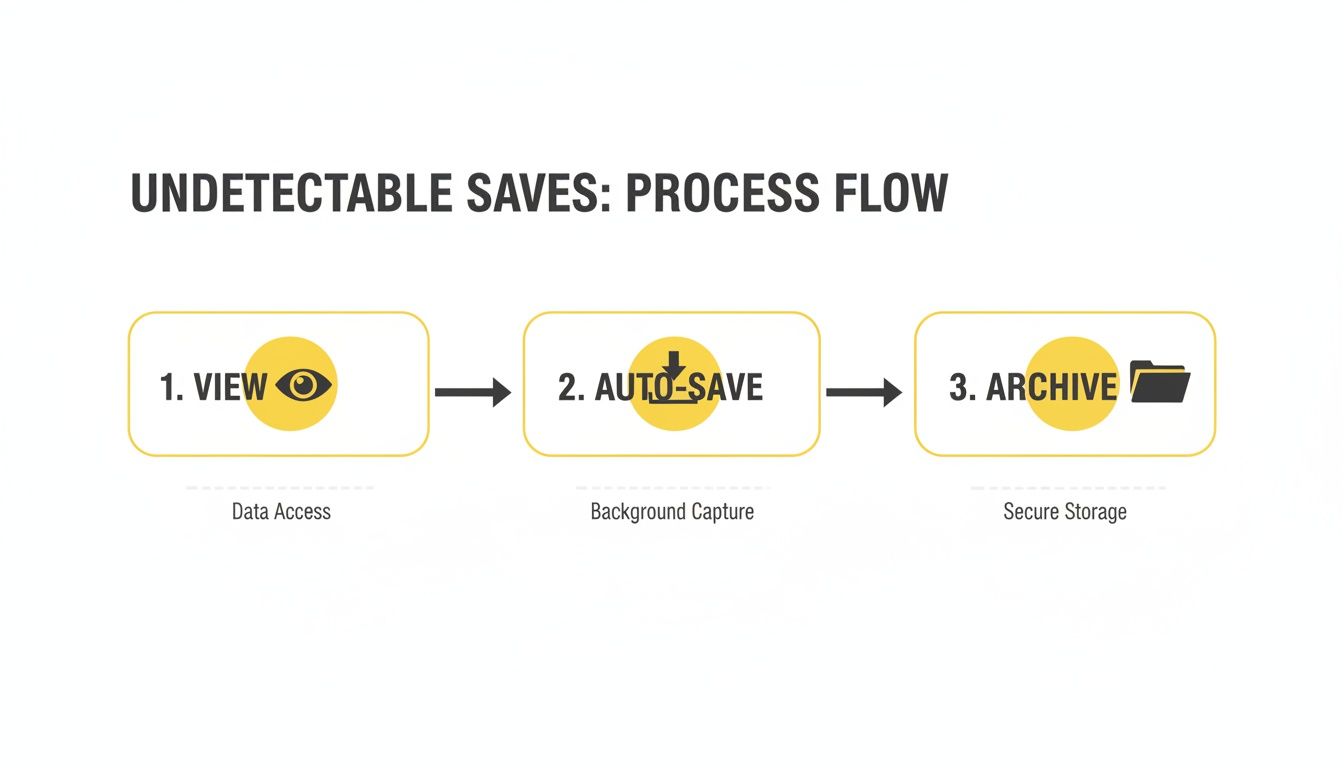
It really is a "view-to-save" pipeline. The whole process is completely hands-off, turning your normal viewing habits into an effortless archiving system.
Locating Your Saved Snaps
So, where does all this media end up? Every Snap and Story you view is automatically sorted and saved into a dedicated SnapNinja folder right on your computer. You can get to it anytime you want, even if you’re offline.
Think of it as building your own private, offline library of Snapchat moments. Here’s how it works in practice:
- Automatic Organization: Files are saved with clear, logical names, so you're not left guessing what's what.
- Full Quality: The software grabs the media in its original resolution. No blurry, compressed files here.
- Instant Access: The second you view a Snap, the file is already on your hard drive, ready to go.
The real magic here is how passive the whole thing is. You just use Snapchat Web as you normally would, and a personal archive builds itself in the background. It’s the perfect solution for a reliable snapchat link download without any extra work.
This hands-free approach is a game-changer for anyone who wants to keep records discreetly. Whether you're archiving hilarious moments from friends, keeping receipts from important chats, or saving a creative Story for inspiration, the process is seamless. And most importantly, it's completely private. You'll have a permanent copy before the original Snap even disappears.
Of course, everyone's needs are a bit different. It’s a good idea to check out the SnapNinja pricing tiers to see which plan makes the most sense for you. Finding the right fit ensures you never miss a moment you wanted to keep.
Best Practices For Smart And Ethical Saving
Being able to download from a Snapchat link privately is a powerful feature, but with great power comes responsibility. This isn't about finding a loophole to exploit. It’s about practicing smart privacy—using the tools at your disposal to archive your own memories and protect your digital life.
Think of SnapNinja as your personal archive. It's designed to empower you, not to harm others. You're simply taking control of your own digital interactions, which is a right everyone should have.
Putting Smart Privacy Into Practice
So, what does ethical saving actually look like? It all boils down to your intentions. The entire point is to build a private library of moments that are meaningful to you or to keep records for your own peace of mind.
Here are a few positive, responsible ways people use this kind of tool:
- Archiving Personal Memories: Saving that amazing video message from your partner or that hilarious clip from a best friend’s Story you know you’ll want to rewatch.
- Keeping Personal Records: Documenting a conversation for your own safety or to have a clear record of an agreement. This is for personal protection, not public drama.
- Saving Creative Inspiration: Seeing a cool design, a brilliant joke, or a useful life hack in a Story and grabbing it for your inspiration file before it's gone forever.
Consider this your personal digital vault. The content you save should be for your eyes only—to look back on, to protect yourself, or to spark new ideas. The golden rule is simple: treat other people's privacy with the same respect you expect for your own.
The Clear Line You Should Never Cross
Let's be perfectly clear: using this tool for malicious reasons is completely out of line. The ability to save content privately should never be used as a weapon.
Any form of blackmail, harassment, bullying, or sharing someone's private content without their consent is not just unethical and harmful—it's often illegal.
Snapchat's temporary nature is a huge part of its appeal. The ability to perform a snapchat link download gives you an edge, but it’s an advantage that must be handled with care. As our digital and real lives continue to merge, tools that restore a bit of control are more important than ever. For a closer look at how your data is managed, feel free to review our commitment to user privacy in our detailed policy.
SnapNinja was built for personal empowerment. It’s for the couple archiving the story of their relationship, the person keeping a record for their own safety, or the user who just wants to save a great meme. When you use it thoughtfully, you’re not just saving Snaps—you’re curating your own digital history, privately and securely.
Frequently Asked Questions
You've got the essentials down, but a few questions might still be bouncing around in your head. Let's tackle the most common ones I hear to make sure you're completely confident.
Is a Desktop Tool Really Safer Than a Mobile App?
100%, yes. This is the Desktop Advantage. Mobile "saver" apps try to directly tamper with the official Snapchat app, which is a massive red flag for their security systems and the fastest way to get banned.
SnapNinja, on the other hand, works with Snapchat Web on your computer. It operates entirely separate from your mobile app, making its activity undetectable. It's the difference between breaking into a house and using the front door with a key. It’s simply the smartest and safest approach.
Does SnapNinja Save Both Photos and Videos?
Yep, it’s designed to be a complete solution. SnapNinja automatically captures and saves any photo or video Snap you view through Snapchat Web. This includes individual snaps sent to you and all the content within your friends' Stories.
If you can see it in your browser, the tool will save a perfect, original-quality copy to your computer. The best part? The sender has no idea.
The philosophy is straightforward: if you can view it, you can save it—automatically and discreetly. This ensures you never miss a moment while keeping your account completely secure.
What Happens When Snapchat Updates Its Website?
This is where having a supported tool makes all the difference. The team behind SnapNinja keeps a close eye on any changes to Snapchat's web platform. When an update rolls out, they quickly release a patch for the software to ensure it keeps working flawlessly and stays undetectable.
This is a stark contrast to those random "hack" apps that break the first time Snapchat pushes an update and are then abandoned by their developers.
Can I Use SnapNinja On My Phone?
No, SnapNinja is built exclusively for Windows and macOS desktops. This Desktop Advantage is the secret to its safety and reliability.
Mobile operating systems (iOS/Android) are locked down tight, and trying to capture screen content without detection requires risky modifications that Snapchat can easily spot. Sticking to a desktop environment is precisely what allows SnapNinja to work so effectively without ever putting your account in jeopardy.
Ready to start building a private archive of your favorite Snapchat memories, all without raising any flags? With SnapNinja, you can finally hold onto the moments that matter.
Get started over at https://snapninja.app.